
What Is AWS Security Agent
Tarek Cheikh
Founder & AWS Cloud Architect
AWS Security Agent is an AI powered application security service from AWS. It was announced in preview at re:Invent 2025 (December 2, 2025) and its on-demand penetration testing reached general availability on March 31, 2026. As of this article's publication in June 2026, it runs in six regions (us-east-1, us-west-2, eu-west-1, eu-central-1, ap-southeast-2, ap-northeast-1), and AWS may add more over time. It is priced at $50 per task-hour with per-second metering, and new customers get a two-month free trial of up to 400 penetration testing task-hours per month.
I spent weeks testing it against a purpose-built vulnerable application, downloading every CloudWatch log stream, and reading every agent decision. That hands-on testing was done in March 2026, during the preview window in the days before the March 31 GA; every product fact in this series is stated as of GA today. This is the first post in a series that covers everything I found. No marketing language. No speculation. Just real data from real experiments. Over the next fifteen posts it goes hands-on: the vocabulary of web vulnerabilities, then setup, design review, and code review, the penetration-testing core, how I measured detection rate, where the agent fails, and the agent's own attack surface, closing with a verdict written four months after GA. The full map is at the end of this post.
The Capabilities
AWS Security Agent is built around penetration testing, and it adds two supporting review capabilities that share the same infrastructure but serve earlier stages of development.
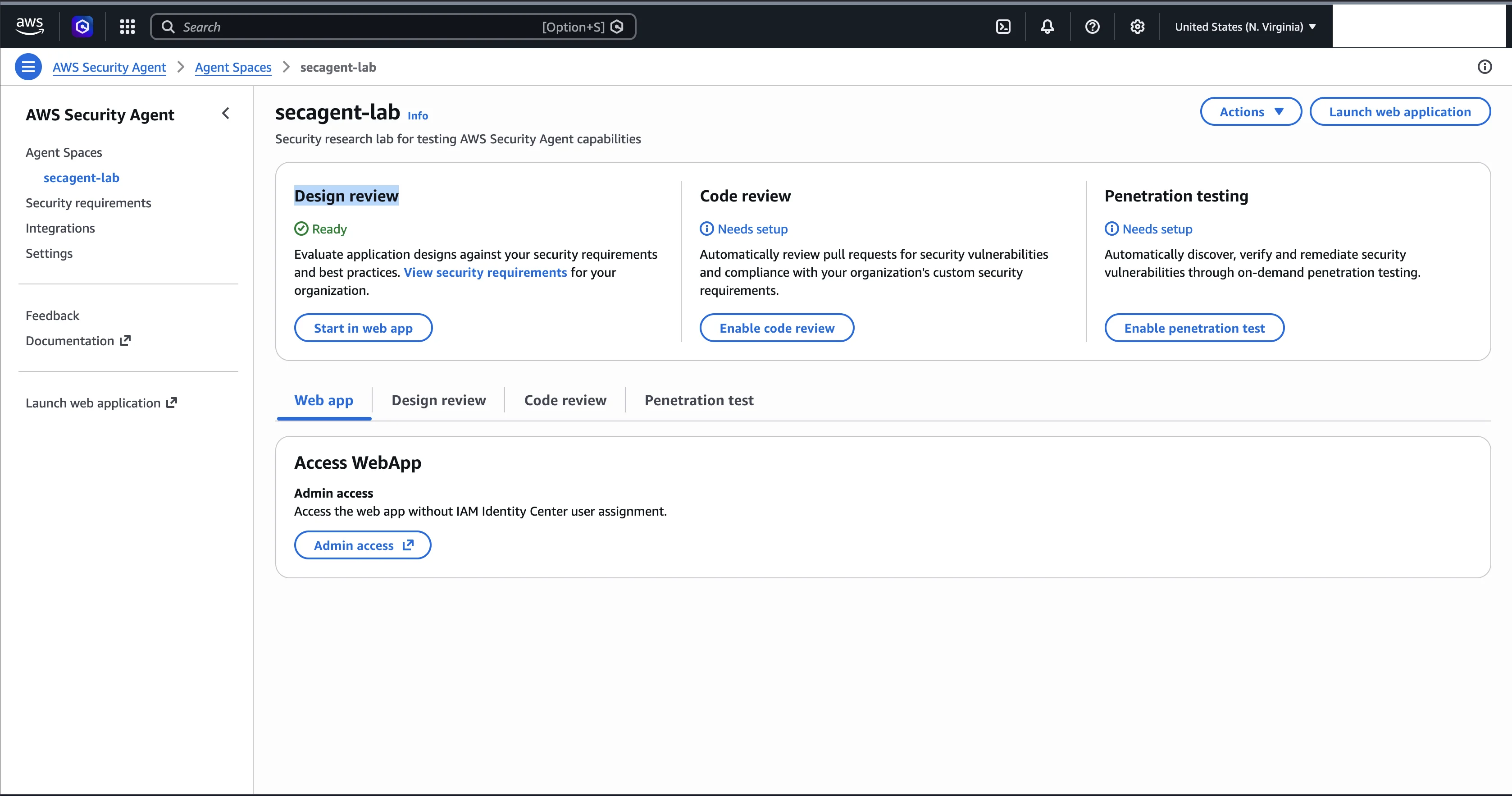
Penetration Testing (the GA flagship)
This is the capability that went generally available and the one the service is built around. The agent actively attacks a running web application to find real vulnerabilities. A penetration test is what it sounds like: the agent probes your application the way an attacker would, sending malicious inputs, manipulating tokens, uploading files, and chaining findings together.
The target does not have to live in AWS. The agent runs from an AWS account you control, but it can test applications hosted in AWS (public or private endpoints), Azure, Google Cloud, other providers, on-premises, and hybrid environments. You point it at an application you own and have verified, and it goes to work.
This is the most powerful of the three, and the one where the multi-agent architecture matters most.
Design Review
You upload architecture documents, such as diagrams, threat models, or design specs, and the agent checks them against security requirements. A design review is a document-level analysis. The agent reads your files and produces text findings. It does not touch your infrastructure or execute any code, and it typically completes in minutes in my testing.
Think of it as handing your architecture doc to a security reviewer who checks it against a list of best practices and tells you where you fall short.
Code Review
You connect a GitHub repository and the agent reviews pull requests. When a PR is opened, the agent reads the code changes and posts findings as inline comments directly on the PR, the same way a human reviewer would. On May 12, 2026 AWS added a full-repository code review in preview, which reasons about a whole codebase at once rather than a single diff.
This is not a static analysis tool that matches patterns against a rule database. The agent uses an LLM to reason about what the code does and where it fails to do it safely. It understands context. In my testing it referenced AWS IMDS endpoints, EC2 security groups, and Werkzeug PIN bypass risks in its code review comments, things no pattern-matching scanner would flag.
Not a Scanner, a Multi-Agent AI System
Here is why this matters.
A traditional vulnerability scanner runs a checklist. It sends a predefined set of payloads, checks responses against known patterns, and reports matches. If the vulnerability does not match a signature, the scanner misses it. If the vulnerability requires multiple steps, such as log in, forge a token, use that token to access another endpoint, the scanner cannot chain those steps together.
AWS Security Agent works differently. It is a multi-agent system. When you start a pentest, it deploys a swarm of specialized AI agents, each focused on a different task. There is an authentication agent that handles sign-in. There are baseline scanners that run network and code analysis in parallel. There are reconnaissance and exploration agents, and attack workers specialized in different vulnerability classes such as SQL injection, cross-site scripting, and command injection. There are validator agents that independently attempt to exploit every reported finding to confirm it is real. A separate scoring step assigns a CVSS rating.
I know all of this because I downloaded the CloudWatch logs and watched every agent work. In my first pentest I observed more than 20 distinct agent types, 47 agent instances, and roughly 5,226 logged actions (about 2,260 reasoning blocks plus about 2,966 tool invocations). Later posts go deep into those logs. For now the point is simple: this is not a scanner. It reasons, adapts, and chains attacks.
Here is a concrete example of what that looks like.
One Real Finding: JWT Authentication Bypass
In my second pentest run, the agent found a critical vulnerability in the application's JWT (JSON Web Token) authentication. JWT is a common way web applications handle login sessions. When you log in, the server gives you a signed token that proves who you are.
The agent forged a JWT token with the algorithm set to "none" (meaning no signature required), set the role to "superadmin", and sent it to the server. The server accepted it.
Finding: JWT 'none' Algorithm Acceptance - Complete Authentication Bypass
Severity: Critical
Risk Score: 10.0 (CVSS:3.1/AV:N/AC:L/PR:N/UI:N/S:C/C:H/I:H/A:H)
The forged token and server response:
Forged token header:  {"alg": "none", "typ": "JWT"}
Forged token payload: {"user_id": 999, "username": "hacker", "role": "superadmin"}
Server response:      {"message":"Welcome hacker","role":"superadmin"}
CVSS 10.0 is the highest possible severity score. The agent also tested algorithm variations:
Algorithms tested: none, None, NONE
Result: All accepted. Complete authentication bypass without any secret key.
This was not a pattern match. The agent had to obtain a valid JWT by logging in, understand the token structure, forge a new token with a modified algorithm and claims, send it to the server, and verify the response indicated success. That is a multi-step attack chain, not a signature check.
What I Found Across Two Pentests
To give you a sense of the scale, here is the comparison between my two pentest runs against the same application. The only variable was whether I provided login credentials.
| Metric | Run-001 (no credentials) | Run-002 (with credentials) |
|---|---|---|
| Findings | 5 | 13 |
| Critical severity | 0 | 6 |
| Duration | ~2.5 hours | 2h 38m |
| CloudWatch log streams | 47 | 57 |
| CloudWatch log size | 7.1 MB | 8.6 MB |
Run-001's 5 findings included 2 that the validators verified; run-002's 13 were all verified. Same application. Same configuration. Providing login credentials increased findings by 160 percent. The post on running a pentest with credentials covers exactly why.
Pricing, Limits, and Data Handling
Two numbers matter most when you plan a budget, and they are easy to confuse.
The first is the rate: $50 per task-hour, metered per second. The second is what a task-hour actually measures. A task-hour is cumulative compute across all the agent tasks in a run, and many of those tasks run concurrently, so the billable task-hours for a run are usually higher than the wall-clock time the run takes. AWS's own examples put an e-commerce application test at 24 task-hours, $1,200, and the pricing page's worked calculation at 31.2583 task-hours, $1,562.92. New customers get a two-month free trial of up to 400 task-hours per month.
The other limits worth knowing:
| Constraint | Value |
|---|---|
| Regions (as of publication, June 2026) | us-east-1, us-west-2, eu-west-1, eu-central-1, ap-southeast-2, ap-northeast-1 (6) |
| Rate | $50 per task-hour, per-second metering; 24 task-hours ($1,200) e-commerce example, 31.2583 task-hours ($1,562.92) pricing-page calculation |
| Free trial | Two months, up to 400 task-hours per month |
| Concurrent pentests | 5 per account per region (adjustable by submitting an AWS Support case) |
| Pentest projects | 1,000 per account per region |
| Agent Spaces | 100 per account per region |
| Custom security requirements | 20 per account per region (not adjustable) |
| Integrations | 20 per account per region (not adjustable) |
| Concurrent code review runs | 5 per account per region |
| Design reviews | 200 per account per region per month |
| PR code reviews | 1,000 per account per region per month |
| Target location | AWS (public or private), Azure, GCP, other clouds, on-premises, hybrid |
| Data encryption | KMS at rest (per the AWS FAQs); TLS in transit (standard for AWS services, not separately documented on the Security Agent pages) |
| Customer data used for model training | No |
AWS does not publish a hard maximum duration for a single pentest. A run scales with the size and complexity of the application, and you control the scope. Results are encrypted with KMS and stored in CloudWatch in your own account, which is what makes the log analysis later in this series possible.
The Companion Lab and Repository
Everything in this series is reproducible, because everything runs against a lab I built and published. The applications, the Terraform that deploys them, and the raw results all live in one public repository:
https://github.com/TocConsulting/aws-security-agent-from-zero-to-hero
When a later post links to a file with a path like ../code/apps/vuln-catalog or ../data/vuln_map.json, that path is inside this repository. Here is how it is organized, so those links make sense before you reach them.
articles/ holds these sixteen articles in Markdown.
code/apps/ is the test lab: six deliberately built applications. Five of them run together as one stack behind an nginx router with Docker Compose, each on its own subdomain; the sixth ships as pull-request source for the code-review test. Each one plays a specific role:
vuln-catalog- the measurement baseline. A Flask app with 39 intentional vulnerabilities across 13 categories at 3 difficulty levels, plus clean endpoints, scored against a committed answer key. This is the target for the penetration-testing and detection-rate posts.clean-app- a false-positive control with zero intentional vulnerabilities, so any finding against it is by definition a false positive.evasion-app- the same vulnerability families asvuln-catalog, but obfuscated behind indirection, generic names, and no helpful comments, to measure whether hiding a bug lowers detection.subtle-app- business-logic flaws only (race conditions, price manipulation, predictable tokens) and no injection bugs, to probe the agent's weak spot.trap-app- an adversarial app that carries no real vulnerabilities and instead tries to trick the agent's own reasoning with bait, fake endpoints, and prompt injection.adversarial-pr- a code-review manipulation test: real bugs hidden behind comments, docstrings, and variable names that lie about what the code does.
The code-review posts (parts 4 and 5) use a separate, smaller vulnerable Flask file that ships under data/code-review/, not one of the stack apps above.
code/infra/ is the Terraform that stands the lab up in AWS so the cloud-hosted agent can reach it. The always-on lab-core module builds a VPC, a TLS-terminated Application Load Balancer, and an EC2 instance that runs the apps behind per-app subdomains. Two optional modules extend it: lab-private adds a private subnet and NAT gateway for testing a target with no public inbound path, and lab-dns-confusion sets up the DNS-confusion research scenario.
data/ is the raw research behind every claim: penetration-test report summaries (data/pentest-reports/), code-review findings and scorecards (data/code-review/), design-review analyses (data/design-review/), a CloudTrail event sample (data/cloudtrail/), and the detection-rate answer key (data/vuln_map.json).
A safety note, because it matters: the applications under code/apps/ are deliberately insecure or actively adversarial, and any secrets inside them (for example secret123) are planted, not real. Run them only in an isolated lab, and only run a penetration test against a target you own and are authorized to test. The repository README covers setup, cost, and teardown in full.
What This Series Covers
Each post builds on the last, and every claim is backed by real data.
- 0. What Is AWS Security Agent - the introduction, you are here
- 1. The Web Application Security Survival Kit - every vulnerability class the agent tests, with code examples
- 2. Setting Up From Scratch - every step, including a domain verification gotcha that cost me time
- 3. Design Reviews - uploading documents, reading results, and a finding about file format affecting results that is not in the AWS documentation
- 4. Code Reviews and GitHub - what the agent catches and misses in a deliberately vulnerable Flask app, plus the new full-repository review
- 5. Custom Security Requirements - one custom requirement turned a 9/10 detection rate into 10/10
- 6. Your First Penetration Test - creating a pentest and watching each agent component work
- 7. Pentesting With Credentials - how 5 findings became 13 with one configuration change
- 8. Advanced Pentesting: VPC and Cross-Account - testing private targets and shared VPCs
- 9. Inside the Engine - 13 tools, 20-plus agent types, real attack scripts, and validator reasoning from the logs
- 10. How We Measured Detection Rate - the methodology and the answer key
- 11. What It Catches and What It Misses - every weakness I found, with data and a practical fix for each
- 12. We Tried to Trick the Agent - obfuscation and prompt injection, and what survived
- 13. Attacking the Agent Itself - independent research into the agent's own attack surface
- 14. The Agent's AWS Footprint - what CloudTrail, Secrets Manager, and VPC Flow Logs reveal
- 15. The Verdict, Four Months Later - what changed since GA, and how AI pentesting compares to traditional pentest consultancy
Every post uses real commands, real JSON, real log snippets, and real findings from my testing. Nothing is paraphrased or hypothetical.
Next up: the Web Application Security Survival Kit, a hands-on tour of every vulnerability class the agent tests, so the findings in the rest of the series make sense before you reach the hands-on posts.
Go Deeper: The State of AWS Security 2026
This article is just the start. Get the full picture with our free whitepaper - 8 chapters covering IAM, S3, VPC, monitoring, agentic AI security, compliance, and a prioritized action plan with 50+ CLI commands.
KloudSec, built by the team behind Toc Consulting
See AWS Security checked automatically, continuously
What you just read is a manual, one-time check. KloudSec runs this and 400+ more automated checks across 90+ AWS services, continuously, agentless, live in about 5 minutes.
Toc Consulting: AWS Security & Cloud Architecture
Want expert help with AWS Security?
Our team helps engineering teams secure and architect AWS the right way: assessment in week one, a prioritized action plan in week two.
More Articles
iam-to-english: Read Any AWS IAM Policy in Plain English and Catch Privilege Escalation Before It Ships
KloudSec releases iam-to-english, a free open-source CLI that explains AWS IAM policies in plain English, flags 21 known privilege escalation paths, including combinations spread across statements, diffs policy changes and gates CI. It runs offline.
AWS IAM Privilege Escalation: Paths, CloudTrail Events, and the Controls That Block Them
Twelve documented ways a limited IAM identity can raise its own permissions, the CloudTrail event each one leaves, and the AWS controls that block them. Commands and policies follow AWS documentation examples and the AWS CLI v2 reference.
Anatomy of a Real AWS Breach: Capital One, 2019
How a misconfigured WAF, an unauthenticated metadata service, and an over-privileged IAM role combined to expose data on roughly 100 million people in the US and 6 million in Canada, and the specific checks that would have stopped it.