
Advanced Pentesting: VPC and Cross-Account
Tarek Cheikh
Founder & AWS Cloud Architect
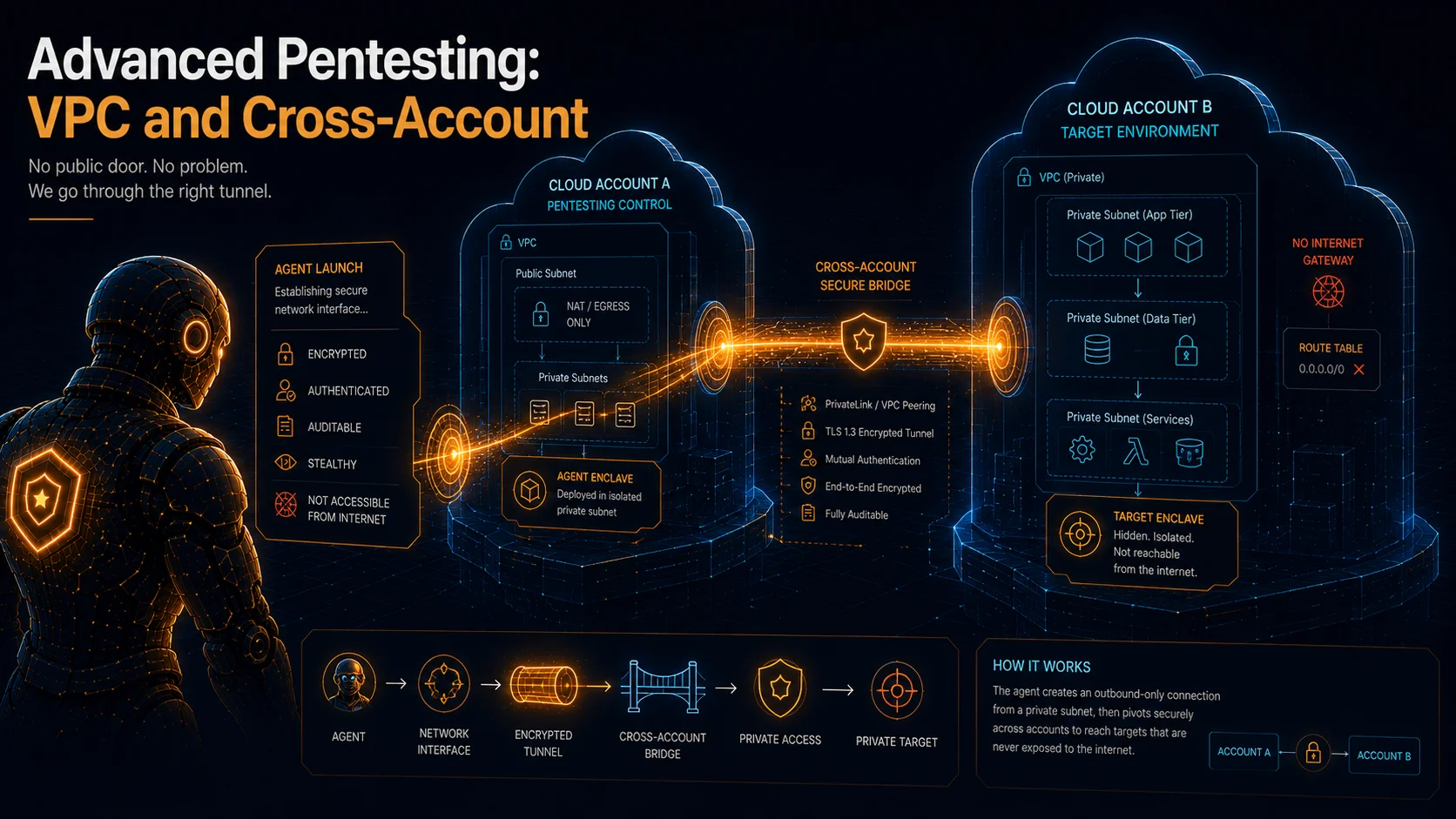
Most real applications are not on the public internet. They sit behind load balancers, inside private subnets, reachable only from within a VPC. An internal API serving microservices, an admin dashboard on a private subnet, a staging environment with no public DNS. These are the applications security teams worry about most, because their attack surface is invisible to any external scanner.
In the previous posts I pointed the agent at a public URL and let it work. This post is about the other case: testing a target that has no public IP at all. I cover how the agent gets network access inside a VPC, the network constraints that actually matter, how to extend the same pattern across AWS accounts using a shared VPC, and how concurrency works when you run several pentests at once.
How the Agent Reaches a Private Application
When you configure VPC pentesting, the agent does not SSH into your infrastructure and it does not deploy a container inside your network. The mechanism is more surgical than that.
The agent creates an Elastic Network Interface (ENI) in a subnet you specify, attached to a security group you control. That ENI becomes the agent's network presence inside your VPC. From there the agent sends HTTP requests to your private application endpoints, exactly as any other resource in that subnet would. When the run finishes, the agent tears the ENI down.
This design has a few hard constraints, and it is worth understanding each one before you configure anything.
No public IP on the ENI. The ENI is created without a public IPv4 address. It cannot talk directly to an Internet Gateway. This is a fixed property of the model, not a setting you can flip.
Only private IP targets. The agent will only send requests to endpoints that resolve to private IP addresses. The allowed ranges, per the AWS documentation on connecting the agent to private VPC resources, are:
| Range | Notes |
|---|---|
10.0.0.0/8 | IPv4 |
172.16.0.0/12 | IPv4 |
192.168.0.0/16 | IPv4 |
fd00::/8 | IPv6 ULA |
These are the full RFC 1918 private ranges plus the locally-assigned portion of the IPv6 unique-local-address (ULA) range (fd00::/8). Any address inside them is allowed. If your application resolves to a public IP, the VPC configuration will not reach it at all, and you should use the standard non-VPC pentest mode instead.
Outbound internet requires a NAT Gateway. If your private application needs to reach external services, or the agent needs to resolve DNS and validate TLS certificates during testing, the subnet must route outbound traffic through a NAT Gateway. The ENI cannot use an Internet Gateway, but it can use a NAT Gateway like any other private resource.
Up to 5 VPCs per Agent Space. You can register multiple VPCs for different environments, up to 5 per Agent Space.
The reason this model is worth the extra setup: you never open inbound access from the internet to your private app. The agent operates entirely inside the network boundary, subject to the same security group rules and network ACLs as everything else in that subnet. You decide what it can reach by controlling the security group egress rules and the subnet route table.
The Network Topology You Need
To test a private app you need a private subnet, a route out for the agent, and a security group for its ENI. In my lab this is the lab-private Terraform module in the companion repository (code/infra/lab-private, enabled with enable_private_subnet = true), which creates the following:
| Resource | Purpose |
|---|---|
| Private subnet | Where the agent's ENI lands (a /24 in one AZ) |
| Elastic IP | Public IPv4 for the NAT Gateway |
| NAT Gateway | Outbound internet for the private subnet |
| Route table + default route | 0.0.0.0/0 pointing at the NAT Gateway |
| Route table association | Binds the subnet to its route table |
| Security group | Attached to the agent ENI, egress to your app |
The shape is the standard private-subnet pattern:
                    Internet
                       |
                  Internet Gateway
                       |
              +--------+--------+
              |                 |
        Public Subnet     NAT Gateway
        (app EC2)              |
                          Private Subnet
                          (Agent ENI here)
                               |
                          Route Table:
                          0.0.0.0/0 -> NAT GW
The agent's ENI sits in the private subnet. It reaches the EC2 instance running the app over the VPC's internal routing, and it reaches the internet for DNS and certificate validation through the NAT Gateway. No request to your app traverses the Internet Gateway.
After applying the module, record three values, because the console configuration needs all three:
- VPC ID
- Private subnet ID
- Agent security group ID
One detail worth getting right before you configure anything, since it is an easy way to waste a run: every EC2 instance in a VPC has a private IP, and the agent talks to your app over that private IP, not the public one. Get it:
aws ec2 describe-instances \
  --filters "Name=tag:Name,Values=secagent-lab*" \
  --query 'Reservations[].Instances[].PrivateIpAddress' \
  --output text
That private IP is the address you hand the pentest. Any RFC 1918 CIDR works for your VPC, since the agent accepts the full private ranges, so the only thing to confirm is that the target resolves to the private address and not the public one.
DNS and Resolution
The target you give the pentest must resolve to a private IP from the agent's point of view inside the VPC. That is the part most people get wrong.
If your app is only reachable through a public DNS name that resolves to a public IP, the VPC pentest will not work against it, even though the box has a private IP. You need one of:
- A Route 53 private hosted zone with a record pointing at the EC2 private IP, so the hostname resolves privately inside the VPC.
- Split-horizon DNS that returns the private address for in-VPC resolvers.
- A direct private-IP target.
A production private app usually already resolves to private addresses through internal DNS, so this is mostly a lab concern. But it is the single most common reason a VPC run fails to connect, so confirm resolution before you spend a task-hour on it.
Configuring the VPC Pentest
With the infrastructure in place, the console side is short.
First register the VPC configuration on the Agent Space. Open the Agent Space, choose Actions, then Edit penetration test configuration, and in the VPC section provide the VPC ID, the private subnet ID, and the agent security group ID. Save.
Then create the pentest. Go to Penetration Test, click Create, open Modify pentest details, and in the VPC Resources section select the configuration you just registered. Set the target to a host that resolves to the private IP, configure credentials the same way as a normal authenticated run, and execute.
During the run the agent provisions the ENI in your subnet, attaches the security group, and tests. The traffic flows entirely inside the VPC, from the ENI's private IP to the app's private IP. You can confirm this in VPC Flow Logs: the source address on requests to your app is the ENI's private IP in your subnet CIDR, not an AWS-owned public IP.
Cross-Account Shared VPC via AWS RAM
In enterprise setups the application you want to test usually lives in a different AWS account from the one running the agent. The common pattern: a central security account operates AWS Security Agent, while application teams deploy into their own accounts, and the apps sit in VPCs the application accounts own.
In February 2026 AWS added support for this directly. The agent can run penetration tests against shared VPCs across AWS accounts using AWS Resource Access Manager (AWS RAM). The application account shares a subnet and a security group with the security account, and the agent places its ENI into that shared subnet. No peering, no transit gateway, no copy of the workload.
The two accounts must be in the same AWS Organization. RAM sharing for this use case is within-organization only.
The architecture:
  Organization
  |
  +-- Security Account (123456789012)
  |   - AWS Security Agent (Agent Space)
  |   - Runs pentests
  |   - Places ENI in the shared subnet
  |
  +-- Application Account (210987654321)
      - VPC with private subnets
      - App on private EC2 / ECS / Lambda
      - Shares subnet + security group via RAM
The agent in the security account creates its ENI in the shared subnet that the application account owns. The ENI gets a private IP in that subnet, giving it direct network access to the app, and the shared security group governs what it can reach.
The setup is three steps across the two accounts.
First, enable RAM sharing in the organization. This is a one-time action from the organization's management account (or a registered RAM delegated administrator):
aws ram enable-sharing-with-aws-organizationSecond, share the subnet and security group from the application account to the security account:
aws ram create-resource-share \
  --name SharePentestResources \
  --resource-arns \
    arn:aws:ec2:us-east-1:210987654321:subnet/subnet-0abc123 \
    arn:aws:ec2:us-east-1:210987654321:security-group/sg-0xyz789 \
  --principals 123456789012
Replace the ARNs with your real subnet and security group, and 123456789012 with the security account ID. Because both accounts are in the same organization and sharing is enabled, the share is accepted automatically rather than waiting on an invitation.
Third, confirm the share landed in the security account:
aws ram get-resource-shares --resource-owner OTHER-ACCOUNTS
aws ec2 describe-subnets --filters "Name=owner-id,Values=210987654321"
You should see the share as ACTIVE and the shared subnet listed. From there, configure the Agent Space exactly as in the single-account case, but enter the application account's VPC ID, the shared subnet ID, and the shared security group ID.
A few things worth doing right on the cross-account side:
- Share a purpose-built security group for the agent. Do not share one that is attached to production resources.
- Network ACLs on the shared subnet apply to the agent's ENI traffic, so account for them.
- The application account keeps full control. Revoke the share and the agent loses access immediately.
- CloudTrail in both accounts logs the ENI creation and deletion, so the activity is auditable from either side.
Running Several Pentests at Once
The concurrent pentest limit is set per account per region and is adjustable by submitting an AWS Support case. The generally available default is 5 (quotas page). You do not hit a ThrottlingException until you exceed your account's configured concurrency quota. With the default of 5, you can run five pentests at once in a region before the next start is throttled. If you need more, raise the quota by submitting an AWS Support case rather than running serially. (One caveat worth knowing: when I ran these tests in March 2026, around the GA cutover, my account's effective limit was still 1, which is what my CloudTrail logs recorded. I walk through that evidence in the post on the agent's AWS footprint. Check your own quota rather than assuming the documented default applies to a brand-new account.)
This matters for throughput. If you are testing several applications, you are not forced to run them back to back. They run concurrently up to your quota, and the only signal that you have gone over is the throttling error, which tells you to either wait for a slot or request a higher quota.
Cost: Mind the NAT Gateway
VPC pentesting adds infrastructure cost that the public-target case does not, and almost all of it is the NAT Gateway. The NAT Gateway is a flat hourly charge plus a per-GB data processing charge, and the Elastic IP it uses is also billed hourly. At current AWS pricing that works out to roughly $37 per month in us-east-1 just for the NAT Gateway and its EIP existing (NAT Gateway at $0.045/hour plus the EIP at $0.005/hour, about 730 hours in a month), before any data flows through it. That is a meaningful addition on top of the rest of the lab's baseline cost.
So treat the private-subnet topology as something you provision for a testing session and tear down afterward. In this repository's Terraform it is a single flag (enable_private_subnet), so enabling and destroying it is quick. The agent's own cost is unchanged from a normal run: $50 per task-hour with per-second metering, where a task-hour is cumulative agent compute, not wall-clock time.
What You Can Do Now
You can point the agent at a private application that has no public footprint, understand exactly how its ENI lands in your subnet and what network rules govern it, and extend that to a target in a different account through a RAM-shared VPC. You also know the concurrency limit (a GA default of 5, adjustable, though check your own account's quota), so you can run tests in parallel instead of serially, and you know to destroy the NAT Gateway when you are done so it does not quietly bill you.
Next in the series: going inside the engine, the tools, the agent types, the real attack scripts, and the validator reasoning, all pulled straight from the CloudWatch logs.
Go Deeper: The State of AWS Security 2026
This article is just the start. Get the full picture with our free whitepaper - 8 chapters covering IAM, S3, VPC, monitoring, agentic AI security, compliance, and a prioritized action plan with 50+ CLI commands.
KloudSec, built by the team behind Toc Consulting
See AWS Security checked automatically, continuously
What you just read is a manual, one-time check. KloudSec runs this and 400+ more automated checks across 90+ AWS services, continuously, agentless, live in about 5 minutes.
Toc Consulting: AWS Security & Cloud Architecture
Want expert help with AWS Security?
Our team helps engineering teams secure and architect AWS the right way: assessment in week one, a prioritized action plan in week two.
More Articles
iam-to-english: Read Any AWS IAM Policy in Plain English and Catch Privilege Escalation Before It Ships
KloudSec releases iam-to-english, a free open-source CLI that explains AWS IAM policies in plain English, flags 21 known privilege escalation paths, including combinations spread across statements, diffs policy changes and gates CI. It runs offline.
AWS IAM Privilege Escalation: Paths, CloudTrail Events, and the Controls That Block Them
Twelve documented ways a limited IAM identity can raise its own permissions, the CloudTrail event each one leaves, and the AWS controls that block them. Commands and policies follow AWS documentation examples and the AWS CLI v2 reference.
Anatomy of a Real AWS Breach: Capital One, 2019
How a misconfigured WAF, an unauthenticated metadata service, and an over-privileged IAM role combined to expose data on roughly 100 million people in the US and 6 million in Canada, and the specific checks that would have stopped it.