
Design Reviews
Tarek Cheikh
Founder & AWS Cloud Architect
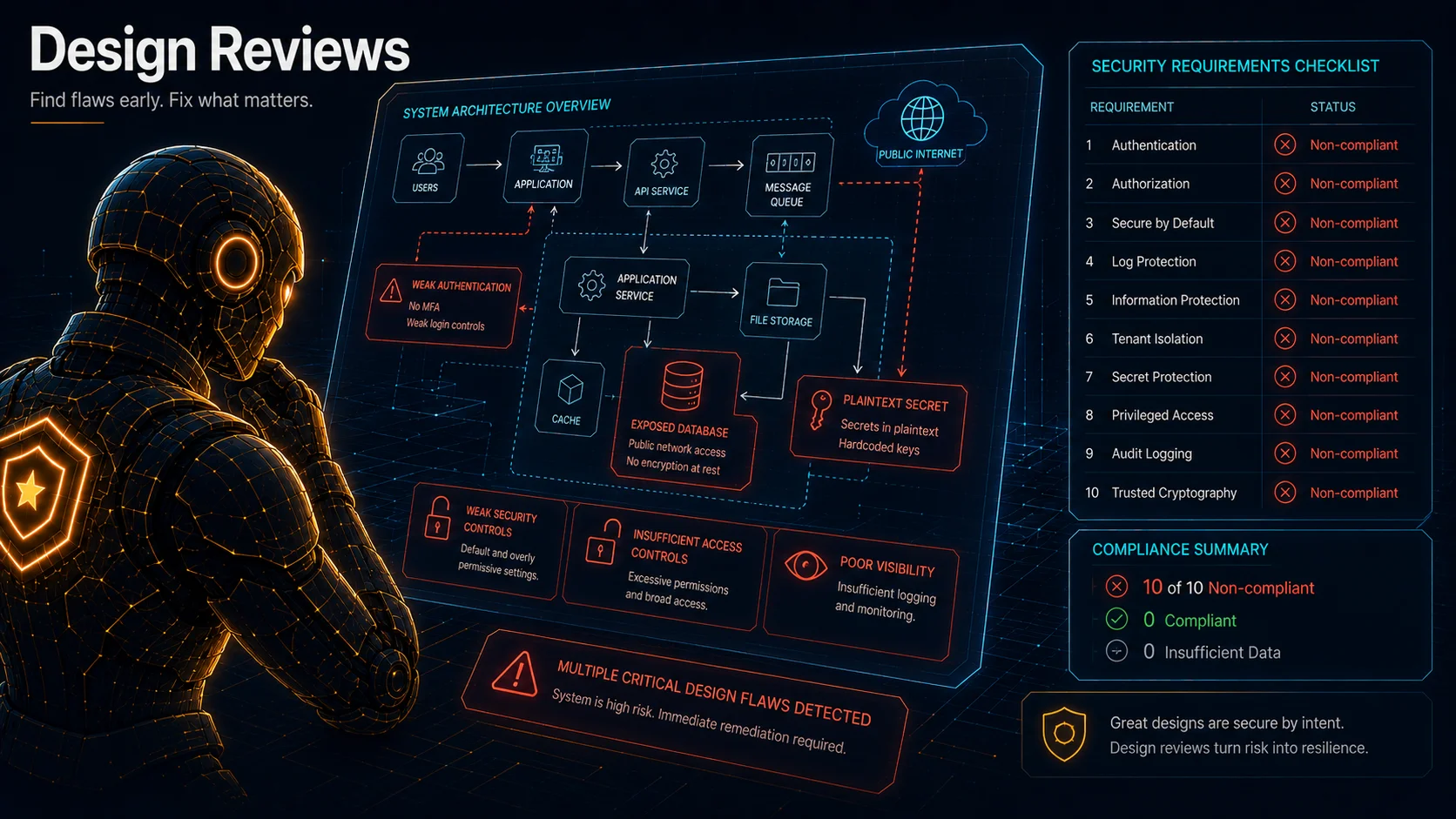
Part 4 of 16 in the AWS Security Agent: From Zero to Hero series
A design review is the fastest way to see AWS Security Agent do something useful. No running application, no code, no infrastructure. You upload documents describing your architecture, and the agent evaluates them against whatever set of security requirements you have enabled. AWS provides managed requirements you can enable, disable, or customize, and the agent evaluates your document against the enabled set. It returns compliance statuses and specific remediation guidance, and it completes in minutes.
I ran my first design review on March 20, 2026 against an intentionally insecure design document. Every finding in this post is real output from that review and the format experiments I ran afterward. The headline result: the insecure design failed every single requirement, and the file format I uploaded changed how many failures the agent reported.
Where Design Reviews Live
Design reviews happen in the Security Agent web application, not the AWS Console. This trips people up. The Console is where you created your Agent Space and configured roles. The web application is a separate UI, with its own URL on an app-{uuid}.securityagent.global.app.aws domain, where you actually run reviews and read results.
To get there: open the Console, navigate to AWS Security Agent, select your Agent Space, and click "Launch web application." The web application has its own left navigation (Home, Penetration tests, Design reviews, Resources, Documentation). Click "Design reviews."
What a Design Review Actually Does
A design review is not a code scan. It does not read source code and it does not probe a running application. It reads documents you provide, such as architecture diagrams, design specs, threat models, and API descriptions, and evaluates them against the AWS managed security requirements you have enabled. In my configuration that was 10 requirements.
Because this is LLM-powered analysis, the agent can understand natural-language descriptions, interpret diagrams uploaded as images, and reason about implicit risks that a checklist tool would miss. The flip side is that the quality of the review depends on the quality of your input. Feed it a vague paragraph and you get vague findings. Feed it a detailed architecture document and you get specific, actionable ones.
What Gets Uploaded
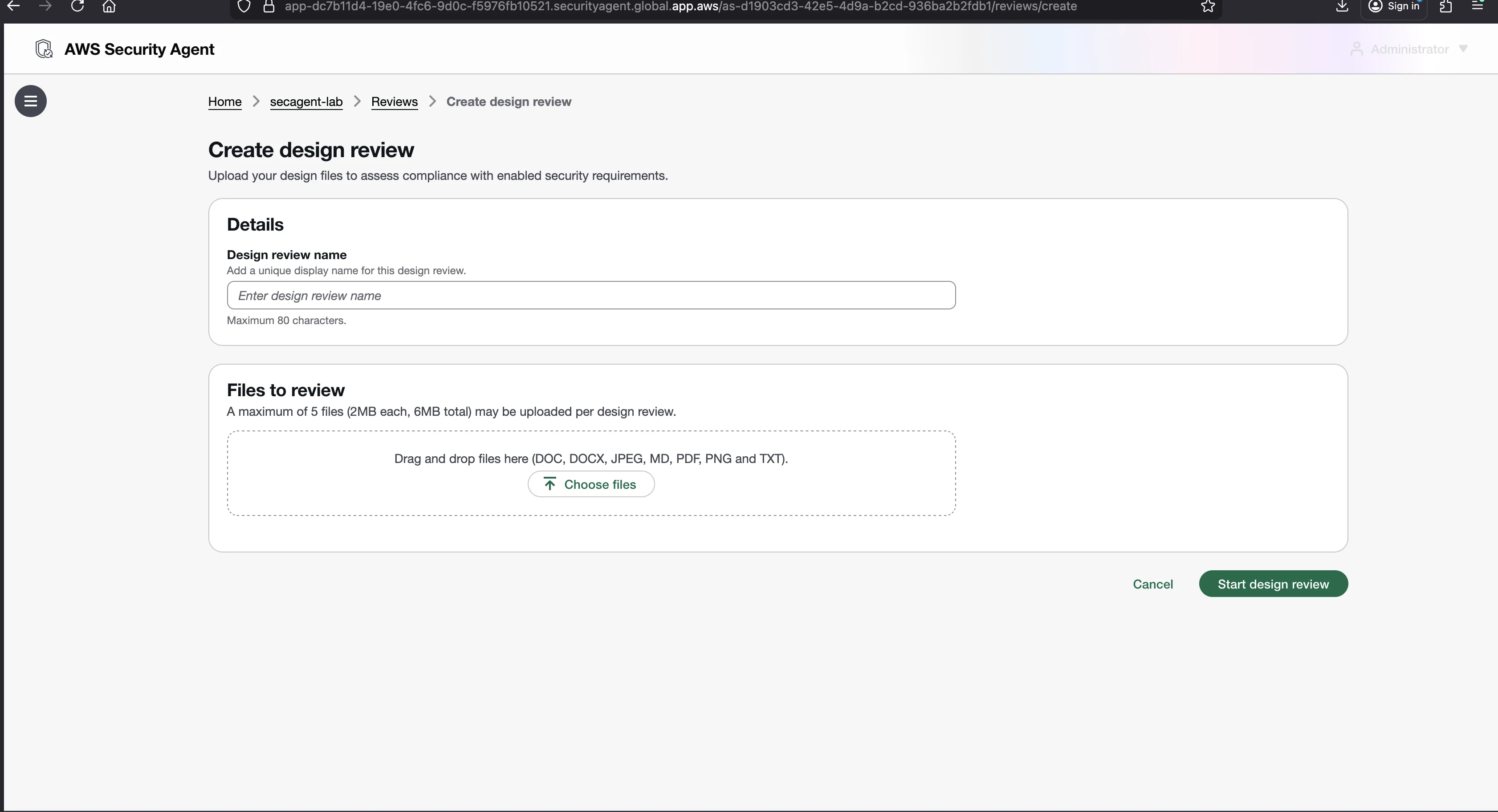
The upload limits are fixed:
- Maximum 5 files per review
- Maximum 2 MB per file
- Maximum 6 MB total across all files
- Supported formats: DOC, DOCX, JPEG, MD, PDF, PNG, TXT
The format diversity is deliberate. You can upload written specs as Markdown or text, architecture diagrams as JPEG or PNG (the agent can interpret visual diagrams), and formal documents as PDF or Word. As I show later, not all of these formats produce the same results.
Creating a review is three fields and a button: enter a name (80 characters max), drag in your files, and click "Start design review." While the review runs, the status shows "In Progress" and each requirement shows "In Progress" individually. You do not need to keep the browser open.
The Managed Security Requirements
AWS provides a set of managed security requirements, which are best-practice rules maintained by AWS. My Agent Space had 10 managed requirements enabled, so that is the set every review in this post was evaluated against, and you can clone any managed requirement into an editable custom requirement to match your own standards. Enabled requirements apply to new design reviews.
One note on currency: the console has changed since I tested. At GA, AWS groups managed requirements into packs (ASA Base, AWS Well-Architected, NIST CSF, and PCI DSS) that you enable or disable as a unit under a Managed security requirements packs tab, and the requirements inside a managed pack are read-only. The preview-era screenshots and the per-requirement toggling shown in this series reflect the March 2026 console I tested against, the four compliance statuses and the clone-to-customize workflow are unchanged.
- Authentication Best Practices: only legitimate users can access the system.
- Authorization Best Practices: the system follows authorization best practices.
- Secure by Default Best Practices: the default configuration is secure.
- Log Protection Best Practices: log integrity and confidentiality are protected.
- Information Protection Best Practices: sensitive data stays confidential and unaltered.
- Tenant Isolation Best Practices: tenants are appropriately separated.
- Secret Protection Best Practices: credentials and secrets stay confidential.
- Privileged Access Best Practices: privileged functions have adequate guardrails.
- Audit Logging Best Practices: the system supports security monitoring.
- Trusted Cryptography Best Practices: only trustworthy cryptographic implementations are used.
For each requirement, the agent returns a compliance status, which is the result of checking that requirement against your document. There are four possible statuses:
| Status | Meaning |
|---|---|
| Compliant | The requirement is met based on the document content. |
| Non-compliant | The requirement is violated. The agent explains why and provides remediation. |
| Insufficient data | The document does not contain enough information to make a determination. |
| Not applicable | The requirement does not apply to this design. |
These are compliance statuses, not severity ratings. The agent is answering "does this design meet this security requirement?" and not "how bad is this bug?"
The Test Document: An Insecure FileDrop Design
I wrote an intentionally insecure file-sharing API design called FileDrop. Every design decision in this document has at least one security problem. Save it as insecure-file-sharing-design.md and upload it to a new design review.
# FileDrop API - System Design Document

## Overview

FileDrop is a file-sharing API that allows users to upload, store, and share
files with other users. It is designed for internal use at a mid-size company
with approximately 500 employees.

## Technology Stack

- Runtime: Node.js with Express
- Database: MySQL 5.7
- Storage: Local filesystem on the application server
- Deployment: Single EC2 instance (t3.large) running in a public subnet

## Authentication

Users authenticate by sending their username and password with every API
request using HTTP Basic Authentication. Credentials are checked against the
users table in MySQL where passwords are stored as MD5 hashes.

There is no session management. Every request is independently authenticated.

Admin users are identified by an `is_admin` column in the users table. When
a user makes a request, the API checks this column and includes admin
privileges in the response context.

## API Endpoints

### POST /upload
Accepts a file upload via multipart form data. The file is saved to
/var/filedata/{original_filename}. The file's metadata (name, size, uploader,
upload time) is stored in the files table. There is no restriction on file
types or sizes.

### GET /download?file={filename}
Returns the file contents. The filename parameter is used directly to
construct the filesystem path: /var/filedata/{filename}. Any authenticated
user can download any file.

### GET /files?user={user_id}
Returns a list of files uploaded by the specified user. The user_id parameter
is taken directly from the query string.

### DELETE /files/{file_id}
Deletes a file. The file_id is used to look up the file in the database.
The SQL query is constructed by concatenating the file_id into the query
string: "DELETE FROM files WHERE id = " + file_id.

### GET /admin/users
Returns a list of all users including their password hashes. Available to
any user whose is_admin column is set to true.

### PUT /admin/config
Allows admins to update application configuration. The request body is
deserialized directly into the application's configuration object.

## Data Storage

All files are stored on the local filesystem of the EC2 instance. There is
no backup system. The MySQL database runs on the same EC2 instance.

Database credentials are stored in a config.json file in the application
root directory, readable by the application process.

## Networking

The EC2 instance has a public IP address. The Express server listens on
port 3000, exposed directly to the internet. There is no load balancer,
WAF, or reverse proxy.

MySQL listens on port 3306 and is bound to 0.0.0.0 to allow remote
administration from the development team's IP addresses. Access is
controlled by MySQL's built-in user authentication.

## File Sharing

When a user wants to share a file, they send the recipient the download URL
directly. The URL contains the filename, and any authenticated user can
access any file via the download endpoint. There is no per-file access
control.

## Logging

Application logs are written to stdout. There is no centralized logging,
no audit trail, and no alerting.

## Deployment

The application is deployed by SSH-ing into the EC2 instance and running
git pull followed by pm2 restart. The deployment user has root access.
Results: All 10 Requirements Non-Compliant
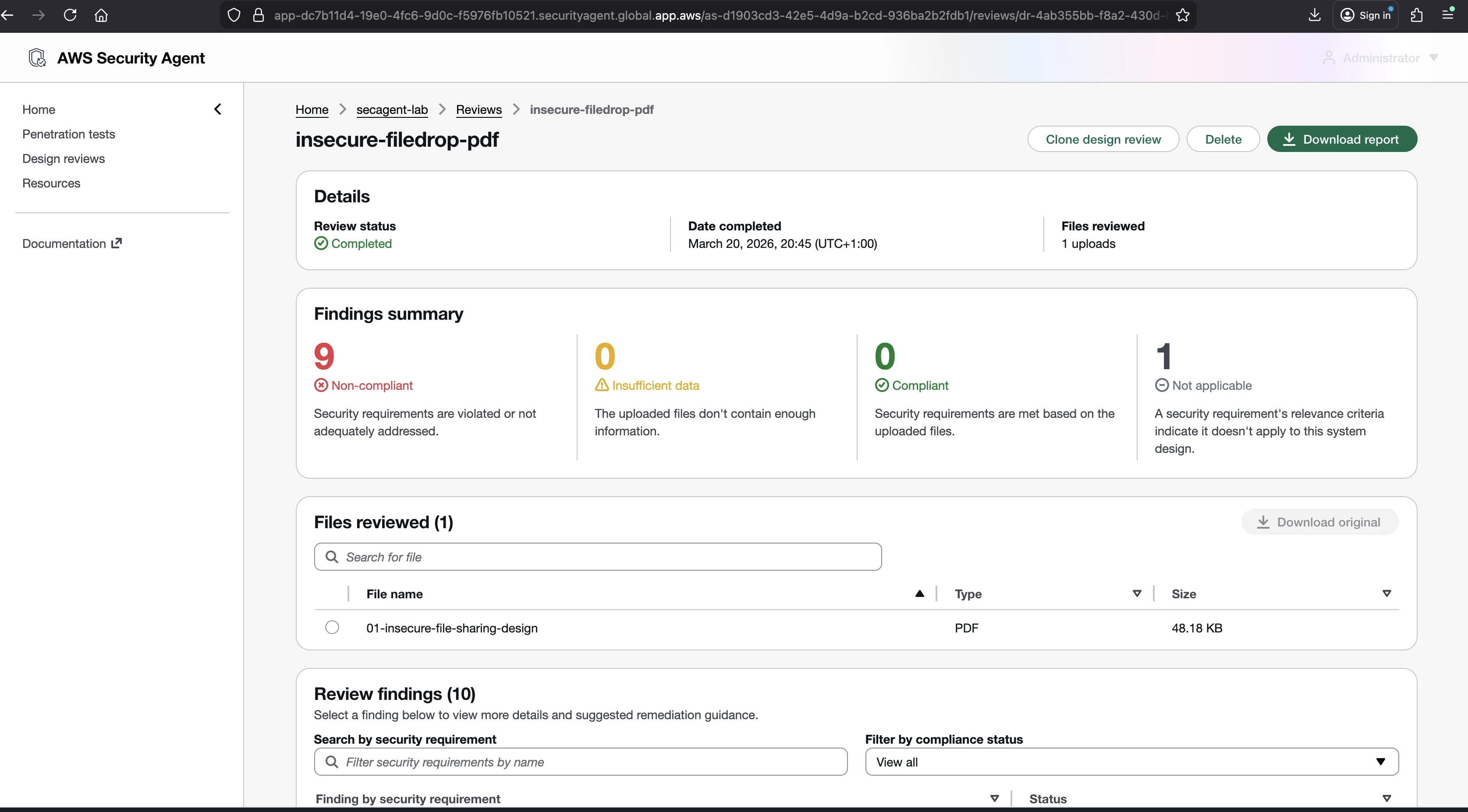
Every single managed requirement came back Non-compliant. Zero compliant, zero insufficient data, zero not applicable. The insecure design failed every check.
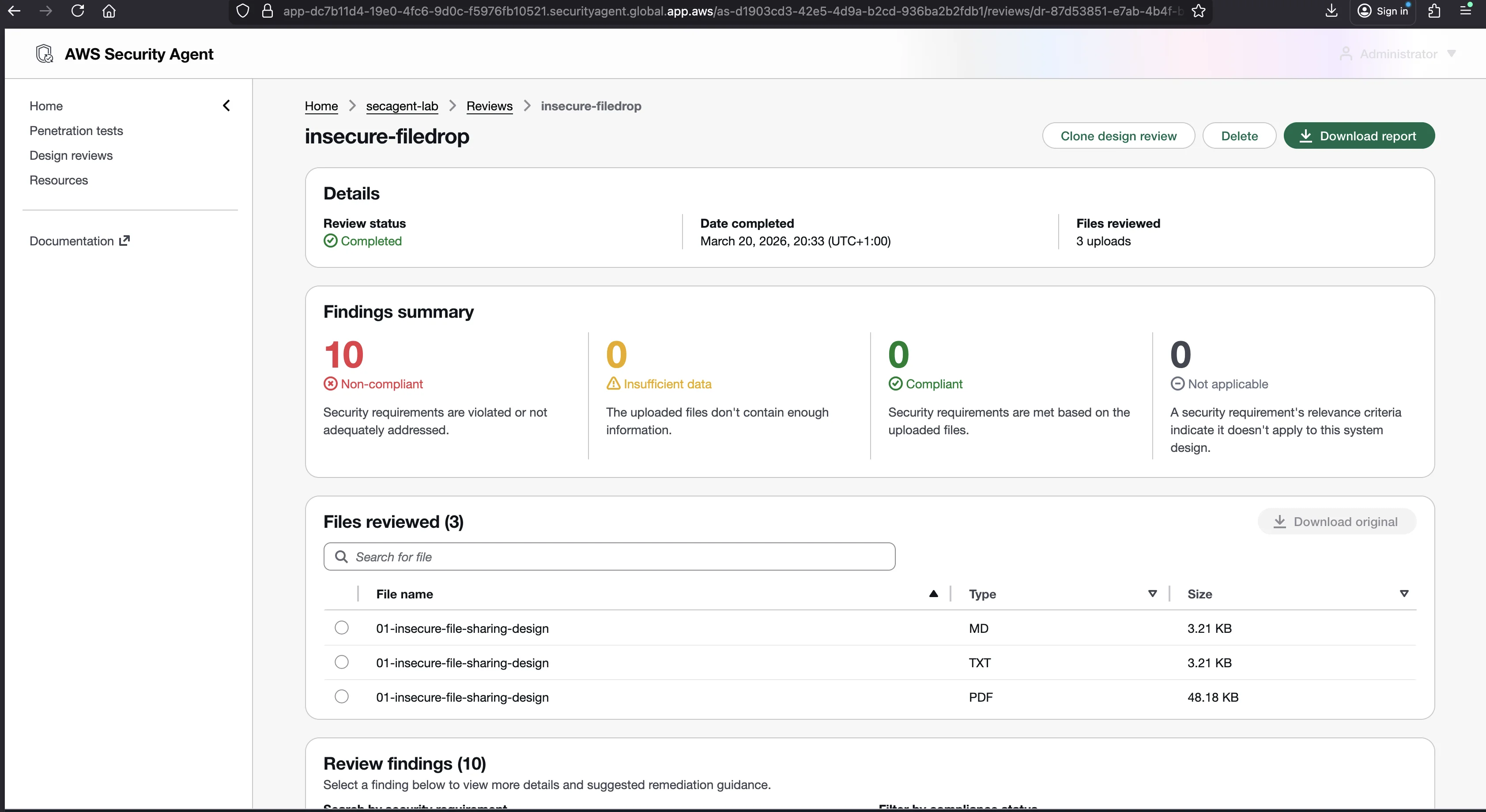
Here is the full results table:
| # | Requirement | Status | What the Agent Found |
|---|---|---|---|
| 1 | Authentication Best Practices | Non-compliant | MD5 hashes are cryptographically broken, vulnerable to rainbow table and brute-force attacks. |
| 2 | Authorization Best Practices | Non-compliant | No per-file access control. Any authenticated user can download or delete any file. |
| 3 | Secure by Default Best Practices | Non-compliant | Files accessible to all users by default, no file type or size restrictions, MySQL bound to 0.0.0.0. |
| 4 | Log Protection Best Practices | Non-compliant | Logs to stdout only, no centralized logging, no audit trail, no alerting. |
| 5 | Information Protection Best Practices | Non-compliant | MD5 passwords, HTTP Basic Auth without TLS, unencrypted files, plaintext credentials in config.json. |
| 6 | Tenant Isolation Best Practices | Non-compliant | Any user can access any other user's files. No per-file isolation in a 500-employee system. |
| 7 | Secret Protection Best Practices | Non-compliant | Database credentials in config.json, no secret rotation, no AWS IAM roles. |
| 8 | Privileged Access Best Practices | Non-compliant | No audit logging for admin actions. /admin/config deserializes the request body directly. |
| 9 | Audit Logging Best Practices | Non-compliant | No centralized logging, no audit trail, no alerting. Security monitoring is impossible. |
| 10 | Trusted Cryptography Best Practices | Non-compliant | MD5 is deprecated and cryptographically broken. No salting. |
What the Agent Actually Said
When you click a finding, a detail modal opens with four sections: a compliance status (a colored badge), the requirement name and description, a "Comment" with the agent's analysis, and "Remediation guidance" with specific fix steps.
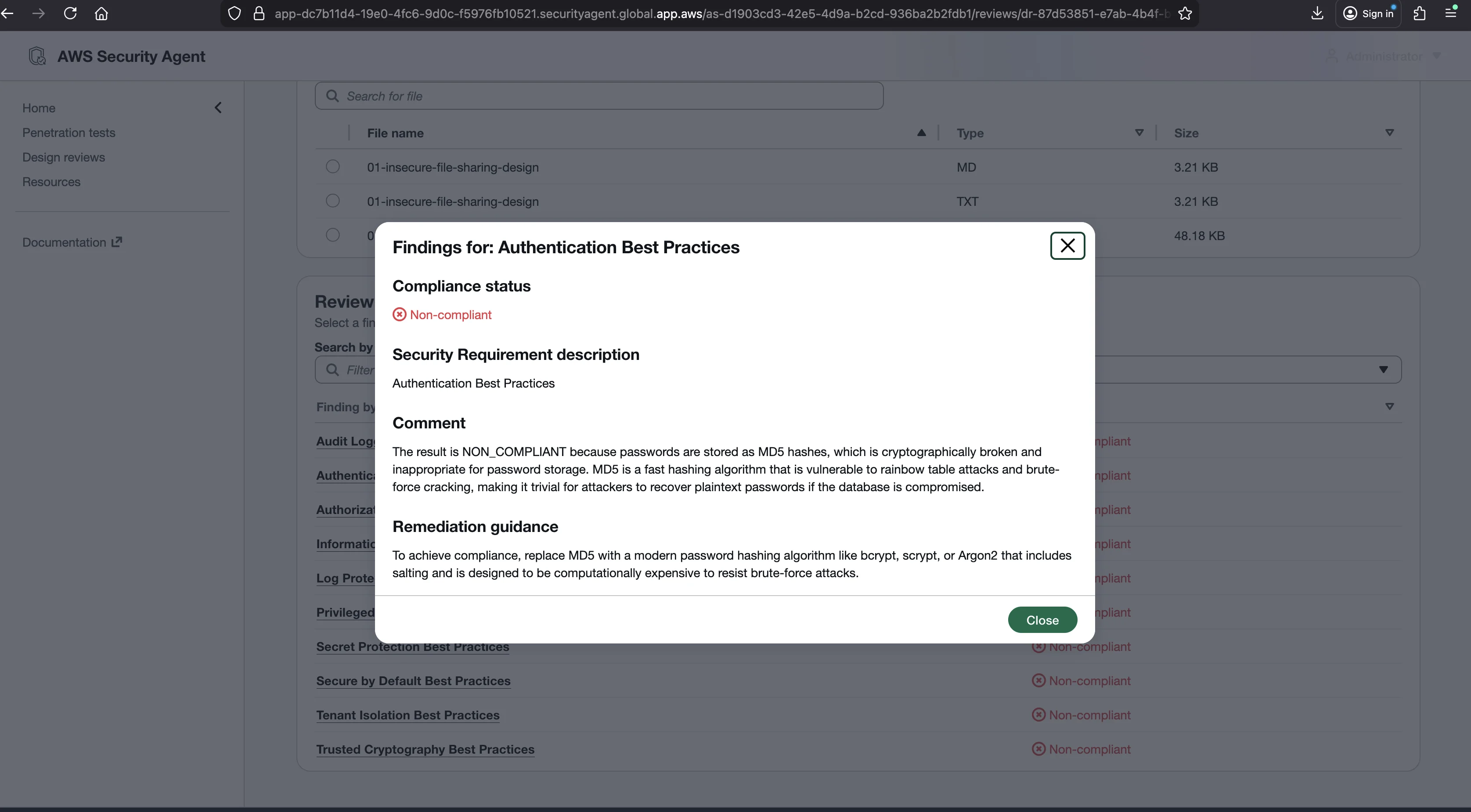
The comments are not generic. They reference your document directly. Here are three findings verbatim, taken from the CSV export of the Markdown-format review (the same review used in the format experiment below, not the specific run pictured in the screenshot above, design reviews are not deterministic and different runs word their findings differently even against identical input).
Authentication Best Practices
Comment:
"The result is NON_COMPLIANT because the system uses MD5 for password hashing, which is cryptographically broken and unsuitable for password storage. HTTP Basic Authentication without TLS sends credentials in plaintext over the internet, and there's no mention of HTTPS/TLS protection."
Remediation guidance:
"To achieve compliance, use a modern password hashing algorithm like bcrypt, Argon2, or PBKDF2, and implement TLS/HTTPS to encrypt credentials in transit."
Secret Protection Best Practices
Comment:
"The result is NON_COMPLIANT because database credentials are stored insecurely in a config.json file in the application directory, and there is no mention of secret rotation policies or revocation procedures. The system also uses long-lived credentials (username/password with MD5 hashes) without any rotation mechanism."
Remediation guidance:
"To achieve compliance, store database credentials in AWS Secrets Manager or Parameter Store with automatic rotation enabled, use IAM roles for EC2-to-RDS authentication instead of static credentials, and implement a credential rotation policy for user passwords."
Secure by Default Best Practices
Comment:
"The result is NON_COMPLIANT because the system defaults to insecure configurations across multiple areas: files are publicly accessible to all authenticated users by default with no per-file access control, MySQL is bound to 0.0.0.0 exposing it publicly, and passwords use weak MD5 hashing. The system requires no explicit opt-in for these permissive settings and lacks basic security features like encryption or restrictive access controls by default."
Remediation guidance:
"To achieve compliance, make files private by default requiring explicit sharing permissions, bind MySQL to localhost only, enable strong password hashing (bcrypt/argon2), and require explicit configuration to enable public access or weaker security settings."
Every finding follows this pattern: the agent identifies the specific problem in your document and prescribes a specific fix. The Authentication finding calls out MD5 by name. The Secret Protection finding points at config.json. The Secure by Default finding names three separate issues, file access, MySQL binding, and MD5, and tells you exactly what to change for each.
How Findings Map to Vulnerabilities
The FileDrop document contains roughly 14 distinct security problems. The agent does not report them as individual vulnerabilities. It organizes its analysis by requirement, grouping related issues together. Some problems appear in multiple findings. MD5 hashing is flagged under Authentication (wrong algorithm for passwords), Information Protection (sensitive data not properly protected), and Trusted Cryptography (broken cryptographic implementation). That is correct: the same flaw violates multiple requirements.
Notice what the agent does not report as individual line items. SQL injection in the DELETE endpoint and path traversal in the download endpoint are covered implicitly under Authorization and Secure by Default (the system accepts unvalidated input), but the agent does not name those specific attack vectors. There is no "Injection" or "Input Validation" managed requirement. The 10-requirement model catches the consequences of these flaws but does not always name the attack.
This is a limitation worth knowing. A design review tells you which security principles your design violates. It does not produce a vulnerability list the way a penetration test does.
The Format Experiment: Format Affects Results
The AWS documentation does not mention this, but the file format you upload changes the results. I uploaded the same FileDrop document in three formats (MD, TXT, and PDF) and compared the outputs. Then I repeated the experiment with a second document, a VulnCatalog architecture spec. Same content each time. Different results. This was one review per format per document, six reviews in total. Because the analysis is LLM-driven and not deterministic, a single run per format is a sample rather than proof: I did not re-run each format repeatedly, so read the pattern below as a strong signal, not a guarantee.
| Document | Format | Non-compliant | Insufficient data | Not applicable |
|---|---|---|---|---|
| FileDrop | MD | 10 | 0 | 0 |
| FileDrop | TXT | 10 | 0 | 0 |
| FileDrop | 9 | 0 | 1 | |
| VulnCatalog | MD | 8 | 1 | 1 |
| VulnCatalog | TXT | 8 | 1 | 1 |
| VulnCatalog | 6 | 1 | 3 |
MD and TXT produced identical results across both documents. Across these runs, PDF produced fewer non-compliant findings.
For FileDrop, the PDF classified Tenant Isolation as "Not applicable" while MD and TXT correctly identified it as Non-compliant. The PDF version saw a 500-employee file-sharing system and decided tenant isolation did not apply. The text-based versions understood that each employee is effectively a tenant who should only see their own files.
For VulnCatalog the gap was wider. PDF found only 6 non-compliant requirements versus 8 for MD and TXT. PDF classified Privileged Access as "Insufficient data" and Audit Logging as "Not applicable", both of which the text-based versions correctly found Non-compliant.
The PDF parser appears to lose context or structure that the text-based parsers preserve. The most likely explanation is that whatever preprocessing turns a PDF into text for the agent drops structure that the text-based formats keep.
The recommendation: if your design document exists as Markdown, a Google Doc, or plain text, upload it in that format. Do not convert to PDF first. Use MD or TXT for the most accurate results.
These files, like every artifact this series links to, live in the companion repository under data/. The full format comparison data is in format-comparison.md, and the complete FileDrop finding set is in insecure-filedrop-analysis.md.
Exporting Results
After a review completes, two export options appear. The "Download report" button downloads a report of the findings. The CSV export downloads a file with columns: Control ID, Control Name, Control Description, Comment, Result, Remediation Guidance. The CSV is useful for tracking findings in a spreadsheet or importing them into a ticket system. Each row is one requirement, and the Comment column holds the full analysis.
You can filter findings with the Compliance status dropdown at the top of the findings table: View all, Compliant, Non-compliant, Insufficient data, Not applicable.
Reviews Are Immutable
You cannot re-run a design review or edit it after it completes. There is no "re-run" or "edit" button.
Instead, use the "Clone design review" button. This creates a new review with the original documents pre-loaded. You can swap out files and start a fresh review, while the original stays intact for comparison.
The workflow for iterating on a design:
- Run a review.
- Read the findings.
- Update your design document to fix what the agent flagged.
- Clone the review.
- Replace the old document with the updated one.
- Start the cloned review.
- Compare the new results against the original.
Each round should produce fewer Non-compliant statuses. Reviews complete in minutes, so iterating is cheap. Use cloning as your feedback loop, not as a one-time assessment.
Common Mistakes
Uploading code instead of design documents. Design reviews are for architectural documents, not source code. The supported formats are DOC, DOCX, JPEG, MD, PDF, PNG, and TXT. Source code files are not in that list. Use code reviews for code.
Uploading too-general documents. A company-wide security policy is not a good input for a design review of a specific application. The agent needs the specific application's design, not your organization's general posture.
Using PDF when you have the source text. As shown above, PDF loses information during parsing. Upload the original Markdown or text.
Ignoring "Insufficient data" findings. That status means the agent could not determine compliance because your document does not describe that aspect of the system. It is a signal to add detail, not to ignore the requirement. If the agent cannot tell whether your design meets Authentication Best Practices, your document probably does not describe authentication at all.
A Note on Quotas
Design reviews are quota-limited to 200 per account per region per month. For iterating on a single design that is effectively unlimited. If you are running design reviews across a large portfolio of applications in one region, plan around that ceiling. This quota is adjustable, so you can request an increase by submitting an AWS Support case if a single region's portfolio needs more.
What Comes Next
Design reviews check architecture documents. Code reviews check actual source code, and the results are very different. In the next post I connect GitHub, push a deliberately vulnerable Flask app, and show what the agent posts as inline PR comments: Code Reviews and GitHub.
Go Deeper: The State of AWS Security 2026
This article is just the start. Get the full picture with our free whitepaper - 8 chapters covering IAM, S3, VPC, monitoring, agentic AI security, compliance, and a prioritized action plan with 50+ CLI commands.
KloudSec, built by the team behind Toc Consulting
See AWS Security checked automatically, continuously
What you just read is a manual, one-time check. KloudSec runs this and 400+ more automated checks across 90+ AWS services, continuously, agentless, live in about 5 minutes.
Toc Consulting: AWS Security & Cloud Architecture
Want expert help with AWS Security?
Our team helps engineering teams secure and architect AWS the right way: assessment in week one, a prioritized action plan in week two.
More Articles
iam-to-english: Read Any AWS IAM Policy in Plain English and Catch Privilege Escalation Before It Ships
KloudSec releases iam-to-english, a free open-source CLI that explains AWS IAM policies in plain English, flags 21 known privilege escalation paths, including combinations spread across statements, diffs policy changes and gates CI. It runs offline.
AWS IAM Privilege Escalation: Paths, CloudTrail Events, and the Controls That Block Them
Twelve documented ways a limited IAM identity can raise its own permissions, the CloudTrail event each one leaves, and the AWS controls that block them. Commands and policies follow AWS documentation examples and the AWS CLI v2 reference.
Anatomy of a Real AWS Breach: Capital One, 2019
How a misconfigured WAF, an unauthenticated metadata service, and an over-privileged IAM role combined to expose data on roughly 100 million people in the US and 6 million in Canada, and the specific checks that would have stopped it.