
What It Catches and What It Misses
Tarek Cheikh
Founder & AWS Cloud Architect
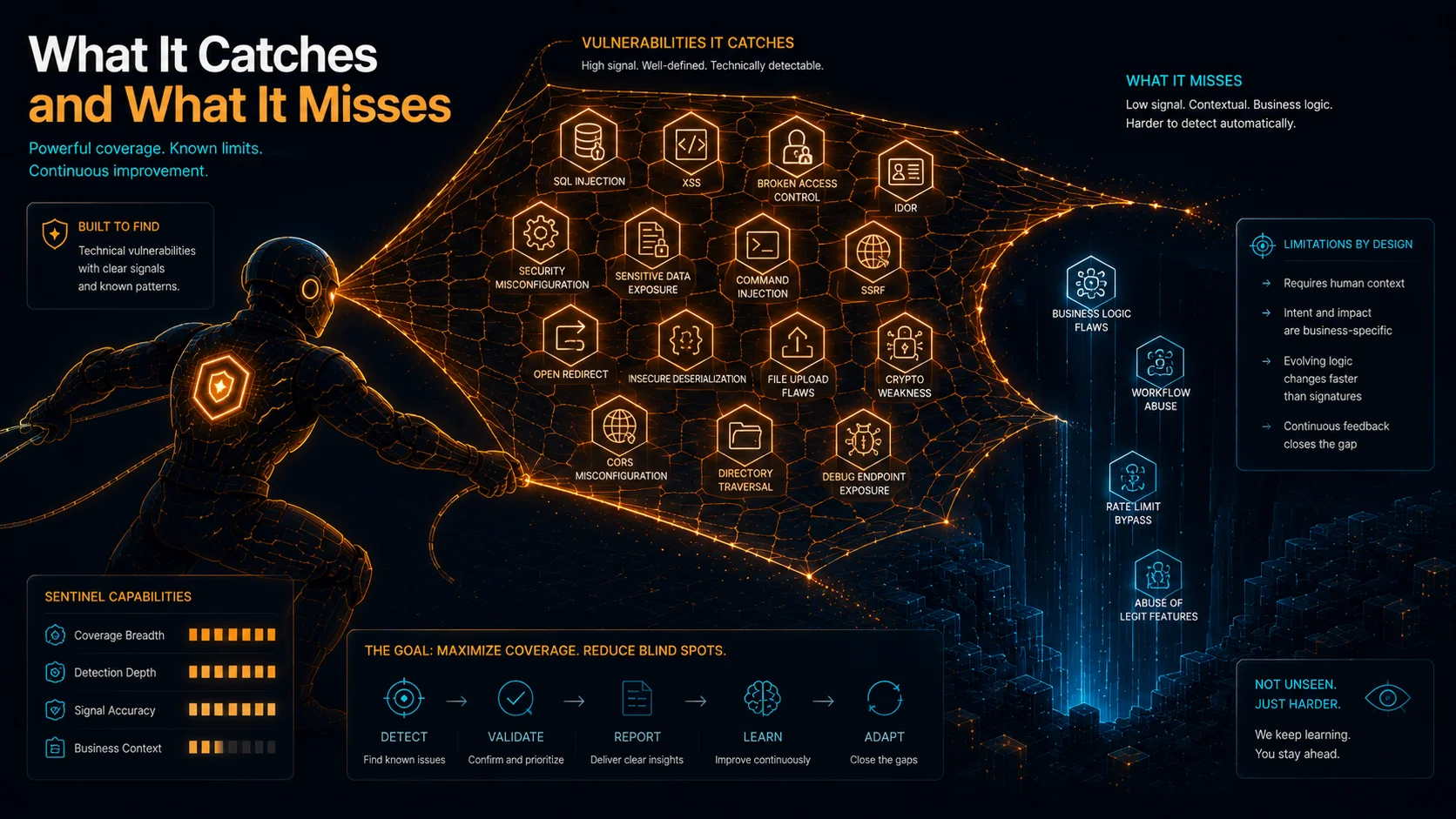
After two primary pentests (plus a handful of short exploratory runs), nine design reviews (seven in the format experiment, two adversarial prompt-injection tests), two code reviews, and weeks of CloudWatch log analysis, here is my honest assessment of where AWS Security Agent falls short and what you can do about each gap.
Every weakness below comes with numbers from my own experiments, and every number comes with a fix. I am not guessing about limitations. I measured them.
There are two themes in this post. The first is the set of concrete limitations I found and how to work around each one. The second is stochastic variance: the agent's reasoning is non-deterministic, so the same configuration against the same application produces different findings on different runs. That second point reframes everything in the first. A single run is a sample, not a census.
Limitation 1: The Discovery Bottleneck
This is the biggest limitation I found, and it has nothing to do with detection quality.
My vulnerable application exposed 48 scored endpoints in total: 39 distinct intentional vulnerabilities spread across 42 endpoints (3 of the hidden vulns use a 2-route multi-step chain), plus 1 login-support route (a backend auth endpoint, separate from the /login page) and 5 clean endpoints. The Crawler discovered 10 routes, but only 7 of them are among the 48 scored endpoints (the 2 upload vulnerability endpoints plus the 5 clean endpoints); the other 3 are the unscored infrastructure routes /, /login, and /dashboard. That is a 15 percent discovery rate of the scored grid (7/48 = 14.6 percent). Every endpoint the Crawler missed was invisible to every attack worker downstream.
Here are the 10 routes the Crawler found (the first three are unscored infrastructure):
/, /login, /dashboard, /clean/health, /clean/search,
/clean/users (401), /clean/profile (401), /clean/download,
/upload/obvious, /upload/hidden
Almost all of the 42 vulnerability endpoints were missed entirely (/sqli/*, /xss/*, /cmdi/*, /ssrf/*, /ssti/*, /idor/*, /lfi/*, /path-traversal/*, /codei/*, /jwt/*, /privesc/*, /xxe/*). The only vulnerability endpoints the Crawler reached were the two upload routes (/upload/obvious, /upload/hidden); the rest of its hits were the 5 clean endpoints and the 3 infrastructure routes.
Why? No sitemap.xml. No robots.txt. No navigation links from the index page to the vulnerability endpoints. No API documentation uploaded. The Crawler had nothing to follow.
To be precise about the ladder behind that number: run-001 produced 5 findings total, 4 of which mapped to distinct planted vulnerability categories (4 of 39 = 10.3 percent), while the 5th was an Information Disclosure on a clean endpoint (/clean/search) that does not map to any planted category. Of those 5 findings, only 2 were validator-verified (AWS hides the other 3 by default as unverified), which is why my run-001 data file frames the same run as "2 verified out of 39." So the category-coverage rate is 4/39 = 10.3 percent and the verified-only rate is 2/39; the 10.3 percent figure counts the unverified-but-mapped findings as well.
The deeper problem is discovery, not detection: of the 42 vulnerability endpoints, the Crawler reached only the 2 upload routes, so almost every planted vulnerability was never even seen by an attack worker. The agent is good at finding vulnerabilities. It is bad at finding endpoints.
| Metric | Value |
|---|---|
| Distinct intentional vulnerabilities | 39 (13 categories x 3 difficulty levels) |
| Vulnerability endpoints | 42 (3 hidden vulns use a 2-route chain) |
| Total scored endpoints (incl. 1 backend login-support route, separate from the /login page, + 5 clean) | 48 |
| Scored endpoints discovered by Crawler | 7 of 48 (5 clean + 2 upload), plus 3 unscored infrastructure routes |
| Distinct planted vulns with a finding | 4 (of the 5 total findings; the fifth did not map to a planted category) |
| Detection rate (of 39 distinct vulnerabilities) | 4/39 = 10.3% |
The fix: give the agent a map. Provide a sitemap.xml, an OpenAPI spec, accessible URLs, or an explicit endpoint list in the "Additional learning resources" section of the pentest wizard. If the agent knows where to look, it finds what is there. The detection number you get is bounded first by discovery and only second by detection skill, so the single highest-leverage thing you can do is hand it the attack surface instead of making it find one.
Limitation 2: Credentials Are Not Optional
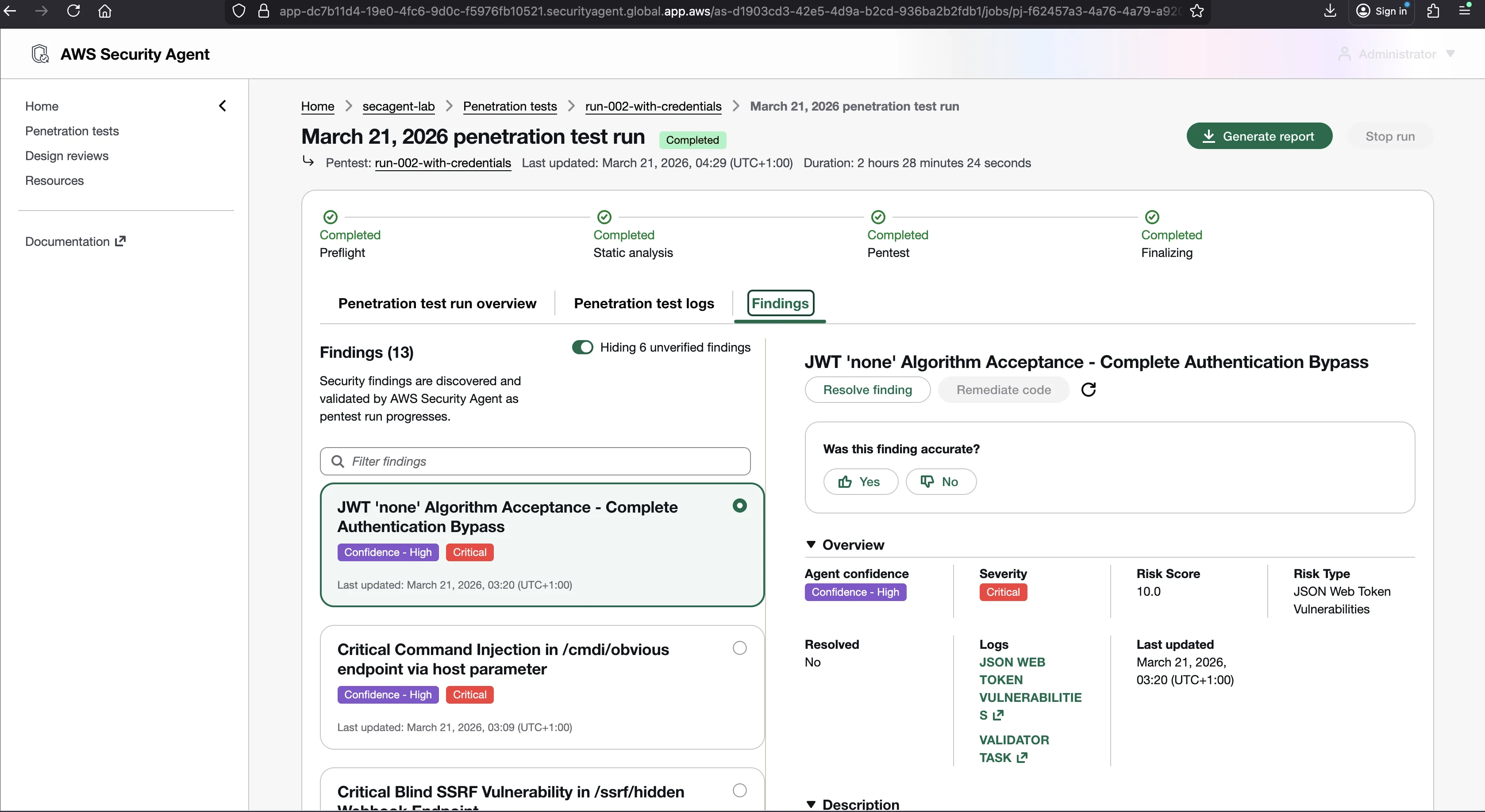
Same application. Same configuration. One variable changed: I provided login credentials through the Authentication Resources screen.
The results went from 5 findings to 13, a 160 percent increase. Here is the full comparison with every finding named:
| # | Finding | Severity | Risk Score | Risk Type | Run-001 | Run-002 |
|---|---|---|---|---|---|---|
| 1 | Critical Command Injection in /cmdi/obvious via host parameter | Critical | 9.9 | Command Injection | - | New |
| 2 | Critical Blind SSRF in /ssrf/hidden Webhook Endpoint | Critical | 9.9 | SSRF | - | New |
| 3 | JWT 'none' Algorithm Acceptance - Complete Auth Bypass | Critical | 10.0 | JWT Vulnerabilities | - | New |
| 4 | SSTI with RCE in /ssti/obvious endpoint | Critical | 9.9 | SSTI | - | New |
| 5 | SSRF via URL Parameter (/ssrf/obvious) | Critical | 9.1 | SSRF | - | New |
| 6 | JWT Signature Verification Not Implemented - Complete Auth Bypass | Critical | 9.8 | JWT Vulnerabilities | - | New |
| 7 | Critical IDOR - Unauthenticated Access to All User Data | High | 7.5 | IDOR | - | New |
| 8 | LFI Filter Bypass via Incomplete Blacklist in /lfi/obvious | High | - | LFI | - | New |
| 9 | File Existence Oracle via Path Traversal in lang Parameter | Medium | - | Path Traversal | - | New |
| 10 | Critical XXE Injection in /xxe/obvious endpoint | Medium | - | XXE | - | New |
| 11 | File Upload MIME Type Validation Bypass | Medium | - | Arbitrary File Upload | - | New |
| 12 | Path Traversal in /path-traversal/obvious endpoint | Medium | - | Path Traversal | Yes | Yes |
| 13 | Broken RBAC on /clean/users - Regular Users Access Admin Endpoint | Medium | - | Privilege Escalation | - | New |
Twelve of the 13 findings were new relative to run-001; only the Medium path-traversal finding carried over. Run-001 produced zero Critical findings, and all 6 Criticals appeared only in the credentialed run. Most of those new findings genuinely needed a session: without valid credentials the agent cannot test authentication mechanisms (JWT), authorization controls (IDOR, RBAC), or anything behind a login wall. A few of them, though, sit on public endpoints (/cmdi/obvious, /ssti/obvious, /ssrf/obvious) that run-001's narrower crawl never reached, so the credentialed run is also where the agent's broader discovery finally surfaced them. That is the discovery bottleneck and the credentials gap showing up together in one comparison.
| Metric | Run-001 (no creds) | Run-002 (with creds) | Change |
|---|---|---|---|
| Findings | 5 | 13 | +160% |
| Critical findings | 0 | 6 | 0 to 6 |
| CloudWatch log streams | 47 | 57 | +10 |
| CloudWatch log size | 7.1 MB | 8.6 MB | +21% |
The fix: always configure Authentication Resources. It takes two minutes. Fill in a username, a password, and a login prompt such as "Go to /login and submit the form." The agent handles the rest through its Authentication agent, which opens a browser, fills the form, extracts tokens, and shares them with the other agents. The agent supports static credentials, IAM role assumption, Secrets Manager secrets, and dynamically retrieved credentials via Lambda. In my testing it also handled an API key stored as plaintext and TOTP-based 2FA. There is no excuse to run unauthenticated and leave more than half the findings on the table.
Limitation 3: IDOR and Business-Logic Authorization
The code review found 9 out of 10 vulnerabilities in my deliberately insecure Flask application. The one it missed was IDOR.
The IDOR endpoint looked like this:
@app.route("/customers/<int:customer_id>/notes")
def get_customer_notes(customer_id):
    conn = get_db()
    result = conn.execute(
        "SELECT notes FROM customers WHERE id = ?", (customer_id,)
    ).fetchone()
    if result:
        return jsonify({"notes": result["notes"]})
    return jsonify({"error": "not found"}), 404
The code is clean. Parameterized query. Proper error handling. The vulnerability is what is not there: no check that the caller is authorized to access this customer's data. The agent cannot know this is wrong unless it knows what "authorized" means for this application.
I wrote one custom security requirement called "Authorization Check on User-Specific Data Access" and ran PR #2 with the same code. The result jumped to 10/10.
| Aspect | PR #1 (no custom requirement) | PR #2 (with custom requirement) |
|---|---|---|
| Custom requirements | 0 | 1 (IDOR) |
| IDOR detected | No | Yes |
| Detection rate | 9/10 (90%) | 10/10 (100%) |
| Summary mentions IDOR | No | Yes |
Here is the agent's actual IDOR finding from PR #2:
What is the issue? Multiple endpoints use a customer_id path parameter to retrieve customer-specific data without any authentication or authorization checks. The /customers/<int:customer_id> endpoint exposes customer profile data (name, email, phone, notes), and the /customers/<int:customer_id>/notes endpoint exposes customer notes, both to any unauthenticated or unauthorized caller who can enumerate customer IDs.
Why is this important? These are classic Insecure Direct Object Reference (IDOR) vulnerabilities. Without authentication and authorization checks, an attacker can enumerate customer IDs across both endpoints and retrieve sensitive data (name, email, phone, notes) belonging to any customer in the system, leading to widespread unauthorized data disclosure.
Security Requirement: Authorization Check on User-Specific Data Access (c-cm-00000000-0000-0000-0000-000000000000)
The agent found two IDOR endpoints, not just the one I planted. It referenced the custom requirement by name and internal ID, which proves the requirement directly caused the detection.
This is the boundary of business-logic reasoning. The agent gravitates to the surface-level vulnerability at each endpoint. It finds missing authentication, missing authorization, user-controllable fields that should be server-controlled, and information disclosure through API responses. It does not, on its own, reason about your access-control model, your tenant-isolation rules, or any security rule specific to your application. It cannot infer your authorization model from clean code, because clean code that lacks an authorization check looks exactly like clean code that does not need one.
One of the short exploratory runs makes this boundary concrete. I built a separate financial application, subtle-app, with six planted business-logic flaws and no injection bugs at all, and even listed each flaw on its index page so the Crawler could hand every worker a roadmap. The agent still landed only 1 of the 6 exact planted vulnerabilities (the money-transfer race condition, which it confirmed with a competent concurrent-request exploit). On the rest it consistently reported the simpler, surface-level version at the same endpoint: it found that the order price field was user-controllable but missed the negative-discount logic, found a password-reset token leaked in the response but missed that the token was a predictable md5(username + timestamp), found a trivial ?role=admin bypass but missed the get() versus getlist() parameter-pollution technique, and found 200/404 username enumeration but missed the 200ms timing side channel, even when a worker was explicitly tasked with statistical timing analysis. The full run is in the subtle-app run-001 summary. The pattern is exactly the boundary above: given a subtle business-logic flaw, the agent finds what a standard OWASP methodology would find at that endpoint, not the specific logic flaw itself.
The fix: write custom requirements for your authorization model. You get 20 custom requirements per account per region. Spend them on authorization checks, tenant isolation, and any business-specific security rule the agent would not know on its own. For logic flaws deeper than observable HTTP differences (workflow bypasses, cryptographic weakness in token generation, timing side channels), supplement the agent with manual review. The agent is a strong first pass for business logic that manifests as a wrong price, a leaked token, or unauthorized access. It is not a replacement for a human on the genuinely application-specific reasoning.
Limitation 4: A Single Run Undercounts, Because the Agent Is Stochastic
Everything above describes what the agent can and cannot reach. This section is about something more subtle: even within what it can reach, the result changes from run to run.
AWS states this plainly in its own documentation: "Given its stochastic nature, AWS Security Agent is not guaranteed to discover and test all critical applications and endpoints for any target application."
This is not a minor caveat. The agent is built on a large language model. LLMs generate output by sampling from a probability distribution over tokens, so even with identical input, different runs produce different outputs. When the agent decides which URL to visit next, which payload to try, or how to interpret a response, it is making a probabilistic decision that varies across runs. Three things follow directly from that.
Reasoning is non-deterministic. Run the same pentest against the same application with the same configuration twice and you may get different findings. A vulnerability detected in run 1 might be missed in run 2.
Attack ordering affects which findings surface. The order in which the agent explores the application shapes what it reaches before time and budget run out on any given path. A different exploration order surfaces a different subset of the reachable vulnerabilities. The endpoints that get visited early and deeply are not the same across runs.
Validators can vary. The Validator agents independently attempt to exploit each internal finding before it becomes a confirmed result. That validation step is itself a reasoning step, so a finding that is confirmed in one run may be rejected in another, and vice versa. In my testing the validator rejection rate swung widely from run to run: 5 of 7 candidate findings were rejected in the unauthenticated baseline, versus 4 of 18 rejected (plus 1 inconclusive) in the credentialed run. Both runs saw meaningful rejection, which is part of what makes the confirmed results trustworthy, but it also means the confirmed set is not stable.
The practical consequences are sharp:
- A single pentest is a sample, not a census. If the agent finds 25 vulnerabilities in one run, the true number it can find might be 30 (it missed 5 by chance) or 22 (3 of the 25 were lucky hits). You cannot tell from one run.
- A clean bill of health means nothing on its own. Zero findings might mean your app is secure, or it might mean the agent took an exploration path that missed everything.
- Regression testing is unreliable from one run. If you fix a vulnerability, re-run, and the finding disappears, you do not know whether your fix worked or the agent simply missed it this time.
How To Reason About a Stochastic Tool
The only way to reason about a non-deterministic tool is to characterize its variance through repeated trials. You run N identical pentests and compare the finding sets.
The most useful single number for consistency is the Jaccard similarity between two runs' finding sets, which is the size of the intersection divided by the size of the union. A Jaccard of 1.0 means two runs found exactly the same vulnerabilities; a Jaccard of 0.0 means they found completely different ones. Compute it for every pair of runs and report the mean.
| Mean Jaccard | Interpretation |
|---|---|
| 0.90 - 1.00 | Highly deterministic. Findings are consistent. A single run is trustworthy. |
| 0.70 - 0.89 | Moderate variance. Core findings are stable; peripheral findings fluctuate. Two to three runs recommended. |
| 0.50 - 0.69 | Substantial variance. Different runs paint different pictures. Multiple runs and consolidation required. |
| < 0.50 | High variance. Single runs are unreliable. The agent explores a different part of the attack surface each time. |
Across runs you classify each vulnerability into one of three buckets:
- Always detected (found in every run): you can trust a single run for these.
- Sometimes detected (found in some runs, not others): this is the variance. These are the vulnerabilities that make single-run results unreliable.
- Never detected (found in no run): beyond the agent's reach with the configuration you used.
The "sometimes" bucket is the whole story. A vulnerability detected in 7 of 10 runs is one the agent can find but does not always. A vulnerability detected in 1 of 10 runs was a lucky hit. If a rarely detected vuln has a per-run detection frequency of 0.2, the probability of missing it across N runs is 0.8 to the power of N:
N=1:  80% chance of missing it
N=3:  51% chance of missing it
N=5:  33% chance of missing it
N=10: 11% chance of missing it
The fix: do not trust one run. Take the union of findings across multiple runs as your consolidated result, because the union is always at least as large as any single run. A reasonable production strategy:
- Run 3 pentests for routine assessments. Three runs roughly halve the miss rate of a single run, but a vulnerability the agent surfaces only ~20 percent of the time still has about a 50 percent chance of slipping through all three (see the table); the payoff is mostly on more frequent vulnerabilities.
- Run 5 pentests for thorough assessments. Five runs cut the miss chance for that same 20-percent-frequency vulnerability to about one in three, and catch anything the agent surfaces half the time or more with near certainty.
- Run more only for research or for high-security applications, where the diminishing returns are still worth it.
The generally available concurrency default is 5 pentests per account per region, adjustable by submitting an AWS Support case, so a 5-run consolidation fits in a single concurrent batch. Do not assume 5 concurrent runs are guaranteed without checking your own account, though: the 5 is the GA documented default, and your account's effective limit can be lower. If you hit a throttle, it is because you exceeded your account's configured concurrency quota, so check that quota before assuming the default applies (during my March 2026 testing, around the GA cutover, the effective limit was still 1, which is the throttle I captured in The Agent's AWS Footprint). Each run's billing is metered by task-hours of cumulative compute, so budget the consolidation accordingly and watch your monthly task-hour usage.
What Each Capability Catches and Misses
No single capability covers everything, and the stochastic point above applies most strongly to the pentest. Here is the at-a-glance picture:
| Capability | Catches | Misses |
|---|---|---|
| Design review | Architectural flaws before code exists (crypto, logging, access-control design) | Runtime behavior, actual exploitability |
| Code review | Code-level vulnerabilities (90 to 100 percent with custom requirements) | Business logic, deployment issues, runtime state |
| Penetration test | Proves exploitability on a live application | Endpoints the Crawler never discovers; varies run to run |
Design review found all 10 non-compliant areas in my insecure architecture document. Code review found 10/10 in the Flask app with one custom requirement. The pentest proved 13 vulnerabilities were actually exploitable, but only after I provided credentials and only on a run where the Crawler reached the right endpoints. Each capability fills a gap left by the others. Skip any one and you have a blind spot.
The Honest Verdict
Here is what the data says, without opinion:
| What I Tested | Result |
|---|---|
| Code review detection (with custom requirements) | 10/10 (100%) |
| Code review detection (without custom requirements) | 9/10 (90%) |
| Pentest detection (of 39 distinct vulnerabilities) | run-001: 5 findings, 4 mapping to distinct planted categories (4/39 = 10.3%), 2 validator-verified. run-002 (with creds): 13 findings spanning 10 of the 13 planted categories |
| Pentest discovery (endpoints reached) | 10 routes found, 7 of 48 scored; only 2 of the 42 vuln endpoints reached |
| Pentest findings (no creds vs. creds) | 5 vs. 13 (+160%) |
| Validator rejection rate | Varied by run: run-001 rejected 5 of 7 candidate findings (71% rejected, 29% confirmed); run-002 rejected 4 of 18 as false positive plus 1 inconclusive (13 of 18 confirmed, 72%); not a stable rate |
The agent is weak at discovery, which is the dominant limiter here: the Crawler reached only 2 of the 42 vulnerability endpoints, so the overall 4/39 rate is bounded by what was never discovered rather than by detection skill. The agent produces very few false positives. The validators reject a meaningful share of internal findings, with the proportion swinging sharply by run, which means the confirmed results are trustworthy even though they are not stable across runs.
The gaps are predictable and fixable:
- Help the Crawler. Give it a sitemap, accessible URLs, an OpenAPI spec, or connected source code. Discovery, not detection, is the ceiling.
- Provide credentials. Always. Five findings became 13.
- Write custom requirements. The agent cannot infer your authorization model from clean code.
- Supplement with manual review for deep business logic: timing attacks, crypto weakness, workflow bypasses.
- Run more than once. The agent is stochastic. One run is a sample. Consolidate the union of 3 to 5 runs for anything you intend to trust.
These gaps are not design flaws. They are the boundaries of what any automated system can do without human guidance on what to look for and where to look, and the variance is the cost of an LLM that reasons rather than matches signatures. The numbers in this post came from real experiments on a real application with real vulnerabilities. If you run the same experiments, you should get similar results, plus or minus the variance this post is about.
So far every post has pointed the agent at a target and measured what it does by accident. The next post flips that: I actively work against the agent, hiding vulnerabilities behind obfuscation and trying to talk it out of findings it already made, to see what survives.
Go Deeper: The State of AWS Security 2026
This article is just the start. Get the full picture with our free whitepaper - 8 chapters covering IAM, S3, VPC, monitoring, agentic AI security, compliance, and a prioritized action plan with 50+ CLI commands.
KloudSec, built by the team behind Toc Consulting
See AWS Security checked automatically, continuously
What you just read is a manual, one-time check. KloudSec runs this and 400+ more automated checks across 90+ AWS services, continuously, agentless, live in about 5 minutes.
Toc Consulting: AWS Security & Cloud Architecture
Want expert help with AWS Security?
Our team helps engineering teams secure and architect AWS the right way: assessment in week one, a prioritized action plan in week two.
More Articles
iam-to-english: Read Any AWS IAM Policy in Plain English and Catch Privilege Escalation Before It Ships
KloudSec releases iam-to-english, a free open-source CLI that explains AWS IAM policies in plain English, flags 21 known privilege escalation paths, including combinations spread across statements, diffs policy changes and gates CI. It runs offline.
AWS IAM Privilege Escalation: Paths, CloudTrail Events, and the Controls That Block Them
Twelve documented ways a limited IAM identity can raise its own permissions, the CloudTrail event each one leaves, and the AWS controls that block them. Commands and policies follow AWS documentation examples and the AWS CLI v2 reference.
Anatomy of a Real AWS Breach: Capital One, 2019
How a misconfigured WAF, an unauthenticated metadata service, and an over-privileged IAM role combined to expose data on roughly 100 million people in the US and 6 million in Canada, and the specific checks that would have stopped it.