
Custom Security Requirements
Tarek Cheikh
Founder & AWS Cloud Architect
Part 6 of 16 in the AWS Security Agent: From Zero to Hero series
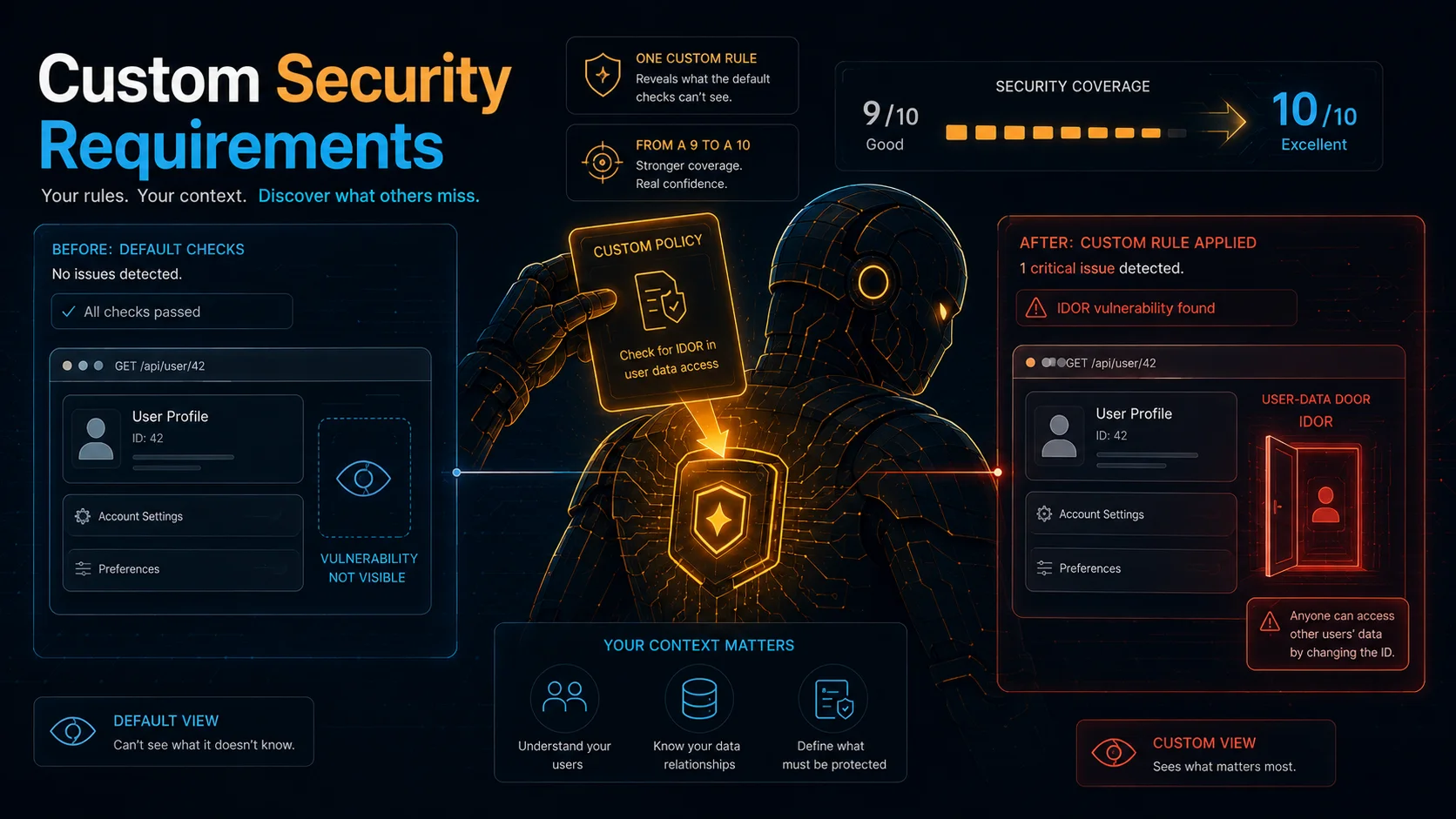
In the previous post I ran AWS Security Agent's code review against a Flask app with 10 planted vulnerabilities. The agent found 9 of them. The one miss was an Insecure Direct Object Reference (IDOR): an endpoint that returns any customer's data when you change the ID in the URL, with no check that the caller is allowed to see it. The code looked clean. The agent had no way to know it was wrong.
This post is about teaching the agent what "wrong" means for your application. I wrote one custom security requirement, re-ran the same code, and the detection rate went from 9/10 to 10/10. Every screenshot, finding, and number here comes from that experiment, run on March 20 to 21, 2026.
What a Custom Security Requirement Is
A custom security requirement is a security rule you write that the agent checks during reviews. You define what "compliant" looks like, what "non-compliant" looks like, when the rule applies, and how to fix violations. The agent evaluates code and designs against your requirements and posts findings when something breaks a rule.
There is an important distinction between two types of requirement:
- Managed requirements are the AWS-provided rules (Authentication Best Practices, Authorization Best Practices, and so on; 10 in my Agent Space at testing time, though AWS does not publish a fixed count and the set may change). AWS documents that enabled requirements, managed and custom, apply to both design and code reviews. In practice, though, AWS also documents that code review needs at least one enabled custom requirement to surface requirement-based findings, and in my testing the managed Authorization rule did not surface the IDOR during code review. Only a custom rule did.
- Custom requirements are rules you write yourself. They are checked in both design reviews and code reviews, and in practice they are what makes requirement-based findings appear in code review.
This means that if your code review analysis type is set to "Security requirement validation" and you have zero custom requirements, nothing happens. No review is posted. That is not the default configuration (the default is "Security requirements and vulnerability findings," which does produce findings out of the box), but it is the number one source of confusion with this service, because it is the one option you can deliberately switch to and then get silence.
Where Requirements Live
Security requirements are managed in the AWS Console, not the web application. The web application is where you run tests and view results. The console is where you configure requirements.
Path: AWS Console > AWS Security Agent > Security requirements
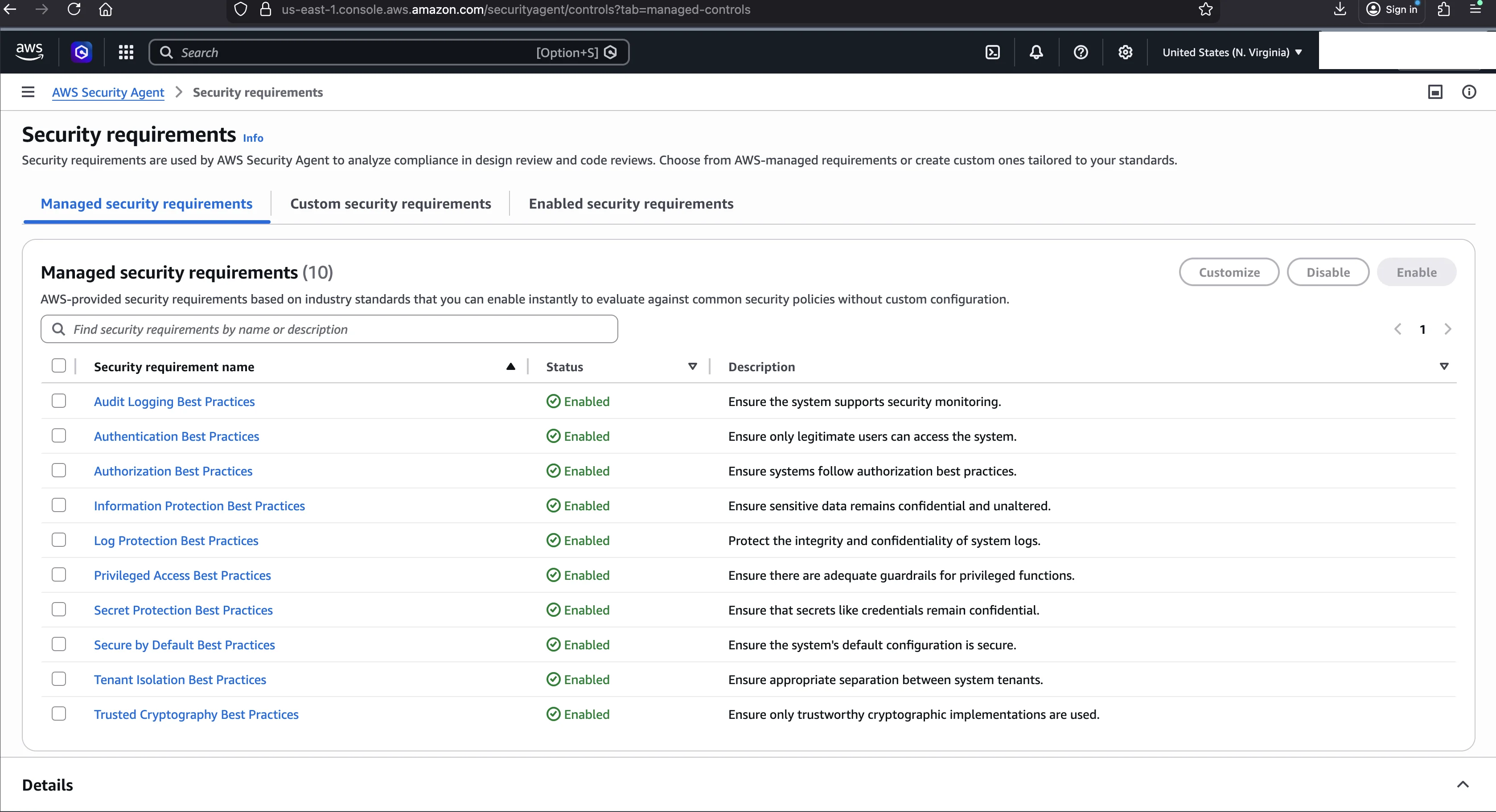
The page has three tabs:
- Managed security requirements: the AWS-provided rules (10 in my configuration), all enabled by default. You can enable or disable them, but you cannot edit their content.
- Custom security requirements: requirements you create yourself.
- Enabled security requirements: all active requirements (managed plus custom) in one view, with a Type column that reads "AWS-managed" for the managed ones.
These three tabs are the preview-era console I used in March 2026. At GA, AWS reorganized this screen around security requirement packs: a Managed security requirements packs tab, where AWS packs (ASA Base, AWS Well-Architected, NIST CSF, and PCI DSS) are enabled or disabled as a unit, and a Custom security requirements packs tab, where you first create a custom pack and then add requirements to it. The five-field form, its character limits, and the customize-from-managed workflow described below are unchanged; only the surrounding pack structure and the tab names differ.
The Code That Was Missed
Here is the endpoint the agent missed in PR #1. It is the IDOR vulnerability.
@app.route("/customers/<int:customer_id>/notes")
def get_customer_notes(customer_id):
    conn = get_db()
    result = conn.execute(
        "SELECT notes FROM customers WHERE id = ?", (customer_id,)
    ).fetchone()
    conn.close()
    if result:
        return jsonify({"notes": result["notes"]})
    return jsonify({"error": "not found"}), 404
Parameterized query. Proper error handling. No injection. The code follows every best practice a scanner would look for. The problem is what is not there: no check that the authenticated caller is authorized to view this customer's notes. Any user who can guess or enumerate customer IDs gets every customer's private data.
The agent cannot flag this as a vulnerability unless you tell it what "authorized access" means for your application. That is exactly what custom requirements do.
The Five Fields
Creating a custom requirement means filling out a form with five fields. You find it in the AWS Console under Security requirements > Custom security requirements > Create custom security requirement. (That is the preview-era navigation; at GA you first open or create a custom pack, then add the requirement to it. The form fields below are the same.)
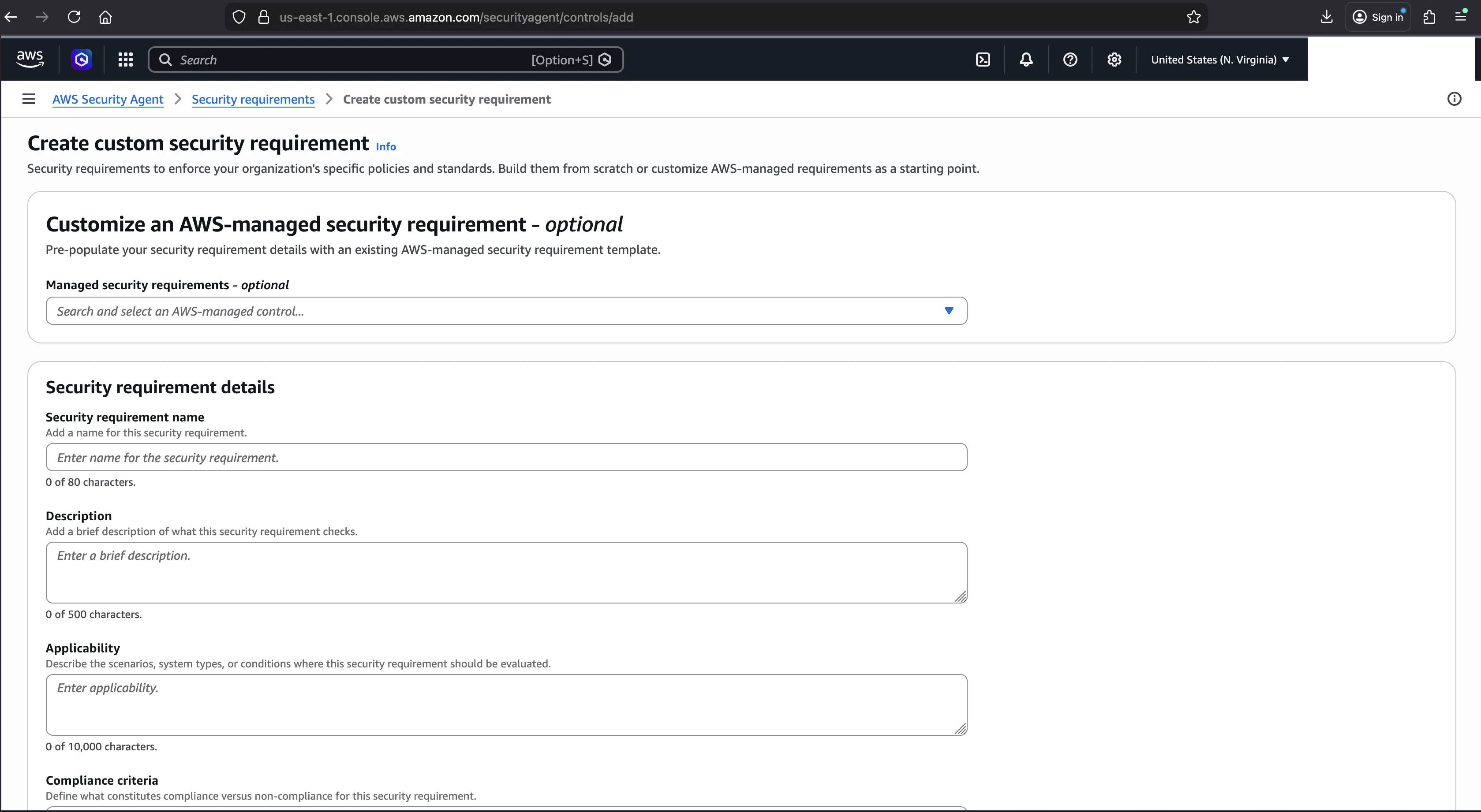
There is an optional shortcut at the top of the form. A template selector (the "Customize a managed security requirement" option) lets you select any of the managed requirements as a starting template. The form then pre-populates all five fields with that requirement's content, which you can modify. This is useful when you want a managed requirement's checks to drive code-review findings (which in practice requires an enabled custom requirement) or when you want a stricter version of an existing rule. Note that this creates an independent copy: the original managed requirement stays unchanged, and if AWS updates it, your copy does not inherit the update.
The five fields, with their character limits:
| Field | Max length | Required? |
|---|---|---|
| Name | 80 chars | Yes |
| Description | 500 chars | Yes |
| Applicability | 10,000 chars | Yes |
| Compliance criteria | 10,000 chars | Yes |
| Remediation guidance | 10,000 chars | No |
What each field is for:
- Name appears in findings, reports, and the requirements table. Make it specific enough that a developer seeing it in a PR comment immediately knows what control is being enforced. "Authorization Check on User-Specific Data Access" is good. "Security check" or "Policy 7.3" is not.
- Description explains what the requirement checks and why. The agent uses it for semantic context when evaluating compliance.
- Applicability defines when the requirement applies and when it does not. This is the most important field for reducing false positives.
- Compliance criteria is the actual test. Structure it in two parts: what compliant code looks like and what non-compliant code looks like.
- Remediation guidance gives developers step-by-step instructions for fixing violations. When the agent posts a finding, this guidance shapes the recommendation in the PR comment.
Two save buttons appear at the bottom (next to a Cancel button):
- Create security requirement: creates the requirement but does not enable it. You must enable it separately from the Enabled security requirements tab.
- Create and enable security requirement: the primary button. Creates and immediately activates the requirement for all future reviews. This is the one you usually want.
An info banner spells out the choice: "Choose Create and enable security requirement to immediately enable this security requirement for all future security reviews. You can also choose Create security requirement and enable separately."
My IDOR Requirement, Field by Field
Here is the exact requirement I created. Every character is shown as entered.
Name:
Authorization Check on User-Specific Data AccessDescription:
Every API endpoint that retrieves, modifies, or deletes data belonging to a
specific user or entity must verify that the authenticated caller is authorized
to access that specific resource. Prevents Insecure Direct Object Reference
(IDOR) vulnerabilities.
Applicability:
THIS CONTROL APPLIES TO all API endpoints that accept a user identifier,
customer identifier, account identifier, or any entity-specific identifier as
a path parameter, query parameter, or request body field, and use that
identifier to retrieve, modify, or delete data belonging to that specific
entity.

MARK AS NOT_APPLICABLE IF the endpoint does not accept any entity-specific
identifier, or if the endpoint is explicitly designed for public/anonymous
access where all data is intended to be globally readable.
Compliance criteria:
COMPLIANT IF: Every endpoint that accepts an entity-specific identifier (e.g.,
user_id, customer_id, account_id) performs an explicit authorization check that
verifies the authenticated caller has permission to access the requested
resource BEFORE returning, modifying, or deleting the data. The authorization
check must compare the caller's authenticated identity against the ownership
or access control list of the requested resource.

NON_COMPLIANT IF: Any endpoint accepts an entity-specific identifier and
returns, modifies, or deletes the corresponding data without verifying that the
authenticated caller is authorized to access that specific resource. This
includes endpoints where any authenticated user can access any other user's
data simply by changing the identifier value in the request.
Remediation guidance:
Add an authorization check before data access. After authenticating the caller,
verify they own or have explicit permission to access the requested resource.
Example pattern: retrieve the resource, compare its owner_id against the
authenticated user's ID, and return 403 Forbidden if they do not match. Use
middleware or decorators to enforce this consistently across all endpoints.
Reference: OWASP Insecure Direct Object Reference (IDOR)
https://owasp.org/www-project-web-security-testing-guide/latest/4-Web_Application_Security_Testing/05-Authorization_Testing/04-Testing_for_Insecure_Direct_Object_References
A few things to notice about the structure:
The Applicability field uses explicit THIS CONTROL APPLIES TO and MARK AS NOT_APPLICABLE IF sections. Without the NOT_APPLICABLE clause, the agent might flag a /health endpoint for lacking authorization, technically true but useless. This field controls false positives.
The Compliance criteria is bidirectional. It defines both what good looks like (COMPLIANT IF) and what bad looks like (NON_COMPLIANT IF). The agent needs both sides to make a clear determination. One-sided criteria produce ambiguous results.
The Remediation guidance includes a specific code pattern (compare owner_id against the authenticated user) and an OWASP reference. The agent does not parrot this text verbatim, but it gives the agent concrete vocabulary for the recommendation developers see in the PR comment.
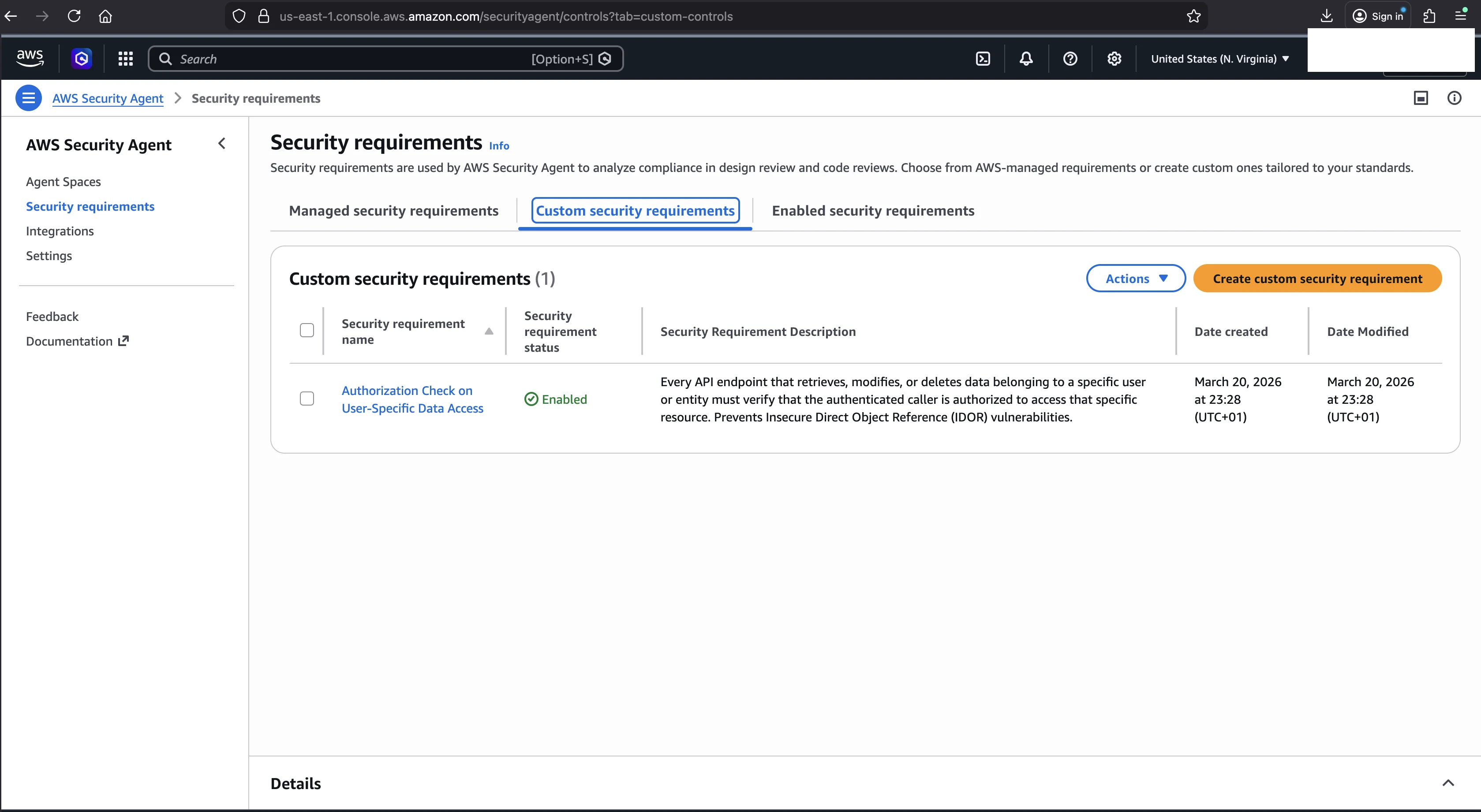
I clicked Create and enable security requirement. The requirement appeared immediately in the Custom security requirements tab, enabled, with a date created and date modified timestamp.
The Experiment
Same app. Same code. No source code comments, so the agent got zero hints. The change that matters for IDOR detection was enabling one custom IDOR requirement; I also removed the hint comments PR #1 had, and the comparison below confirms those comments were not doing any work.
I opened PR #2 on the same repository, the same customer-management Flask app from the previous post (in data/code-review/), with identical code. The analysis type was set to "Security requirements and vulnerability findings," the option that checks both vulnerability patterns and custom requirements.
Here is the agent's finding, quoted verbatim from the PR #2 review:
What is the issue? Multiple endpoints use a customer_id path parameter to retrieve customer-specific data without any authentication or authorization checks. The /customers/<int:customer_id> endpoint exposes customer profile data (name, email, phone, notes), and the /customers/<int:customer_id>/notes endpoint exposes customer notes, both to any unauthenticated or unauthorized caller who can enumerate customer IDs.
Additional Occurrences:
- Lines 110-119
Why is this important? These are classic Insecure Direct Object Reference (IDOR) vulnerabilities. Without authentication and authorization checks, an attacker can enumerate customer IDs across both endpoints and retrieve sensitive data (name, email, phone, notes) belonging to any customer in the system, leading to widespread unauthorized data disclosure.
What is the recommendation? Implement authentication (e.g., JWT or session-based) on all customer-specific endpoints and verify that the authenticated caller owns or has explicit permission to access the requested customer_id before returning any data. Return HTTP 401 Unauthorized if the caller is not authenticated and HTTP 403 Forbidden if the caller is authenticated but not authorized to access the specified customer resource. Apply this consistently across all endpoints that reference customer_id or any other direct object reference.
Security Requirement: Authorization Check on User-Specific Data Access (c-cm-00000000-0000-0000-0000-000000000000)
The last line is the proof. The agent explicitly cites my custom requirement by name and internal UUID. This finding did not exist in PR #1. The requirement directly caused it. Notice that the recommendation mirrors my remediation guidance (JWT or session auth, 401/403 responses, ownership verification) but the agent synthesized it with its own analysis rather than copying my text verbatim.
More Than I Expected
I planted one IDOR endpoint: /customers/<id>/notes. The agent found two:
/customers/<int:customer_id>(line 63), which returns the full customer profile (name, email, phone, notes)/customers/<int:customer_id>/notes(lines 110-119), which returns customer notes
The notes endpoint moved from lines 121-126 in the previous post to lines 110-119 here because PR #2 is the commentless control: with the labeling hint comments stripped out, that code sits a little higher in the file. The profile endpoint, by contrast, is reported at line 63. Both lack authorization checks. Both are valid IDOR findings. The agent understood the requirement broadly enough to apply it to every endpoint matching the pattern, not just the most obvious one.
PR #1 vs PR #2
| Aspect | PR #1 (no custom req) | PR #2 (with custom req) |
|---|---|---|
| Custom requirements | 0 | 1 (IDOR) |
| IDOR detected | No | Yes |
| Detection rate | 9/10 (90%) | 10/10 (100%) |
| Total inline findings | 9 | 11 |
| Summary mentions IDOR | No | Yes |
| Custom requirement cited | N/A | By name and UUID |
| Source code comments | Yes (hints everywhere) | No (clean code) |
The detection rate improvement is clear: 90 percent to 100 percent. The finding count also went up by two, from 9 to 11. The first new finding is a single IDOR finding raised by the custom requirement, which spans two endpoints (the second reported as an additional occurrence under the same finding). The second new finding is on that same os.popen line: a separate comment flagging it as an outdated way to start and communicate with processes and recommending the subprocess module instead, a finding that did not appear in PR #1.
One more detail. PR #1 had source code comments hinting at vulnerabilities. PR #2 had clean code with no comments. The agent still found all 9 original vulnerabilities without hints. The comments were not helping. The agent detects code patterns, not developer annotations.
One caveat on scope: this is a single controlled run (n=1). The agent's analysis is LLM-based and can vary between runs, so read this as a clean demonstration that the custom requirement closed the IDOR gap, not as a statistical measurement. The post on measuring detection rate covers how I measured detection rate more rigorously across multiple runs.
How Requirements Interact With Analysis Types
The analysis type setting, configured per Agent Space in the Code review tab, controls what the agent checks:
| Analysis type | What it checks |
|---|---|
| Security requirement validation | Custom requirements only |
| Security vulnerability findings | Common vulnerabilities only (SQLi, XSS, and so on) |
| Security requirements and vulnerability findings | Both |
If you choose "Security requirement validation" with zero custom requirements, nothing happens. No review is posted.
My recommendation is to use "Security requirements and vulnerability findings." This gives you both vulnerability detection and custom requirement validation. If you have no custom requirements yet, it behaves identically to "Security vulnerability findings."
Scope and Limits
A few things to know about how custom requirements work:
They apply to both review types and across repositories. A custom requirement is checked in both design reviews and code reviews, and it applies across all Agent Spaces in your account. You do not create requirements per repository or per Agent Space. Security standards are organizational, and the service treats them that way. If you need repository-specific scoping, encode it in the Applicability field (for example, "MARK AS NOT_APPLICABLE IF the repository is a frontend-only application with no API endpoints").
New reviews only. Creating or modifying a requirement affects future reviews. Existing completed reviews are not updated. To test existing code against a new requirement, open a new PR.
20 custom requirements per account per region. This limit is not adjustable. Twenty slots means you should focus on high-impact controls rather than trying to encode every possible security check.
Each requirement gets a UUID in the format c-cm-{uuid}. This ID appears in code review findings, making it possible to track which requirement triggered which finding.
Writing Good Requirements
Based on this experiment, three patterns produced the best results.
Use explicit applicability boundaries. The THIS CONTROL APPLIES TO and MARK AS NOT_APPLICABLE IF pattern gives the agent clear scoping. Without NOT_APPLICABLE rules, you will get false positives on endpoints that legitimately do not need authorization, like health checks and public status pages. Every dismissed finding erodes developer trust in the system.
Make compliance criteria bidirectional. Define what compliance looks like and what non-compliance looks like. The agent uses the COMPLIANT IF section to understand what correct code does and the NON_COMPLIANT IF section to understand what incorrect code does. Both are necessary.
Include specific remediation patterns. The agent does not just parrot your remediation text. It blends your guidance with its own analysis. But specific patterns (compare owner_id, return 403, use middleware) give the agent concrete vocabulary to work with when writing recommendations for developers.
What Custom Requirements Catch That Scanners Cannot
SQL injection, XSS, command injection, hardcoded secrets: these are pattern-based vulnerabilities. A scanner looks for execute("SELECT * FROM " + user_input) and flags it. The code pattern itself is the vulnerability.
IDOR is different. The code pattern is correct. Parameterized queries, proper error handling, clean structure. The vulnerability is the absence of something: an authorization check that should exist but does not. No scanner can flag missing code without knowing what code should be there.
Custom requirements bridge that gap. They encode what "correct behavior" means for your specific application. The managed requirements are too general. "Authorization Best Practices" does not tell the agent that every endpoint accepting a customer_id must verify ownership. Your custom requirement does.
One requirement took this code review from 90 percent detection to 100 percent. The next post covers penetration testing, where the agent attacks a live, running application instead of reading source code.
Go Deeper: The State of AWS Security 2026
This article is just the start. Get the full picture with our free whitepaper - 8 chapters covering IAM, S3, VPC, monitoring, agentic AI security, compliance, and a prioritized action plan with 50+ CLI commands.
KloudSec, built by the team behind Toc Consulting
See AWS Security checked automatically, continuously
What you just read is a manual, one-time check. KloudSec runs this and 400+ more automated checks across 90+ AWS services, continuously, agentless, live in about 5 minutes.
Toc Consulting: AWS Security & Cloud Architecture
Want expert help with AWS Security?
Our team helps engineering teams secure and architect AWS the right way: assessment in week one, a prioritized action plan in week two.
More Articles
iam-to-english: Read Any AWS IAM Policy in Plain English and Catch Privilege Escalation Before It Ships
KloudSec releases iam-to-english, a free open-source CLI that explains AWS IAM policies in plain English, flags 21 known privilege escalation paths, including combinations spread across statements, diffs policy changes and gates CI. It runs offline.
AWS IAM Privilege Escalation: Paths, CloudTrail Events, and the Controls That Block Them
Twelve documented ways a limited IAM identity can raise its own permissions, the CloudTrail event each one leaves, and the AWS controls that block them. Commands and policies follow AWS documentation examples and the AWS CLI v2 reference.
Anatomy of a Real AWS Breach: Capital One, 2019
How a misconfigured WAF, an unauthenticated metadata service, and an over-privileged IAM role combined to expose data on roughly 100 million people in the US and 6 million in Canada, and the specific checks that would have stopped it.