
Chaos Engineering on AWS: Graceful Degradation with Circuit Breakers, SQS, and a DynamoDB Cache
Tarek Cheikh
Founder & AWS Cloud Architect
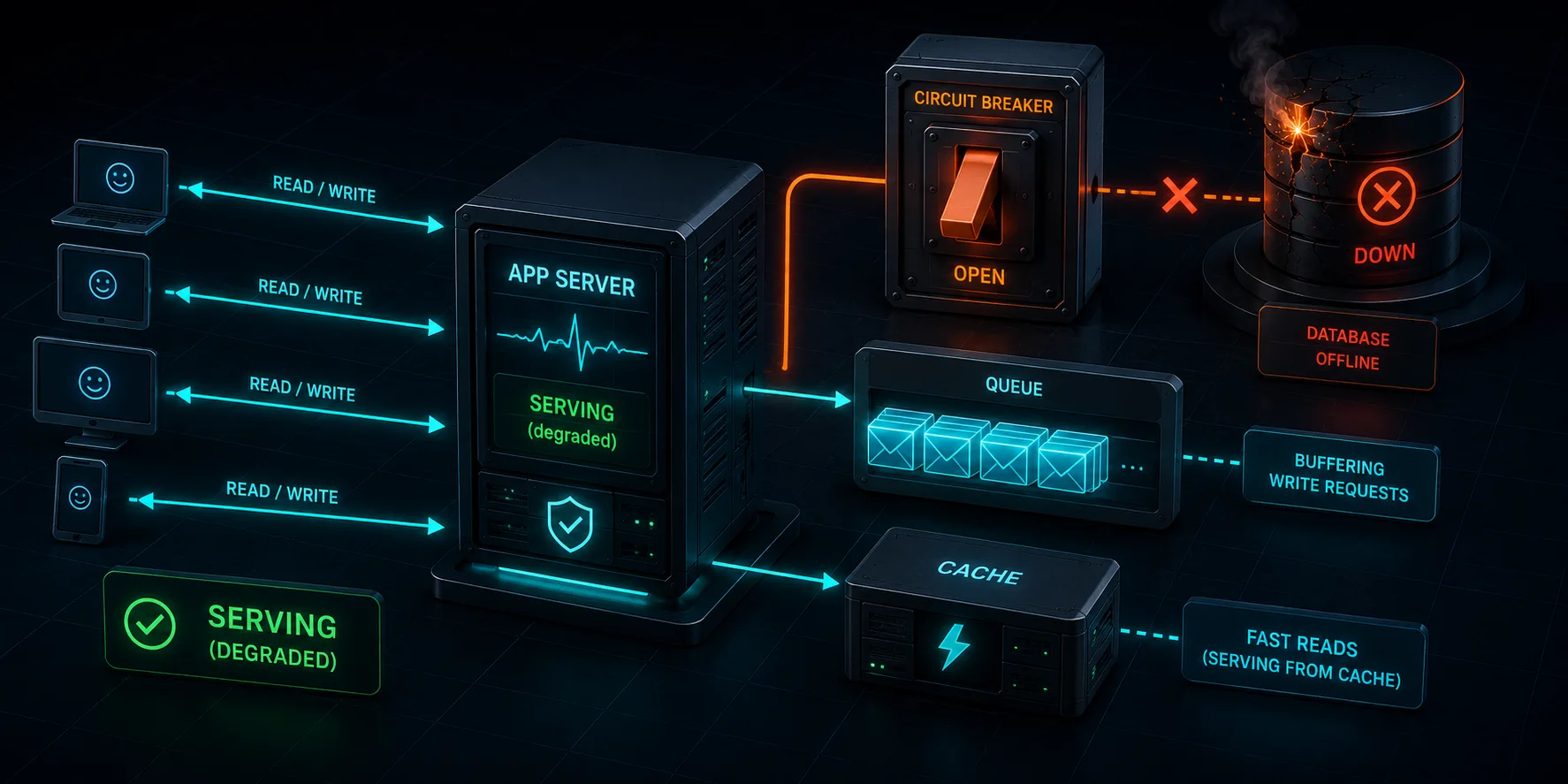
This is Article 4, the finale of the "Chaos Engineering on AWS" series. We take the database completely away from the application and make the application survive it: serve reads from a cache, accept writes into a queue, and lose nothing.
Where Article 3 Left Us
In Article 3, we forced an Aurora failover and watched a naive application break permanently. Then we fixed it with RDS Proxy, read/write separation, and retry logic, turning a permanent outage into a ten-second blip. But we ended on a warning: RDS Proxy and retries only help when there is a healthy backend to reconnect to. If Aurora is gone entirely, the proxy has nothing to route to, and retry logic just retries into nothing.
This article is about that case: an extended, complete database outage. Not a failover that resolves in seconds, but a backend that is simply not there. The question is whether the application can stay useful to customers anyway. The answer is yes, but only if you design for it. We will add three patterns and prove they work by taking the database away on a live AWS account.
The full code is at github.com/TocConsulting/chaos-on-aws, in the 04-graceful-degradation/terraform/ directory.
The Three Patterns
Graceful degradation means the application keeps doing something useful when a dependency fails, instead of returning errors. We add three patterns to Chaos Shop, all gated behind a single Terraform variable enable_degradation so we can deploy the application with and without them and compare.
- Circuit breaker. After a few consecutive database failures, stop trying the database for a while. Fail fast to the fallback instead of making every request wait for a timeout. This is what prevents a database outage from cascading into a thread-pool and connection-pool exhaustion in the application tier.
- DynamoDB read cache. Product reads are cached in DynamoDB on every successful database read (write-through). When the circuit is open, reads are served from the cache. Stale product data is far better than a 500 error.
- SQS write buffer. When the database is unreachable, orders are written to an SQS queue and the customer gets an immediate "order accepted" response. A Lambda recovery worker drains the queue into Aurora once the database is back. No order is lost.
The Circuit Breaker
The circuit breaker is plain module-level state guarded by a lock. It has three states. CLOSED is normal: requests go to the database. After _cb_failure_threshold consecutive failures it trips to OPEN, and every request fails fast to the fallback without touching the database. After _cb_recovery_timeout seconds it moves to HALF_OPEN and lets one request through to test the database; success closes the circuit, failure opens it again.
_cb_state = "CLOSED"
_cb_failure_count = 0
_cb_failure_threshold = 3
_cb_last_failure_time = 0.0
_cb_recovery_timeout = int(os.environ.get("CB_RECOVERY_TIMEOUT", "30"))
_cb_lock = threading.Lock()


def circuit_breaker_allow():
    """Check if the circuit breaker allows the request through."""
    global _cb_state
    with _cb_lock:
        if _cb_state == "CLOSED":
            return True
        if _cb_state == "OPEN":
            if time.time() - _cb_last_failure_time >= _cb_recovery_timeout:
                _cb_state = "HALF_OPEN"
                return True
            return False
        return True


def circuit_breaker_failure():
    """Record a failed database operation."""
    global _cb_state, _cb_failure_count, _cb_last_failure_time
    with _cb_lock:
        _cb_failure_count += 1
        _cb_last_failure_time = time.time()
        if _cb_failure_count >= _cb_failure_threshold:
            _cb_state = "OPEN"
Without a circuit breaker, every request during an outage waits for its connection timeout before failing. At a hundred requests per second with a five-second timeout, you exhaust your worker pool almost immediately, and the database outage becomes an application outage. The circuit breaker is what keeps the application responsive while the database is down.
The DynamoDB Read Cache
Every successful product read writes the result back to DynamoDB (write-through). When the circuit is open, the read handler serves from DynamoDB instead of the database.
@app.route("/products")
def list_products():
    if not circuit_breaker_allow():
        cached = get_products_from_dynamodb()
        if cached is not None:
            return jsonify({
                "products": cached,
                "count": len(cached),
                "source": "cache",
                "served_by": INSTANCE_ID,
            })
        return jsonify({"error": "database unavailable, cache empty"}), 503
    # ... normal path: read from the database via the proxy reader endpoint,
    #     then cache_products_to_dynamodb(products) ...
The source field in the response tells you where the data came from: database or cache. During the experiment we count how many reads were served from each, which is how we measure the cache actually doing its job.
The SQS Write Buffer and Lambda Recovery Worker
When the circuit is open, the order handler does not try the database. It sends the order to SQS and returns 202 Accepted.
        if not circuit_breaker_allow():
            if send_order_to_sqs(product_id, quantity):
                return jsonify({
                    "status": "accepted",
                    "message": "order queued for processing",
                    "product_id": product_id,
                    "quantity": quantity,
                    "served_by": INSTANCE_ID,
                }), 202
            return jsonify({"error": "database unavailable and queue failed"}), 503
The order is now durable in SQS. A Lambda function, triggered by the queue with batch_size = 1 for transactional safety, drains each message into Aurora through RDS Proxy using the same stock-decrement transaction the web app uses. The worker distinguishes two outcomes. A transient failure, such as the database still being unreachable, raises an exception, so SQS redelivers the message; it is retried up to ten times (our maxReceiveCount) and only then lands in the dead letter queue. A business rejection, such as the product not existing or being out of stock, is a valid result, not an error: the worker returns normally and SQS deletes the message, so it is never retried and never reaches the dead letter queue.
def handler(event, context):
    """SQS Lambda handler. Processes one order message per invocation."""
    for record in event["Records"]:
        body = json.loads(record["body"])
        product_id = int(body["product_id"])
        quantity = int(body["quantity"])
        conn = get_connection()
        try:
            success, result = process_order(conn, product_id, quantity)
            # business rejections (insufficient stock) are not retried;
            # connection failures raise, so SQS redelivers the message
        finally:
            conn.close()
    return {"statusCode": 200}
The customer got an immediate response. The actual write happens asynchronously when the database is healthy. The tradeoff is eventual consistency: the confirmation means "we have your order," not "your order is committed." For most e-commerce flows that is the right tradeoff, because the alternative is losing the order entirely.
The Terraform
All three patterns and their resources are gated on enable_degradation, so the same code deploys the fragile version (false) and the resilient version (true).
resource "aws_sqs_queue" "order_buffer" {
  count                      = var.enable_degradation ? 1 : 0
  name                       = "chaos-lab-order-buffer"
  visibility_timeout_seconds = 90
  receive_wait_time_seconds  = 20
  redrive_policy = jsonencode({
    deadLetterTargetArn = aws_sqs_queue.order_buffer_dlq[0].arn
    maxReceiveCount     = 10
  })
}

resource "aws_dynamodb_table" "product_cache" {
  count        = var.enable_degradation ? 1 : 0
  name         = "chaos-lab-product-cache"
  billing_mode = "PAY_PER_REQUEST"
  hash_key     = "id"
  attribute {
    name = "id"
    type = "N"
  }
}

resource "aws_lambda_event_source_mapping" "order_buffer" {
  count            = var.enable_degradation ? 1 : 0
  event_source_arn = aws_sqs_queue.order_buffer[0].arn
  function_name    = aws_lambda_function.recovery_worker[0].arn
  batch_size       = 1
}
A Lesson Before the Experiment: Make Initialization Resilient
The application creates and seeds its tables at startup with an init_db() function. The first version of this lab ran it once at boot, caught any exception, and logged "will retry on first request." It never actually retried. That is a trap. The application talks to Aurora through RDS Proxy, and a proxy can take a few minutes to become fully available after deployment. If the first init_db() attempt runs before the proxy is ready, it fails, the tables are never created, and the application returns 500 forever even though the connection later succeeds, because nothing ever tries to create the tables again.
The fix is to retry initialization in a background thread so the worker can start serving its health check immediately while initialization keeps trying until it succeeds.
def _init_db_with_retry():
    """Keep trying to create and seed the tables until it succeeds.

    Runs in a background thread so the worker serves /health immediately even
    while the RDS Proxy and Aurora are still becoming available after a deploy.
    """
    delay = 2
    while True:
        try:
            init_db()
            print("Database initialized.")
            return
        except Exception as e:
            print(f"Database not ready yet, retrying init in {delay}s: {e}")
            time.sleep(delay)
            delay = min(delay * 2, 30)


threading.Thread(target=_init_db_with_retry, daemon=True).start()
This is itself a chaos engineering finding. We only discovered the fragility because the deployed application would not serve traffic, and we had to ask why. A blocking retry at startup would have been worse: gunicorn kills a worker that takes too long to boot, so the retry has to be in the background.
How to Actually Break the Database
Our first instinct was to use AWS Fault Injection Service with aws:network:disrupt-connectivity to block all traffic to the subnets the database lives in. We deployed dedicated database subnets specifically so FIS could target them, ran the experiment, and watched the application keep working. The "outage" caused almost no failures.
Here is why, and it is worth understanding. The application does not talk to Aurora directly. The Aurora security group only accepts connections from RDS Proxy, so an EC2 instance cannot even open a socket to Aurora. All database traffic goes EC2 to proxy to Aurora. We confirmed this from inside an instance: a direct connection to the Aurora endpoint on port 5432 was refused, while the proxy endpoint was reachable.
The reason the fault did not bite is in how it was scoped. Our template targets only the database subnets, where the Aurora network interfaces live, and the RDS Proxy network interfaces are in a different subnet (the private subnets, alongside the EC2 instances). More importantly, we ran the action with scope = "all", and the FIS documentation is explicit that this scope "denies all traffic entering and leaving the subnet" but "allows intra-subnet traffic, including traffic to and from the network interfaces in the subnet." The action installs a temporary network ACL on the targeted subnets, and a network ACL is stateless and operates per subnet, not per connection. With the fault scoped this way, the proxy-to-Aurora path was not reliably severed, so the application barely noticed.
The lesson is that disrupt-connectivity requires careful scoping to actually isolate a backend, and an RDS Proxy topology, where the proxy and the database sit in different subnets, makes that harder to get right. It is a great fault for compute failures and was exactly right in Articles 1 and 2, but for a reliable, complete database outage in this architecture we needed a fault aimed at the proxy's backend directly rather than at a subnet's network ACL.
The fault that does produce a real, complete backend outage is to remove the proxy's backend. Deregister the Aurora target from the proxy and the proxy has nothing to route to. Every query through it fails immediately. This is precisely the "no backend to connect to" scenario Article 3 warned about, and it is reliable and reversible.
# Take the backend away: the proxy now has no database to route to.
aws rds deregister-db-proxy-targets \
    --db-proxy-name chaos-lab-proxy \
    --db-cluster-identifiers chaos-lab-aurora

# ... outage holds ...

# Recover: re-register the target. RDS Proxy reconnects, and the Lambda
# worker drains any orders that were buffered in SQS during the outage.
aws rds register-db-proxy-targets \
    --db-proxy-name chaos-lab-proxy \
    --db-cluster-identifiers chaos-lab-aurora
The traffic generator sends three reads and one write per second. After thirty seconds of healthy baseline, we deregister the target, hold the outage for three minutes, then re-register and watch the system recover.
The BEFORE Experiment: No Fallback
Deploy with enable_degradation = false. The application has RDS Proxy, read/write separation, and retry logic from Article 3, but no circuit breaker, no cache, and no queue. Then run the backend outage.
The healthy baseline is clean: ninety-two reads and ninety-two writes, zero failures. Then we take the backend away:
=== BEFORE: backend outage, no degradation ===
Reads:  DB=30  CACHE=0  FAIL=12
Writes: OK=31  202_QUEUED=0  STOCK_OUT=0  FAIL=11
Every request that reached the application during the outage and tried the database failed with a 500. Nothing was served from a cache, because there is no cache. No order was queued, because there is no queue. Those twelve failed reads were customers who could not see products, and those eleven failed writes were orders that were simply lost. The retry logic from Article 3 did exactly what Article 3 predicted: it retried into nothing. When we re-registered the target, the application recovered, but the lost orders stayed lost.
The AFTER Experiment: Graceful Degradation
Now deploy the same application with enable_degradation = true and refresh the instances so they pick up the resilient code. Warm the cache with a minute of normal traffic, then run the identical backend outage.
=== AFTER: backend outage, with degradation ===
Reads:  DB=51  CACHE=19  FAIL=0
Writes: OK=44  202_QUEUED=23  STOCK_OUT=3  FAIL=0
Zero failures. During the outage, the circuit breaker tripped after three failed database calls, and from then on the application served reads from the DynamoDB cache (nineteen of them) and accepted writes into SQS (twenty-three of them, each returning 202 Accepted). Not a single customer saw an error. The three STOCK_OUT writes are normal "insufficient stock" 409 responses from the healthy portions of the run, not outage failures: they are a correct business rejection, not a 500.
Then we re-registered the proxy target and checked the queue:
SQS remaining: 0 DLQ: 0The Lambda recovery worker drained all twenty-three buffered orders into Aurora. None failed, none landed in the dead letter queue. The orders that would have been lost in the BEFORE run were all committed once the database came back. Zero orders lost.
BEFORE vs AFTER
| BEFORE (no degradation) | AFTER (with degradation) | |
|---|---|---|
| Read failures during outage | 12 (500 errors) | 0 |
| Reads served from cache | 0 (no cache) | 19 |
| Write failures during outage | 11 (orders lost) | 0 |
| Orders buffered to SQS | 0 (no queue) | 23 |
| Orders lost | 11 | 0 (all drained to Aurora) |
| Customer experience | Errors and timeouts | Served, no visible error |
The exact counts vary from run to run with traffic timing, but the shape is always the same: without degradation, a backend outage means errors and lost orders; with it, the application stays useful and nothing is lost.
What This Series Taught Us
Across four articles we started with a single stopped EC2 instance and ended with a complete database outage that the application survived without losing data. The throughline is the same every time: the architecture diagram is a hypothesis, and the only way to know whether it holds is to run the experiment.
- Article 1 showed that even a simple instance stop has a detection window where real requests fail.
- Article 2 added the observability and stop conditions that make experiments safe to run.
- Article 3 proved RDS Proxy and retries turn an Aurora failover from a permanent outage into a ten-second blip, and warned that they cannot help when the backend is gone.
- Article 4 handled exactly that case with a circuit breaker, a cache, and a queue, and proved no order is lost.
Two of the most useful findings in this article were not the patterns themselves but the surprises along the way: that one-shot initialization leaves an application permanently broken if its dependency is slow to start, and that a subnet-scoped disrupt-connectivity does not reliably cut an RDS Proxy's path to the database when the proxy and the database sit in different subnets. Neither was on any diagram. Both showed up only because we deployed the real thing and broke it on purpose. That is the entire point of chaos engineering.
Cleanup
cd chaos-on-aws/04-graceful-degradation/terraform
terraform destroy -var="enable_degradation=true"
RDS Proxy, the Lambda, the SQS queues, the DynamoDB table, and the Aurora cluster all delete in a few minutes. As with every article in this series, tear the lab down when you are done so it does not run up a bill.
References
Go Deeper: The State of AWS Security 2026
This article is just the start. Get the full picture with our free whitepaper - 8 chapters covering IAM, S3, VPC, monitoring, agentic AI security, compliance, and a prioritized action plan with 50+ CLI commands.
KloudSec, built by the team behind Toc Consulting
See Chaos Engineering checked automatically, continuously
What you just read is a manual, one-time check. KloudSec runs this and 400+ more automated checks across 90+ AWS services, continuously, agentless, live in about 5 minutes.
Toc Consulting: AWS Security & Cloud Architecture
Want expert help with Chaos Engineering?
Our team helps engineering teams secure and architect AWS the right way: assessment in week one, a prioritized action plan in week two.
More Articles
Chaos Engineering on AWS: Running a Program with GameDays and Continuous Chaos
One experiment is a demo. A program is what builds resilience. Turn FIS experiments into an ongoing practice: the resilience flywheel, GameDays, continuous automated chaos on a schedule and in CI/CD, and AWS Resilience Hub. Includes a real, validated EventBridge Scheduler setup and the jsonencode gotcha that makes a recurring schedule silently run only once.
Chaos Engineering on AWS: Multi-Region Disaster Recovery and Measuring Real RPO
Stop talking about disaster recovery and measure it. Pause DynamoDB global table replication with AWS FIS while a live two-Region application keeps writing, then count exactly how many records the surviving Region cannot see. Real Terraform, real RPO, real recovery time.
Chaos Engineering on AWS: Containers and Serverless with FIS (ECS Fargate and Lambda)
Leave EC2 behind. Stop a whole Fargate task set and force AWS Lambda invocations to error and to stall, using AWS FIS. Real Terraform, real numbers, and the exact setup gotchas for the Lambda fault-injection extension.