
Chaos Engineering on AWS: Running a Program with GameDays and Continuous Chaos
Tarek Cheikh
Founder & AWS Cloud Architect
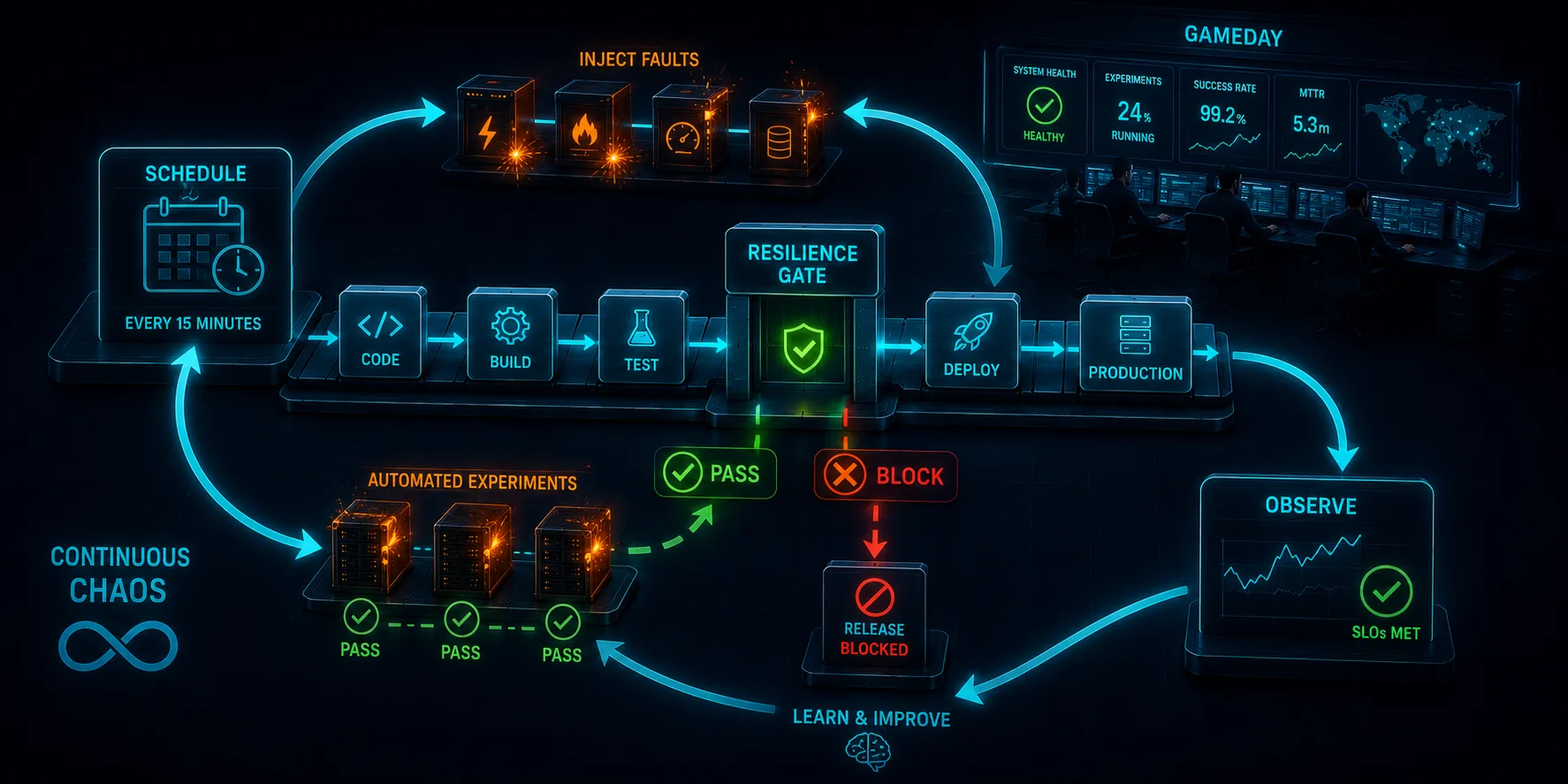
This is Article 10, the final article in the "Chaos Engineering on AWS" series. The previous nine broke things: EC2, databases, dependencies, availability zones, containers, functions, and whole Regions. A single experiment proves a point once. This article is about the part that actually builds resilience: turning those experiments into a program that runs forever.
From Experiment to Practice
Every experiment in this series followed the same loop: form a hypothesis, inject a fault, measure, learn. Run that loop once and you have a result. Run it continuously, across teams, against production, and you have a resilience flywheel: each turn surfaces a weakness, you fix it, you raise the blast radius, and you find the next one. The system gets harder to break because something is always trying to break it.
The flywheel has three gears, and a real program runs all three:
- GameDays: scheduled, human-in-the-loop exercises where a team runs experiments together and practices the response.
- Continuous chaos: automated experiments that run unattended on a cadence, so resilience is verified between GameDays, not just during them.
- Pipeline gates: experiments wired into CI/CD, so a resilience regression fails a build instead of reaching production.
The first is mostly process. The second and third are where AWS tooling matters, and where this article puts real, validated infrastructure on the table. Source is at github.com/TocConsulting/chaos-on-aws, in 10-chaos-program/.
GameDays: the Human Gear
A GameDay is a deliberate, scheduled session where a team injects a known fault into a real environment and practices detecting, diagnosing, and recovering from it. The point is not the fault; it is the response. You learn whether the alarms fire, whether the runbook is correct, whether the on-call engineer knows what to do, and whether the dashboards actually show the problem.
The whole series is a GameDay catalogue. Each article is a self-contained scenario with a hypothesis and a measured outcome: stress a fleet (Article 5), kill an availability zone (Article 6), throttle a dependency (Article 7), pause cross-Region replication (Article 9). A good GameDay program works through scenarios like these on a calendar, starts in staging, and graduates to production once the team trusts the safety controls (stop conditions, alarms, blast-radius limits) that every one of these templates already includes.
Continuous Chaos: the Automated Gear
GameDays are periodic and manual. Resilience decays continuously: a config drifts, a retry gets removed, a timeout is bumped, a new dependency is added without a fallback. To catch that you need experiments that run on their own, on a schedule, with no one watching.
Here is the first important fact: AWS FIS has no native scheduler. The FIS console only offers "start experiment." Recurrence comes from outside, and the AWS-documented way is Amazon EventBridge Scheduler calling the FIS StartExperiment API through its universal (AWS SDK) target. The lab for this article is exactly that: a small EC2 instance, an aws:ec2:stop-instances FIS template, and an EventBridge Scheduler schedule that starts the experiment every few minutes, unattended.
The schedule uses the universal target ARN arn:aws:scheduler:::aws-sdk:fis:startExperiment and an execution role trusting scheduler.amazonaws.com with fis:StartExperiment on both the template and the experiment resource:
resource "aws_scheduler_schedule" "fis_recurring" {
  name = "chaos-program-recurring-experiment"

  flexible_time_window { mode = "OFF" }
  schedule_expression = "rate(3 minutes)"

  target {
    arn      = "arn:aws:scheduler:::aws-sdk:fis:startExperiment"
    role_arn = aws_iam_role.scheduler.arn
    input    = "{\"ClientToken\": \"\", \"ExperimentTemplateId\": \"${...}\"}"
  }
}
The Gotcha That Makes a Recurring Schedule Run Only Once
This is the detail worth the price of admission, and it cost real debugging time to find. FIS StartExperiment requires a ClientToken, an idempotency token. If that token is the same on every invocation, FIS treats every call after the first as a duplicate and returns the original experiment instead of starting a new one. The schedule looks healthy, no errors, no alarms, and yet only one experiment ever runs.
The fix AWS documents is to make the token unique per invocation using the EventBridge Scheduler context attribute <aws.scheduler.execution-id>, which is substituted at run time. The trap is in how you write it in Terraform. The obvious approach, jsonencode, breaks it:
# WRONG: jsonencode HTML-escapes the angle brackets
input = jsonencode({
  ClientToken          = ""
  ExperimentTemplateId = aws_fis_experiment_template.stop_target.id
})
# stored as: {"ClientToken":"\u003caws.scheduler.execution-id\u003e", ...}
Terraform's jsonencode escapes < and > to \u003c and \u003e. EventBridge Scheduler only substitutes the literal <aws.scheduler.execution-id>, so the escaped form is never recognized, the token stays static, and the schedule silently runs the experiment exactly once. I confirmed this live: with jsonencode, after eleven minutes at a three-minute rate, there was still exactly one experiment.
The fix is to build the input as a raw string so the angle brackets survive:
input = "{\"ClientToken\": \"\", \"ExperimentTemplateId\": \"${aws_fis_experiment_template.stop_target.id}\"}" The Validation
With the raw-string input deployed, the stored target input held the literal placeholder, and the schedule started behaving as a schedule should. The experiments it started, with no human involved:
EXP8nCtZ1gegrkq5nr   start 23:53:10   completed   (before the fix)
EXPjXXtNk21hZdoyCv   start 00:11:00   completed
EXPkVRFTcTLcrWsh9L   start 00:14:00   completed
The two experiments after the fix started at 00:11:00 and 00:14:00, exactly three minutes apart, each a distinct experiment with its own unique client token, each one stopping and then restarting the target instance on its own. That is continuous chaos: a resilience check that runs forever on a cadence and needs no one to remember to run it. Point it at a non-destructive experiment with a tight stop condition and you have a heartbeat for your resilience.
Pipeline Gates: the CI/CD Gear
The third gear runs an experiment as a step in your deployment pipeline and fails the build if it does not pass. The pattern is the same in any CI system: start an experiment, poll until it finishes, and exit non-zero if it stopped or failed (for example because a stop-condition alarm tripped). The repository includes two example gates, a GitHub Actions workflow and a CodeBuild buildspec, both built on the same three calls:
EXP_ID=$(aws fis start-experiment \
  --experiment-template-id "$FIS_TEMPLATE_ID" --query 'experiment.id' --output text)
# poll aws fis get-experiment ... until completed | stopped | failed
# exit 1 on stopped/failed  -> the deploy is blocked
The IAM here matters: StartExperiment needs permission on both the experiment-template/* and the experiment/* resource, and it does not require iam:PassRole because FIS uses the experiment role stored on the template itself. A gate like this means a change that quietly removes a retry or breaks a fallback gets caught by a red build, not by customers.
Measuring the Program: AWS Resilience Hub
Experiments tell you what broke. AWS Resilience Hub tells you whether you are meeting your targets across an application. You define an application, set a resiliency policy with explicit RTO and RPO targets (the two numbers from Article 9), and Resilience Hub assesses the architecture, scores it against those targets, and recommends the FIS experiments that would validate its findings. It closes the loop: define targets, assess, run the recommended experiments, fix the gaps, reassess.
Terraform coverage for Resilience Hub is uneven, so the practical path today is to define the application and policy in the console, run the recommended experiments using the FIS templates from this series, and read the score. Treat the score as a trend line, not a grade: the point is that it moves in the right direction as the flywheel turns.
Putting It Together: a Real Program
A working chaos engineering program on AWS looks like this:
- Start in a pre-production environment, with every experiment carrying a stop condition wired to a CloudWatch alarm, exactly as the templates in this series do.
- Run GameDays on a calendar, working through scenarios like the nine in this series, and use them to harden runbooks and train on-call engineers.
- Promote the safe, non-destructive experiments to continuous runs on EventBridge Scheduler, so resilience is checked between GameDays.
- Gate deployments in CI/CD on a fast resilience experiment, so regressions fail builds.
- Track the whole thing against RTO and RPO targets in Resilience Hub, and graduate to production once you trust the controls.
None of this requires exotic tooling. Everything in this series is FIS, CloudWatch, EventBridge, ordinary IAM, and Terraform. The hard part was never the tools; it was the discipline to keep turning the flywheel, and the honesty to measure real numbers instead of trusting the diagram. That is the whole series in one sentence: do not assume your system is resilient, break it on purpose and find out.
The Series
Thank you for reading all ten. If you are starting from scratch, begin with Article 1 and work forward; each article is a self-contained, validated experiment you can deploy from the repository and run yourself. If you want help standing up a chaos engineering program on your own AWS estate, that is exactly the kind of work we do.
Cleanup
cd chaos-on-aws/10-chaos-program/terraform
terraform destroy
The schedule keeps starting experiments every few minutes until you remove it, so do not leave this lab running. A single destroy removes the schedule, the FIS template, the instance, the VPC, and the roles.
References
- AWS FIS: Tutorial, schedule a recurring experiment (EventBridge Scheduler, the execution-id client token)
- AWS FIS: run an experiment (no native scheduler; use EventBridge)
- EventBridge Scheduler universal targets (the aws-sdk target ARN)
- EventBridge Scheduler context attributes
- AWS Resilience Hub
- Full source code: TocConsulting/chaos-on-aws
- Article 9: Multi-Region Disaster Recovery and Measuring Real RPO
Go Deeper: The State of AWS Security 2026
This article is just the start. Get the full picture with our free whitepaper - 8 chapters covering IAM, S3, VPC, monitoring, agentic AI security, compliance, and a prioritized action plan with 50+ CLI commands.
KloudSec, built by the team behind Toc Consulting
See Chaos Engineering checked automatically, continuously
What you just read is a manual, one-time check. KloudSec runs this and 400+ more automated checks across 90+ AWS services, continuously, agentless, live in about 5 minutes.
Toc Consulting: AWS Security & Cloud Architecture
Want expert help with Chaos Engineering?
Our team helps engineering teams secure and architect AWS the right way: assessment in week one, a prioritized action plan in week two.
More Articles
Chaos Engineering on AWS: Multi-Region Disaster Recovery and Measuring Real RPO
Stop talking about disaster recovery and measure it. Pause DynamoDB global table replication with AWS FIS while a live two-Region application keeps writing, then count exactly how many records the surviving Region cannot see. Real Terraform, real RPO, real recovery time.
Chaos Engineering on AWS: Containers and Serverless with FIS (ECS Fargate and Lambda)
Leave EC2 behind. Stop a whole Fargate task set and force AWS Lambda invocations to error and to stall, using AWS FIS. Real Terraform, real numbers, and the exact setup gotchas for the Lambda fault-injection extension.
Chaos Engineering on AWS: Dependency and API Faults with FIS
Sever the DynamoDB and S3 endpoints an application quietly depends on, using AWS FIS, and watch whether one dependency outage stays contained or takes the whole app down. Real Terraform, real per-endpoint numbers.