
Chaos Engineering on AWS: Surviving an Availability Zone Failure with FIS and Static Stability
Tarek Cheikh
Founder & AWS Cloud Architect
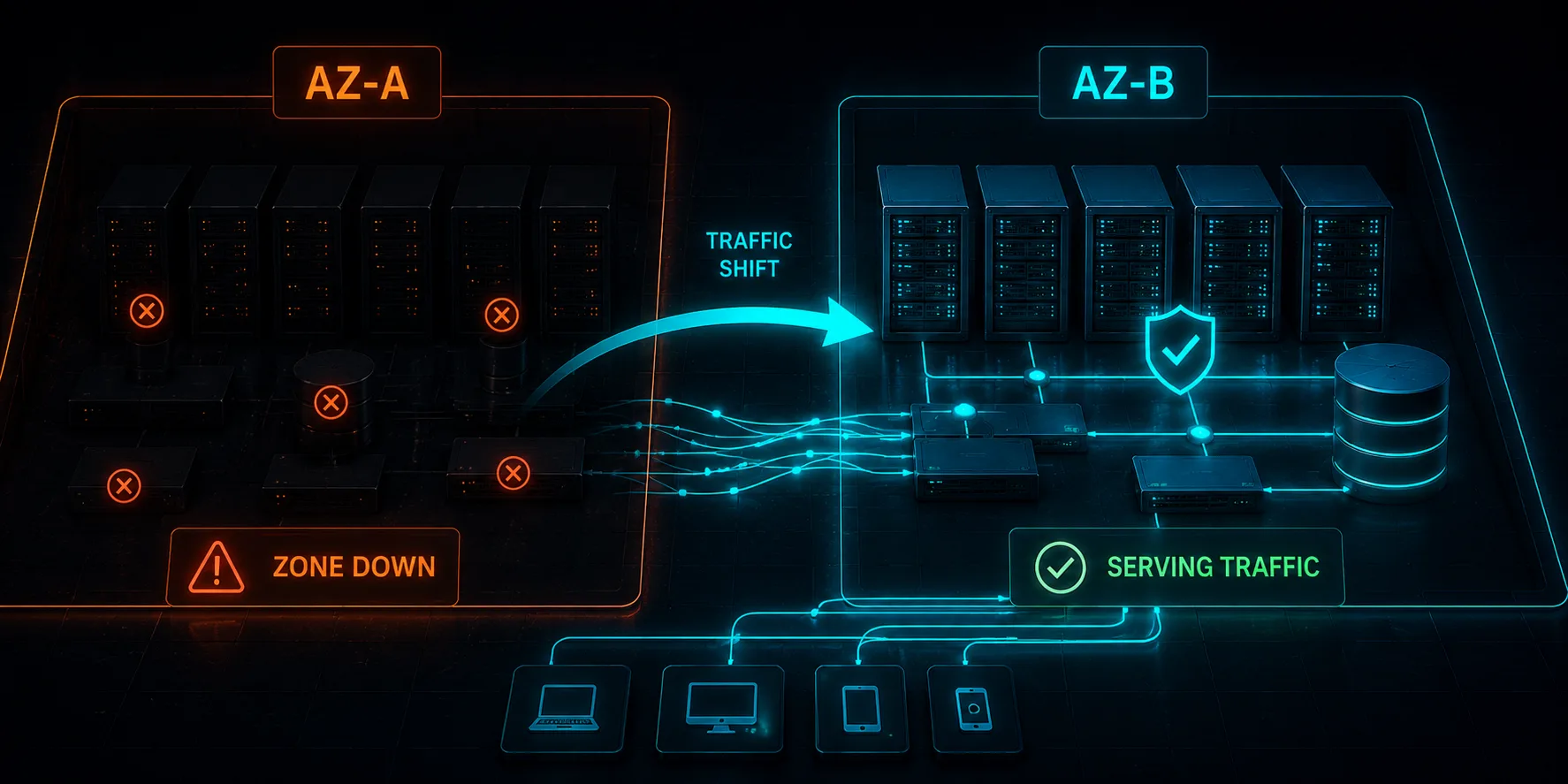
This is Article 6 in the "Chaos Engineering on AWS" series. We stop degrading single instances and take down an entire Availability Zone: every instance in it stopped, its subnet blackholed, and the database failed out of it. Then we find out whether "multi-AZ" actually means what the diagram says.
The Most Important AWS Resilience Test
Every serious AWS architecture claims to be multi-AZ. Two subnets, instances spread across zones, a Multi-AZ database. The assumption is that losing one Availability Zone is a non-event: the survivors carry the load and customers never notice. That assumption is almost never tested, and it is the single most valuable thing to test, because AZ failures are exactly the kind of large, rare, expensive event your architecture exists to survive.
In this article we simulate a full AZ power interruption against the Chaos Shop stack and measure what actually happens. The infrastructure is built for static stability: an Application Load Balancer across two AZs, an Auto Scaling group with two instances in each AZ, and a Multi-AZ Aurora cluster with a writer and a reader in different zones. Code at github.com/TocConsulting/chaos-on-aws, in 06-availability-zone-failure/terraform/.
Static Stability: The Idea Being Tested
The AWS Well-Architected Reliability Pillar (REL11-BP05, "Use static stability to prevent bimodal behavior") frames static stability as a workload that is statically stable and only operates in a single normal mode. Its opposite is bimodal behavior, which the page defines as a workload that "exhibits different behavior under normal and failure modes," for example a system that tries to recover from losing an AZ by launching new capacity in the survivors. That is fragile, because the moment you most need to launch instances (a large-scale event) is the moment the control plane is most stressed and capacity is least guaranteed.
Static stability means provisioning the surviving AZ to carry the full load before the failure, not after. That is why our Auto Scaling group runs four instances, two per AZ: if one AZ disappears, the two instances in the other AZ are already running and already in the load balancer. We are not betting on launching anything during the failure. The experiment will tell us whether that bet pays off.
How We Take Down an AZ
AWS FIS ships an "AZ Availability: Power Interruption" scenario, and its full JSON is published in the docs: you can save that "Scenario Content" and feed it to create-experiment-template from the CLI, or create it from the Console or an SDK. Rather than importing it, we compose the equivalent symptoms ourselves in Terraform so the experiment lives in our codebase next to the infrastructure it tests. We reduce it to three actions that run in parallel against the target AZ (us-east-1a):
- Stop every instance in the AZ.
aws:ec2:stop-instancestargeting instances filtered byPlacement.AvailabilityZone, withstartInstancesAfterDuration = PT6Mso they stay down. - Blackhole the AZ's subnet.
aws:network:disrupt-connectivitywithscope = allon the AZ's private subnet for two minutes. This is what makes it feel like a real power loss: packets are dropped, not refused, so anything still talking to that AZ hangs instead of failing fast. - Fail Aurora over.
aws:rds:failover-db-cluster, which promotes the reader in the surviving AZ if the writer was in the failing one.
resource "aws_fis_experiment_template" "az_power_interruption" {
  description = "Simulate loss of one Availability Zone"
  role_arn    = aws_iam_role.fis.arn

  action {
    name      = "stop-az-instances"
    action_id = "aws:ec2:stop-instances"
    parameter { key = "startInstancesAfterDuration", value = "PT6M" }
    target    { key = "Instances", value = "az-instances" }
  }
  action {
    name      = "blackhole-az-subnet"
    action_id = "aws:network:disrupt-connectivity"
    parameter { key = "duration", value = "PT2M" }
    parameter { key = "scope", value = "all" }
    target    { key = "Subnets", value = "az-subnet" }
  }
  action {
    name      = "failover-aurora"
    action_id = "aws:rds:failover-db-cluster"
    target    { key = "Clusters", value = "aurora-cluster" }
  }

  target {
    name           = "az-instances"
    resource_type  = "aws:ec2:instance"
    selection_mode = "ALL"
    resource_tag   { key = "Project", value = "chaos-lab" }
    filter         { path = "Placement.AvailabilityZone", values = ["us-east-1a"] }
    filter         { path = "State.Name", values = ["running"] }
  }
  # ... az-subnet (the AZ private subnet) and aurora-cluster targets ...
}
Note the instance target uses selection_mode = "ALL" with an AZ filter, so it stops every instance in the target AZ, not one. Targeting a single instance is the most common way to run a chaos experiment that proves nothing, because the load balancer simply routes around it. To test an AZ failure you have to take the whole AZ.
One honest gap: our three-action template deliberately omits the scenario's insufficient-capacity actions (aws:ec2:api-insufficient-instance-capacity-error and aws:ec2:asg-insufficient-instance-capacity-error), which simulate the dead AZ refusing to launch new instances. With static stability we are betting on the surviving AZ's already-running capacity rather than re-launching into the failed one, so this gap does not change the result here, but if you ever rely on scaling during the failure, add those actions back to keep the test honest.
A Gotcha: FIS Will Not Start if the Stop-Condition Alarm Is Already Breaching
Our first attempt failed immediately with "the following alarms were not in state OK." The experiment has a CloudWatch stop condition on the healthy-host-count alarm, and FIS refuses to start an experiment whose stop-condition alarm is already in ALARM. Right after deployment, while the four instances were still passing their first health checks, that alarm had not settled to OK yet. The fix is simple: wait for your stop-condition alarms to be OK before starting. It is worth knowing, because the error looks like a permissions problem and is not.
The Hypothesis
Hypothesis: Because the architecture is statically stable (two instances already running in the surviving AZ, a Multi-AZ database), losing us-east-1a will be survivable: the two instances in us-east-1b carry the load and Aurora promotes its reader. We expected some disruption during detection, but no sustained outage.
A probe hits /products twice a second and records status and latency. We capture a baseline, start the AZ interruption, and probe through the loss and recovery.
The Results
Baseline, healthy: 58 requests, zero failures, p95 of 227 ms.
During the AZ interruption: 266 requests, 255 succeeded, 11 failed, and every failure was a ten-second client timeout (status 0), clustered in a window from 16:26:14 to 16:28:01, about one minute and forty-seven seconds:
16:26:14  TIMEOUT (10.1s)
16:26:25  TIMEOUT (10.1s)
16:26:36  TIMEOUT (10.1s)
   ... eleven of these ...
16:28:01  TIMEOUT (10.1s)
then back to 200 OK
After the window, the service returned to normal and /products answered 200. The architecture survived: the two instances in us-east-1b kept serving, and Aurora promoted its reader so writes continued.
What the Roughly Two-Minute Window Tells Us
Static stability worked, and that is the headline: we lost an entire Availability Zone and the service recovered on its own, with no scaling action and no human. But "survived" is not "no impact," and the eleven ten-second timeouts are the part worth dwelling on.
Those timeouts are the signature of a real power loss rather than a clean shutdown. When we blackholed the AZ's subnet, packets to the stopped instances were dropped, not rejected. A request the load balancer had already routed to a us-east-1a instance got no TCP reset; it simply waited until the client gave up ten seconds later. This is exactly how a real AZ power event behaves, and it is why it is more dangerous than a graceful instance stop: the load balancer cannot get a fast failure signal, so it keeps a dead target in rotation until its health checks time out and cross the unhealthy threshold. During that detection window, the fraction of traffic still hashed to the dead AZ hangs for the full client timeout.
The lesson is that static stability protects your capacity but not your detection window. You provisioned us-east-1b to carry the load, and it did. But for the minute or two it takes the load balancer to notice us-east-1a is gone, the unlucky requests already in flight to it black-hole. Reducing that window is a separate piece of work from static stability:
- Tighter health checks (shorter interval, lower unhealthy threshold) shrink the detection window, at the cost of more sensitivity to transient blips.
- Aggressive client and connection timeouts turn a ten-second hang into a fast failure the caller can retry against a healthy AZ.
- Amazon Application Recovery Controller (ARC) zonal shift is the real fix. Instead of waiting for health checks to discover the dead AZ, you proactively shift traffic away from it with a single action, and ARC removes that AZ's targets from the load balancer's DNS immediately. ARC zonal autoshift can even do this automatically when AWS detects an AZ impairment. That collapses the detection window to near zero, which is why it exists.
The Database Side
The Aurora failover is the other half of surviving an AZ loss, and it is why the cluster has a reader in the second AZ with promotion_tier = 1. When the writer's AZ fails, Aurora promotes that reader to writer. A single-AZ database would have turned this experiment into a hard outage the moment the writer's zone went dark, with no failover target and nothing the compute tier could do about it. Multi-AZ on the data tier is not optional for AZ survival; it is the precondition.
What Is Next
We have now survived the loss of an entire Availability Zone, and seen that static stability buys you capacity but not instant detection. But an AZ is still inside one Region. In Article 7, we go after the dependencies an application leans on without thinking, S3 and DynamoDB endpoints and the APIs themselves, and watch what happens when those degrade underneath a service that assumed they were always there.
Cleanup
cd chaos-on-aws/06-availability-zone-failure/terraform
terraform destroy
Tear the lab down when you are done so it does not run up a bill.
References
- AWS FIS: AZ Availability Power Interruption scenario
- Well-Architected REL11-BP05: use static stability to prevent bimodal behavior
- Amazon Application Recovery Controller: zonal shift
- Amazon Aurora high availability and failover
- Full source code: TocConsulting/chaos-on-aws
- Article 5: CPU, Memory, and Network Faults with FIS and SSM
Go Deeper: The State of AWS Security 2026
This article is just the start. Get the full picture with our free whitepaper - 8 chapters covering IAM, S3, VPC, monitoring, agentic AI security, compliance, and a prioritized action plan with 50+ CLI commands.
KloudSec, built by the team behind Toc Consulting
See Chaos Engineering checked automatically, continuously
What you just read is a manual, one-time check. KloudSec runs this and 400+ more automated checks across 90+ AWS services, continuously, agentless, live in about 5 minutes.
Toc Consulting: AWS Security & Cloud Architecture
Want expert help with Chaos Engineering?
Our team helps engineering teams secure and architect AWS the right way: assessment in week one, a prioritized action plan in week two.
More Articles
Chaos Engineering on AWS: Running a Program with GameDays and Continuous Chaos
One experiment is a demo. A program is what builds resilience. Turn FIS experiments into an ongoing practice: the resilience flywheel, GameDays, continuous automated chaos on a schedule and in CI/CD, and AWS Resilience Hub. Includes a real, validated EventBridge Scheduler setup and the jsonencode gotcha that makes a recurring schedule silently run only once.
Chaos Engineering on AWS: Multi-Region Disaster Recovery and Measuring Real RPO
Stop talking about disaster recovery and measure it. Pause DynamoDB global table replication with AWS FIS while a live two-Region application keeps writing, then count exactly how many records the surviving Region cannot see. Real Terraform, real RPO, real recovery time.
Chaos Engineering on AWS: Containers and Serverless with FIS (ECS Fargate and Lambda)
Leave EC2 behind. Stop a whole Fargate task set and force AWS Lambda invocations to error and to stall, using AWS FIS. Real Terraform, real numbers, and the exact setup gotchas for the Lambda fault-injection extension.