
Production Vault Deployment on AWS: From Terraform to Monitoring
Tarek Cheikh
Founder & AWS Cloud Architect
In the previous two articles, we covered what HashiCorp Vault is, how dynamic secrets work, and how to authenticate applications and integrate them with Python. Everything so far used the dev server — a single process with in-memory storage, no encryption, and a root token. That is fine for learning and development, but it is not acceptable for production.
This article covers how to deploy Vault as a production service on AWS. We will build the infrastructure with Terraform, configure KMS auto-unseal, set up Raft storage for high availability, put Vault behind a load balancer, and establish monitoring and backup procedures.
Development vs Production: What Changes
The dev server makes several shortcuts that are unacceptable in production:
| Aspect | Dev Server | Production |
|---|---|---|
| Storage | In-memory (data lost on restart) | Raft or Consul (persistent, replicated) |
| Encryption | HTTP (plaintext) | TLS with valid certificates |
| Authentication | Root token | AppRole, AWS IAM auth (no root token) |
| Unsealing | Automatic (pre-unsealed) | KMS auto-unseal |
| Availability | Single process | 3+ nodes across availability zones |
| Backup | None | Automated Raft snapshots to S3 |
| Monitoring | None | CloudWatch alarms, audit logging |
Each of these differences exists for a reason. Losing your secrets store because a single server rebooted is not a theoretical risk — it is a certainty in any cloud environment where instances are ephemeral. Let us address each one.
Architecture Overview
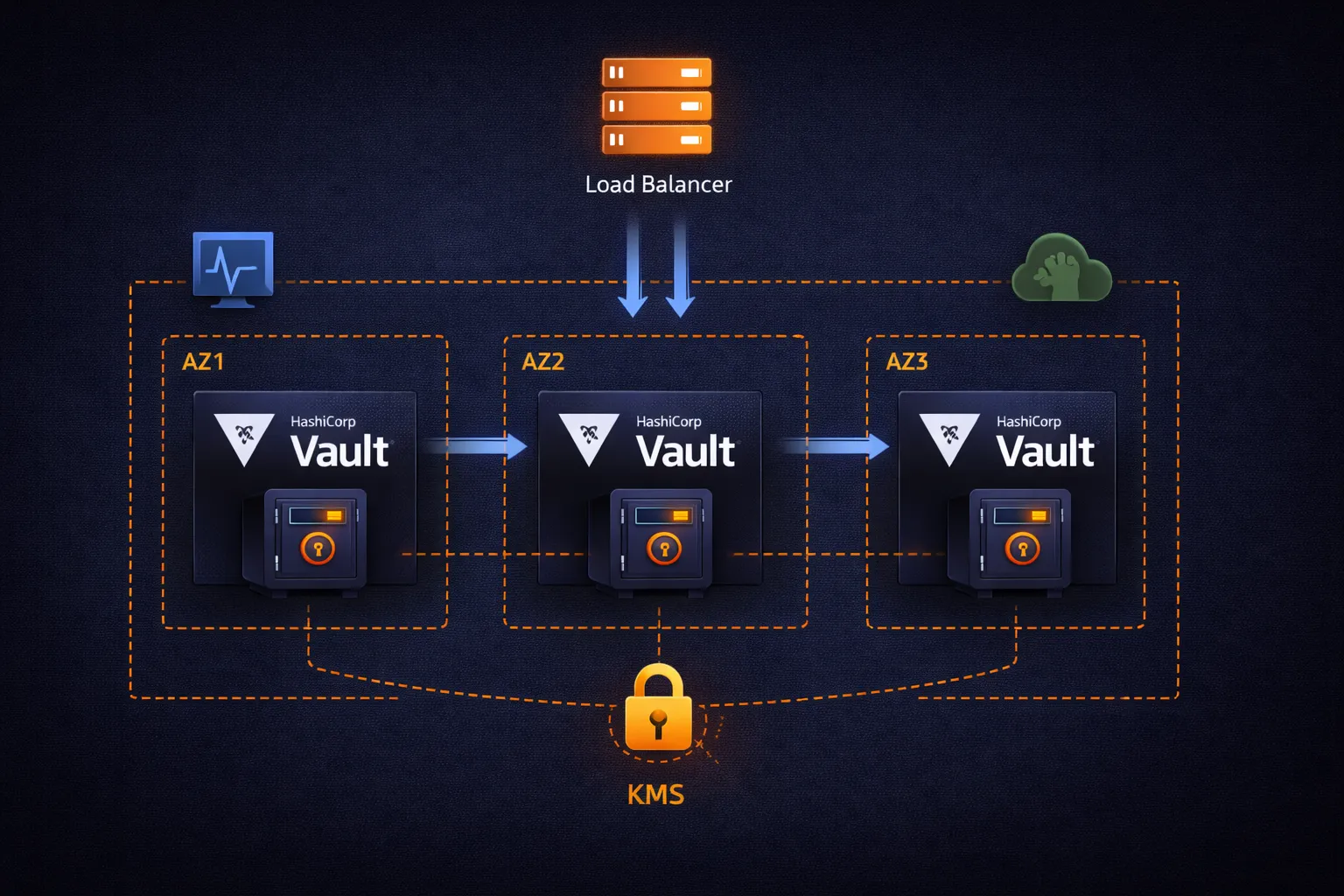
The production architecture follows standard AWS high-availability patterns:
                        Internet Gateway
                              |
                              v
                  Application Load Balancer (ALB)
                    - TLS termination
                    - Health checks (/v1/sys/health)
                    - Request distribution
                              |
                 +------------+------------+
                 |                         |
                 v                         v
        Availability Zone 1       Availability Zone 2
        +------------------+      +------------------+
        | Vault Server 1   |      | Vault Server 2   |
        | (active)         |<---->| (standby)        |
        |                  |      |                  |
        | Raft Storage     |      | Raft Storage     |
        +------------------+      +------------------+
                 |                         |
                 +------------+------------+
                              |
                              v
                     Availability Zone 3
                     +------------------+
                     | Vault Server 3   |
                     | (standby)        |
                     |                  |
                     | Raft Storage     |
                     +------------------+

        All nodes: KMS auto-unseal, TLS, private subnets
The key components:
- 3 Vault nodes spread across availability zones. One is the active leader that handles all writes. The other two are standby nodes that replicate data and can take over if the leader fails.
- Raft consensus protocol handles leader election and data replication between nodes. It guarantees that a write acknowledged by Vault is persisted on a majority of nodes before returning success.
- Application Load Balancer routes client requests to the active node using health checks. Vault's health endpoint returns different HTTP status codes depending on the node's role: 200 for active, 429 for standby, 473 for performance standby.
- AWS KMS handles automatic unsealing so nodes can restart without manual intervention.
- Private subnets ensure Vault nodes are not directly reachable from the internet. Only the ALB in public subnets receives external traffic.
Phase 1: Network Foundation
Vault servers must be network-isolated. They handle the most sensitive data in your infrastructure, so they belong in private subnets with controlled access.
VPC and Subnets
# Isolated VPC for Vault infrastructure
resource "aws_vpc" "vault" {
  cidr_block           = "10.0.0.0/16"
  enable_dns_hostnames = true
  enable_dns_support   = true

  tags = {
    Name        = "production-vault-vpc"
    Environment = "production"
  }
}

# Private subnets for Vault servers (no direct internet access)
resource "aws_subnet" "vault_private" {
  count             = 3
  vpc_id            = aws_vpc.vault.id
  cidr_block        = "10.0.${count.index + 1}.0/24"
  availability_zone = data.aws_availability_zones.available.names[count.index]

  tags = {
    Name = "vault-private-${count.index + 1}"
    Type = "Private"
  }
}

# Public subnets for the load balancer
resource "aws_subnet" "vault_public" {
  count                   = 3
  vpc_id                  = aws_vpc.vault.id
  cidr_block              = "10.0.${count.index + 101}.0/24"
  availability_zone       = data.aws_availability_zones.available.names[count.index]
  map_public_ip_on_launch = true

  tags = {
    Name = "vault-public-${count.index + 1}"
    Type = "Public"
  }
}
The separation between public and private subnets is fundamental. Vault servers sit in private subnets with no public IP addresses and no internet gateway route. The only path to reach them is through the ALB in the public subnets. This means an attacker who compromises a web server elsewhere in your infrastructure cannot directly connect to Vault — they would need to go through the load balancer, which only forwards traffic on port 8200 and only to healthy Vault nodes.
Three subnets across three availability zones ensure that losing an entire availability zone (which does happen) does not take down your Vault cluster. Raft consensus requires a majority of nodes to be available, so with three nodes, you can lose one AZ and still operate normally.
Phase 2: KMS Auto-Unseal
When Vault starts, it is sealed. A sealed Vault cannot read or write secrets — the encryption key that protects all data is itself encrypted, and Vault needs an unseal key to decrypt it.
In development, the dev server handles this automatically. In production with Shamir's Secret Sharing, you would need 3 out of 5 key holders to manually unseal Vault every time it restarts. This is secure but operationally painful: server reboots, auto-scaling events, and deployments all require human intervention.
KMS auto-unseal delegates the unseal operation to AWS KMS. Instead of splitting the master key into shares held by humans, the master key is encrypted with a KMS key. When Vault starts, it calls KMS to decrypt the master key, and if the IAM permissions are correct, Vault unseals automatically.
# KMS key for Vault auto-unseal
resource "aws_kms_key" "vault_unseal" {
  description             = "Vault auto-unseal key"
  deletion_window_in_days = 30
  enable_key_rotation     = true

  tags = {
    Name    = "vault-auto-unseal"
    Purpose = "Vault master key encryption"
  }
}

resource "aws_kms_alias" "vault_unseal" {
  name          = "alias/vault-unseal"
  target_key_id = aws_kms_key.vault_unseal.id
}
Two important settings here:
- deletion_window_in_days = 30: If someone accidentally schedules this key for deletion, you have 30 days to cancel. Losing this KMS key means losing the ability to unseal Vault — and therefore losing access to all secrets.
- enable_key_rotation = true: KMS automatically rotates the underlying key material annually. Previous versions of the key remain available for decryption, so existing Vault data is not affected.
The unseal flow works as follows:
- Vault server starts and detects it is sealed
- Vault reads the encrypted master key from its Raft storage
- Vault sends a Decrypt request to KMS with the encrypted master key
- KMS checks the IAM role of the Vault server — does it have
kms:Decryptpermission on this key? - If authorized, KMS decrypts and returns the master key
- Vault uses the master key to unseal and begins serving requests
This means the security of your Vault cluster depends on IAM permissions. Only the Vault server IAM role should have kms:Decrypt on this key. If you revoke that IAM permission, Vault cannot unseal — which serves as an emergency kill switch.
Phase 3: IAM Roles for Vault Servers
Vault servers need two categories of IAM permissions: KMS permissions for auto-unseal, and IAM permissions for generating dynamic credentials.
resource "aws_iam_role" "vault" {
  name = "vault-server-role"

  assume_role_policy = jsonencode({
    Version = "2012-10-17"
    Statement = [{
      Action = "sts:AssumeRole"
      Effect = "Allow"
      Principal = {
        Service = "ec2.amazonaws.com"
      }
    }]
  })
}

resource "aws_iam_instance_profile" "vault" {
  name = "vault-server-profile"
  role = aws_iam_role.vault.name
}

resource "aws_iam_role_policy" "vault_kms" {
  name = "vault-kms-unseal"
  role = aws_iam_role.vault.id

  policy = jsonencode({
    Version = "2012-10-17"
    Statement = [{
      Effect = "Allow"
      Action = [
        "kms:Encrypt",
        "kms:Decrypt",
        "kms:DescribeKey"
      ]
      Resource = aws_kms_key.vault_unseal.arn
    }]
  })
}

resource "aws_iam_role_policy" "vault_iam" {
  name = "vault-iam-dynamic-secrets"
  role = aws_iam_role.vault.id

  policy = jsonencode({
    Version = "2012-10-17"
    Statement = [{
      Effect = "Allow"
      Action = [
        "iam:CreateUser",
        "iam:CreateAccessKey",
        "iam:DeleteUser",
        "iam:DeleteAccessKey",
        "iam:PutUserPolicy",
        "iam:DeleteUserPolicy",
        "iam:ListAccessKeys",
        "iam:ListAttachedUserPolicies",
        "iam:ListGroupsForUser",
        "iam:ListUserPolicies",
        "sts:AssumeRole"
      ]
      Resource = "*"
    }]
  })
}
The policies are split into two for clarity and maintainability:
- vault-kms-unseal: Scoped to the specific KMS key ARN. This is the minimum needed for auto-unseal.
kms:Encryptis needed because Vault re-encrypts the master key during rekey operations. - vault-iam-dynamic-secrets: Broader permissions because Vault needs to create and delete IAM users with arbitrary inline policies. The
sts:AssumeRolepermission is needed if you use theassumed_rolecredential type. TheResource = "*"is necessary here because Vault creates users with dynamic names that cannot be predicted in advance.
In a locked-down environment, you can further restrict the IAM policy by adding a condition that limits Vault to creating users with a specific name prefix (e.g., vault-dynamic-*) and only attaching policies you pre-approve.
Phase 4: Vault Server Configuration
The Vault configuration file defines how each server operates. This is the HCL configuration that runs on each EC2 instance:
# /etc/vault.d/vault.hcl

# Raft storage backend for high availability
storage "raft" {
  path    = "/opt/vault/data"
  node_id = "vault-1"

  performance_multiplier = 1
  trailing_logs         = 10000
  snapshot_threshold    = 10000
}

# API listener - clients connect here
listener "tcp" {
  address       = "0.0.0.0:8200"
  tls_cert_file = "/opt/vault/tls/vault.crt"
  tls_key_file  = "/opt/vault/tls/vault.key"

  tls_min_version = "tls12"
  tls_cipher_suites = [
    "TLS_ECDHE_RSA_WITH_AES_256_GCM_SHA384",
    "TLS_ECDHE_RSA_WITH_AES_128_GCM_SHA256"
  ]
}

# Cluster listener - nodes communicate with each other here
listener "tcp" {
  address       = "0.0.0.0:8201"
  tls_cert_file = "/opt/vault/tls/vault.crt"
  tls_key_file  = "/opt/vault/tls/vault.key"
}

# KMS auto-unseal
seal "awskms" {
  region     = "us-east-1"
  kms_key_id = "alias/vault-unseal"
}

# Prometheus metrics endpoint
telemetry {
  prometheus_retention_time = "30s"
  disable_hostname          = true
}

api_addr      = "https://vault.example.com:8200"
cluster_addr  = "https://vault-1.internal:8201"
ui            = true
log_level     = "info"
Important configuration decisions explained:
Raft Storage
Raft is Vault's integrated storage backend. Unlike Consul (which requires deploying and managing a separate cluster), Raft is built into Vault itself. Each Vault node stores a copy of all data locally, and the Raft consensus protocol ensures all copies stay synchronized.
- path: The local directory where Raft stores its data. This must be on a persistent volume (EBS), not an instance store volume.
- node_id: Unique identifier for each node in the cluster. Each server needs a different value. In an auto-scaling setup, you typically derive this from the instance ID.
- performance_multiplier = 1: Controls Raft timing. The default (1) is appropriate for production. Higher values slow down leader election, which can help in high-latency networks but increases failover time.
TLS Configuration
Both listeners require TLS certificates. The API listener (port 8200) serves client requests, and the cluster listener (port 8201) handles inter-node communication. Both need TLS because Vault data in transit must always be encrypted.
For certificates, you have several options:
- ACM Private CA: AWS Certificate Manager can issue private certificates for internal services. This is the easiest option for AWS-native deployments.
- Vault's own PKI engine: Once Vault is running, it can manage its own certificate lifecycle. This creates a bootstrapping problem for the first deployment, which you solve by using temporary self-signed certificates initially.
- Let's Encrypt: If Vault is reachable from the internet (through the ALB), you can use Let's Encrypt for the ALB's certificate and private certificates for the backend.
The awskms Seal
The seal "awskms" block tells Vault to use KMS for auto-unseal. The kms_key_id references the alias we created in Phase 2. Vault's IAM role provides the necessary permissions — no access keys are configured here because the EC2 instance profile handles authentication to KMS automatically.
Phase 5: Load Balancer and Auto Scaling
Application Load Balancer
The ALB sits in public subnets and forwards traffic to Vault nodes in private subnets:
resource "aws_lb" "vault" {
  name               = "vault-alb"
  internal           = false
  load_balancer_type = "application"
  security_groups    = [aws_security_group.vault_lb.id]
  subnets            = aws_subnet.vault_public[*].id

  enable_deletion_protection = true
}

resource "aws_lb_target_group" "vault" {
  name     = "vault-targets"
  port     = 8200
  protocol = "HTTPS"
  vpc_id   = aws_vpc.vault.id

  health_check {
    enabled             = true
    healthy_threshold   = 2
    interval            = 30
    matcher             = "200,429,473"
    path                = "/v1/sys/health"
    port                = "traffic-port"
    protocol            = "HTTPS"
    timeout             = 5
    unhealthy_threshold = 2
  }

  stickiness {
    enabled         = true
    type            = "lb_cookie"
    cookie_duration = 86400
  }
}
The health check configuration deserves attention. Vault's /v1/sys/health endpoint returns different HTTP status codes:
- 200: Active node, initialized, and unsealed
- 429: Standby node (unsealed but not processing requests)
- 473: Performance standby node
- 501: Not initialized
- 503: Sealed
By including 200, 429, and 473 in the matcher, the ALB considers all unsealed nodes as healthy targets. This matters because during leader failover, the new leader needs to already be registered as healthy in the target group. If only 200 were accepted, standby nodes would be removed from the target group and traffic could not reach them when they become leader.
Session stickiness ensures that a client's requests go to the same Vault node during a session. This prevents inconsistencies that can occur when reading data immediately after writing it, since Raft replication has a small delay between the leader and standbys.
Auto Scaling Group
resource "aws_autoscaling_group" "vault" {
  name                = "vault-asg"
  vpc_zone_identifier = aws_subnet.vault_private[*].id
  target_group_arns   = [aws_lb_target_group.vault.arn]
  health_check_type   = "ELB"
  health_check_grace_period = 300

  min_size         = 3
  max_size         = 5
  desired_capacity = 3

  launch_template {
    id      = aws_launch_template.vault.id
    version = "$Latest"
  }

  tag {
    key                 = "Name"
    value               = "vault-server"
    propagate_at_launch = true
  }
}
The auto-scaling group maintains the desired number of Vault nodes. If a node fails its health check, the ASG terminates it and launches a replacement. The new node starts, auto-unseals via KMS, and joins the Raft cluster automatically.
Important parameters:
- min_size = 3: Raft requires a majority for consensus. With 3 nodes, you can lose 1 and still operate. With 2, losing 1 means loss of quorum. Never run fewer than 3 nodes in production.
- max_size = 5: Allows scaling up during high load. With 5 nodes, you can lose 2 and still have quorum.
- health_check_grace_period = 300: Give new nodes 5 minutes to start, unseal, and join the cluster before the ASG considers them unhealthy.
Phase 6: Security Groups
Network security groups define which traffic can reach Vault and which traffic Vault can initiate:
# Security group for the load balancer
resource "aws_security_group" "vault_lb" {
  name_prefix = "vault-lb-"
  vpc_id      = aws_vpc.vault.id

  ingress {
    from_port   = 443
    to_port     = 443
    protocol    = "tcp"
    cidr_blocks = ["0.0.0.0/0"]
    description = "HTTPS from clients"
  }

  egress {
    from_port       = 8200
    to_port         = 8200
    protocol        = "tcp"
    security_groups = [aws_security_group.vault.id]
    description     = "Forward to Vault servers"
  }
}

# Security group for Vault servers
resource "aws_security_group" "vault" {
  name_prefix = "vault-servers-"
  vpc_id      = aws_vpc.vault.id

  # API traffic from load balancer only
  ingress {
    from_port       = 8200
    to_port         = 8200
    protocol        = "tcp"
    security_groups = [aws_security_group.vault_lb.id]
    description     = "Vault API from ALB"
  }

  # Cluster communication between Vault nodes
  ingress {
    from_port = 8201
    to_port   = 8201
    protocol  = "tcp"
    self      = true
    description = "Raft cluster replication"
  }

  # Outbound: KMS, IAM, S3 (for backups), CloudWatch
  egress {
    from_port   = 443
    to_port     = 443
    protocol    = "tcp"
    cidr_blocks = ["0.0.0.0/0"]
    description = "HTTPS to AWS APIs"
  }
}
The security group design follows the principle of least privilege:
- Vault servers accept traffic on port 8200 only from the load balancer security group. No direct access from any other source.
- Port 8201 (cluster communication) is restricted to
self = true, meaning only other members of the same security group. This prevents anything outside the Vault cluster from interfering with Raft replication. - Outbound access on port 443 is needed for AWS API calls: KMS (auto-unseal), IAM (dynamic credentials), S3 (backups), and CloudWatch (metrics). In a stricter environment, you can use VPC endpoints to keep this traffic within the AWS network instead of going through a NAT gateway.
Phase 7: Monitoring and Alerting
A production Vault cluster needs monitoring for both operational health and security events.
CloudWatch Alarms
# Alert if any Vault node becomes sealed
resource "aws_cloudwatch_metric_alarm" "vault_sealed" {
  alarm_name          = "vault-cluster-sealed"
  comparison_operator = "GreaterThanThreshold"
  evaluation_periods  = "1"
  metric_name         = "vault.core.unsealed"
  namespace           = "Vault"
  period              = "60"
  statistic           = "Minimum"
  threshold           = "0"
  alarm_description   = "One or more Vault nodes are sealed"
  alarm_actions       = [aws_sns_topic.alerts.arn]
}

# Alert on high error rates
resource "aws_cloudwatch_metric_alarm" "high_error_rate" {
  alarm_name          = "vault-high-error-rate"
  comparison_operator = "GreaterThanThreshold"
  evaluation_periods  = "2"
  metric_name         = "vault.core.handle_request.errors"
  namespace           = "Vault"
  period              = "300"
  statistic           = "Sum"
  threshold           = "100"
  alarm_description   = "Error rate exceeds threshold"
  alarm_actions       = [aws_sns_topic.alerts.arn]
}

# SNS topic for alerts
resource "aws_sns_topic" "alerts" {
  name = "vault-alerts"
}
What to Monitor
Critical metrics to track:
- Seal status: If any node becomes sealed, it cannot serve requests. A sealed node usually means a KMS issue (permissions changed, key deleted) or a storage corruption.
- Leader elections: Frequent leader elections indicate cluster instability. One election during a deployment is normal. Multiple elections per hour indicate a problem — likely network issues between nodes or resource exhaustion.
- Request latency: Track p50 and p99 latency for
vault.core.handle_request. Increasing latency often means the storage backend is under pressure or the node is running out of memory. - Token creation rate: A sudden spike in token creation could indicate a compromised Secret ID being used to generate many tokens.
- Lease count: The total number of active leases. If this grows unbounded, applications are requesting credentials but not revoking them, which eventually exhausts Vault's memory.
- Disk usage: Raft storage grows over time. Monitor the EBS volume and set up alerts before it fills up.
- Certificate expiry: Track when TLS certificates expire. Expired certificates cause hard-to-diagnose connection failures.
Audit Logging
Vault's audit log records every API request and response. This is essential for compliance and for investigating security incidents:
# Enable file audit backend
vault audit enable file file_path=/var/log/vault/audit.log

# Enable syslog for centralized logging
vault audit enable syslog tag="vault" facility="AUTH"
Each audit log entry contains the authenticated identity, the requested operation, the path accessed, and the response. Secrets are HMAC-hashed in the audit log, so the log itself does not expose sensitive data but can be used to verify whether a specific secret was accessed.
Ship audit logs to a centralized logging system (CloudWatch Logs, Elasticsearch, Splunk) where they are retained according to your compliance requirements and cannot be modified by Vault administrators.
Phase 8: Backup and Disaster Recovery
Raft storage makes backups straightforward. A Raft snapshot captures the entire state of the Vault cluster at a point in time.
Automated Backup Script
#!/bin/bash
# vault-backup.sh - Run hourly via cron or systemd timer

TIMESTAMP=$(date +%Y%m%d-%H%M%S)
BACKUP_FILE="/tmp/vault-backup-${TIMESTAMP}.snap"
S3_BUCKET="your-vault-backups"

# Take Raft snapshot
vault operator raft snapshot save "${BACKUP_FILE}"

if [ $? -eq 0 ]; then
    # Upload to S3 with server-side encryption
    aws s3 cp "${BACKUP_FILE}" \
        "s3://${S3_BUCKET}/snapshots/vault-${TIMESTAMP}.snap" \
        --sse AES256 \
        --storage-class STANDARD_IA

    echo "[OK] Backup uploaded: vault-${TIMESTAMP}.snap"

    # Clean up local file
    rm -f "${BACKUP_FILE}"
else
    echo "[FAIL] Raft snapshot failed"
    exit 1
fi
Schedule this script to run every hour. Use S3 lifecycle rules to move older backups to cheaper storage classes and to delete backups older than your retention period (e.g., 90 days).
Restore Procedure
To restore from a snapshot:
# Download the snapshot
aws s3 cp s3://your-vault-backups/snapshots/vault-20250224-120000.snap /tmp/restore.snap

# Restore the snapshot (this replaces all current data)
vault operator raft snapshot restore /tmp/restore.snap
After restoring, verify that the secrets engine is functioning and that applications can authenticate and retrieve credentials. A restore replaces all Vault data, including policies, auth configurations, and secrets engine mounts.
Disaster Recovery Planning
For critical environments, consider replicating backups to a second AWS region. If your primary region becomes unavailable:
- Deploy Vault infrastructure in the DR region using the same Terraform code (adjust region and AZ parameters)
- Restore the latest snapshot from cross-region S3 replication
- Initialize the cluster with KMS auto-unseal (use a KMS key in the DR region)
- Update DNS to point to the DR cluster
- Verify application connectivity
With hourly backups and pre-provisioned infrastructure, recovery time is approximately 15-30 minutes. The recovery point is at most 1 hour of data loss (the time since the last backup).
Phase 9: Security Hardening
A checklist of security measures for production Vault:
Network
- Vault servers in private subnets with no public IP addresses
- Security groups restricting inbound to ALB on port 8200 and cluster peers on port 8201
- VPC endpoints for KMS, IAM, and S3 to keep traffic off the public internet
- No SSH access to Vault servers — use AWS Systems Manager Session Manager for emergency access
Authentication
- Root token revoked after initial setup. Generate a new root token only in emergencies using
vault operator generate-root - AppRole with response-wrapped Secret IDs for application authentication
- AWS IAM auth for EC2-based workloads
- Short token TTLs (1-4 hours) with renewal
Storage
- EBS volumes encrypted with a separate KMS key (not the unseal key)
- EBS snapshots for point-in-time recovery at the storage level
- S3 backup bucket with versioning enabled and MFA delete
Operations
- Audit logging enabled with at least two backends (file + syslog or CloudWatch)
- Vault audit logs shipped to a system that Vault administrators cannot modify
- Separate AWS accounts for Vault infrastructure and application workloads
- Documented break-glass procedures for emergency access
Deployment Steps
With all the Terraform code in place, the deployment sequence is:
# Step 1: Deploy infrastructure
terraform init
terraform plan -out=vault.tfplan
terraform apply vault.tfplan

# Step 2: Initialize the Vault cluster (first time only)
# Connect to the first node via Systems Manager
vault operator init -recovery-shares=5 -recovery-threshold=3

# Save the recovery keys securely (they are needed only for
# specific operations like generating a new root token)

# Step 3: Vault auto-unseals via KMS - no manual unseal needed

# Step 4: Enable audit logging
vault audit enable file file_path=/var/log/vault/audit.log

# Step 5: Configure the AWS secrets engine
vault secrets enable aws
vault write aws/config/root \
    region=us-east-1
    # No access keys needed - Vault uses the instance profile

# Step 6: Create roles and policies
vault policy write webapp - <<EOF
path "aws/creds/webapp" {
  capabilities = ["read"]
}
EOF

vault write aws/roles/webapp \
    credential_type=iam_user \
    policy_document=-<<EOF
{
  "Version": "2012-10-17",
  "Statement": [{
    "Effect": "Allow",
    "Action": ["s3:GetObject", "s3:PutObject", "s3:ListBucket"],
    "Resource": ["arn:aws:s3:::my-app-bucket", "arn:aws:s3:::my-app-bucket/*"]
  }]
}
EOF

# Step 7: Revoke the root token
vault token revoke <root-token>
After step 7, all access to Vault goes through authenticated methods (AppRole, AWS IAM auth). The root token no longer exists. If you need root access in an emergency, use vault operator generate-root with the recovery keys from step 2.
Cost Estimate
A 3-node Vault cluster on AWS (US East 1, approximate monthly costs):
| Component | Cost |
|---|---|
| 3x t3.medium EC2 instances | ~$90 |
| 3x 50GB EBS gp3 volumes | ~$12 |
| Application Load Balancer | ~$25 |
| KMS key + operations | ~$3 |
| S3 backup storage | ~$5 |
| Data transfer | ~$15 |
| Total | ~$150/month |
This runs a production-grade cluster capable of handling thousands of credential requests per minute. For most organizations, this cost is negligible compared to the operational cost of managing static credentials manually and the risk cost of a credential-related security incident.
Key Takeaways
- Production Vault requires persistent storage (Raft), TLS encryption, automated unsealing (KMS), and high availability (3+ nodes across AZs)
- Raft integrated storage eliminates the need for a separate Consul cluster — fewer moving parts means fewer failure modes
- KMS auto-unseal removes the operational burden of manual unsealing during restarts, deployments, and scaling events
- Security groups should restrict Vault access to the load balancer only — no direct access from application servers or developers
- Monitor seal status, leader elections, request latency, and lease count — these are the early warning indicators of cluster problems
- Hourly Raft snapshots to S3 provide the backup foundation — test your restore procedure regularly
- Revoke the root token after initial setup and use recovery keys only for emergencies
- Ship audit logs to a system that Vault administrators cannot modify — this is a compliance requirement in most regulated environments
This concludes the three-part series on HashiCorp Vault with AWS. Starting from the fundamentals of dynamic secrets, through authentication and application integration, to this production deployment guide, you now have the knowledge to run Vault as a core piece of your credential management infrastructure.
Go Deeper: The State of AWS Security 2026
This article is just the start. Get the full picture with our free whitepaper - 8 chapters covering IAM, S3, VPC, monitoring, agentic AI security, compliance, and a prioritized action plan with 50+ CLI commands.
KloudSec, built by the team behind Toc Consulting
See AWS Security checked automatically, continuously
What you just read is a manual, one-time check. KloudSec runs this and 400+ more automated checks across 90+ AWS services, continuously, agentless, live in about 5 minutes.
Toc Consulting: AWS Security & Cloud Architecture
Want expert help with AWS Security?
Our team helps engineering teams secure and architect AWS the right way: assessment in week one, a prioritized action plan in week two.
More Articles
Anatomy of a Real AWS Breach: Capital One, 2019
How a misconfigured WAF, an unauthenticated metadata service, and an over-privileged IAM role combined to expose data on roughly 100 million people in the US and 6 million in Canada, and the specific checks that would have stopped it.
Anatomy of a Real AWS Breach: Code Spaces, 2014
A single compromised AWS console login, no MFA, and a company was gone within 12 hours. The full story, and why "our backups are in AWS too" was the real failure.
Anatomy of a Real AWS Breach: Imperva, 2019
A security company got breached through one exposed AWS API key on an internet-reachable instance. Even the people who build WAFs for a living can miss this.