
Stop Reinventing Authentication: How I Built a Production-Ready Auth API That Scales to 50K Users for Free
Tarek Cheikh
Founder & AWS Cloud Architect
You're building your next big SaaS product. You've got the perfect idea, the technical skills, and the motivation. But then you hit the authentication wall. Again.
Sound familiar?
Every developer has been there. We've all wasted countless hours implementing user registration, login flows, password resets, and MFA — only to realize we're essentially rebuilding the same wheel for the nth time. Worse yet, popular authentication services like Auth0 or Okta can cost hundreds of dollars per month for even modest user bases.
That's exactly why I built CognitoApi — and today, I'm open-sourcing it for the community.
The Problem: Authentication Shouldn't Break the Bank
Let's talk numbers. Most authentication-as-a-service providers charge based on Monthly Active Users (MAUs). Here's what you're looking at:
- Auth0: Starts at $240/month for just 1,000 MAUs (Professional plan)
- Okta: Enterprise pricing that can reach thousands per month and starting from 6$ per user per month
- OneLogin: Starts from $4/month per user
For bootstrapped startups and indie developers, these costs are prohibitive. But rolling your own auth system? That's a security nightmare waiting to happen.
Enter CognitoApi: Enterprise-Grade Auth at Indie Prices
CognitoApi is a fully automated, production-ready authentication API built on AWS Cognito. Here's the kicker: it's completely free for your first 50,000 users.
Yes, you read that right. 50K users. Free.
What Makes CognitoApi Different?
1. True Infrastructure as Code
git clone https://github.com/TocConsulting/cognito-api.git
cd terraform
ENVIRONMENT=dev make apply
Three commands. That's it. Your entire authentication infrastructure is deployed, configured, and ready to use.
2. Security First, Always
- Mandatory Multi-Factor Authentication (MFA) using TOTP
- Automated QR code generation and secure storage
- Password policy enforcement (14+ characters, special chars, numbers)
- Token rotation with configurable expiry times
3. Complete User Lifecycle Management
Every aspect of user management is handled through simple REST endpoints:
- User registration with email verification
- Password reset flows
- MFA setup and recovery
- Session management
- User deletion and GDPR compliance
Architecture That Scales
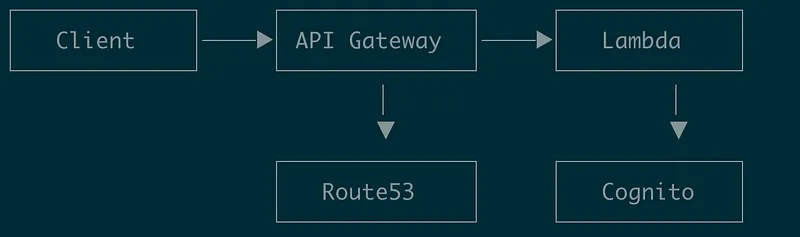
CognitoApi leverages a serverless architecture that automatically scales with your user base.
Key Components:
- 16 Lambda Functions: Each handling specific auth operations
- API Gateway: RESTful endpoints with built-in rate limiting
- Cognito User Pool: Battle-tested user management by AWS
- S3 Buckets: Encrypted storage for MFA QR codes
- Terraform: Complete IaC for reproducible deployments
The Magic Behind the Scenes
Let's look at a typical authentication flow:
// Step 1: User Login
POST /v1/login
{
    "email": "user@example.com",
    "password": "SecurePassword123!"
}

// Response
{
    "email": "user@example.com",
    "verification_session": "AYABeLHXhc...",
    "verification_type": "SOFTWARE_TOKEN_MFA"
}

// Step 2: MFA Verification
POST /v1/mfa-verify
{
    "email": "user@example.com",
    "verification_type": "SOFTWARE_TOKEN_MFA",
    "verification_session": "AYABeLHXhc...",
    "otp_code": "123456"
}

// Response
{
    "id_token": "eyJraWQiOiJp...",
    "access_token": "eyJraWQiOiJu...",
    "refresh_token": "eyJjdHkiOiJK...",
    "expires_in": 3600
}
Clean, simple, secure. No complexity hidden from you, yet all the heavy lifting is handled.
Cost Breakdown: The Math That Makes Sense
Here's what running CognitoApi costs for different user scales:
Compare that to Auth0's $240/month for just 1,000 users. The savings are astronomical.
Real-World Implementation
Quick Start Guide
1. Prerequisites
# Install required tools
brew install terraform
brew install awscli
2. Configure Your Environment
# terraform/environments/dev/terraform.tfvars.dev
aws-region = "us-east-1"
auth-api-dns-name = "auth.yourapp.com"
cognito-reply-to-email-address = "hello@yourapp.com"
3. Deploy
export AWS_PROFILE=YourProfile
ENVIRONMENT=dev make plan
ENVIRONMENT=dev make apply
In under 10 minutes, you have a production-ready authentication system.
See It In Action: The React Example App
Want to see CognitoApi in action before integrating it into your own project? I've built a complete React example application that demonstrates every feature of the authentication system.
Live Demo Features
The CognitoApi React Example App is a modern, responsive application that showcases:
- Complete Authentication Flow: From registration to login, every step is implemented
- Real MFA Integration: See how QR code generation and TOTP verification work in practice
- Token Management: Watch JWT tokens being handled, refreshed, and used
- Responsive Design: Experience the auth flow on mobile, tablet, and desktop
- Dark/Light Mode: Because modern apps need modern themes
What's Under the Hood
The example app is built with modern web technologies:
// Modern React with Vite
cognito-api-react-example-app/
├── src/
│   ├── App.jsx           // Main auth flow component
│   ├── services/
│   │   └── ApiService.js // CognitoApi integration
│   └── config.js         // Environment configuration
Try It Yourself in 5 Minutes
Getting the example app running is incredibly simple:
# 1. Clone the example app
git clone https://github.com/TocConsulting/cognito-api-react-example-app.git
cd cognito-api-react-example-app

# 2. Install dependencies
npm install

# 3. Configure your CognitoApi endpoint
echo "VITE_API_URL=https://your-cognito-api.com" > .env.local
echo "VITE_API_KEY=your_api_key_here" >> .env.local

# 4. Start the development server
npm run dev
Visit http://localhost:3000 and experience the entire authentication flow!
The Complete User Journey
Here's what your users will experience:
1. Registration
- Clean form with name, email, and phone fields
- Real-time validation feedback
- Smooth transition to confirmation step
2. Email Confirmation
- Users receive a temporary password via email
- They set their own secure password
- Automatic progression to MFA setup
3. MFA Setup
- QR code appears instantly for scanning
- Support for all major authenticator apps (Google Authenticator, Authy, etc.)
- One-time verification ensures MFA is working
4. Secure Login
- Two-step authentication process
- Session management with JWT tokens
- Automatic token refresh for seamless UX
Integration Insights
The example app demonstrates best practices for integrating CognitoApi:
// Clean API service abstraction
class ApiService {
  async register(userData) {
    const response = await fetch(`${API_URL}/v1/users`, {
      method: 'POST',
      headers: {
        'Content-Type': 'application/json',
        'x-api-key': API_KEY
      },
      body: JSON.stringify(userData)
    });
    return response.json();
  }

  async verifyMFA(mfaData) {
    // Handles the two-step authentication flow
    // Returns JWT tokens on success
  }

  async refreshToken(refreshToken) {
    // Keeps users logged in seamlessly
  }
}
Customizable and Production-Ready
The example app isn't just a demo — it's a solid foundation for your own authentication UI:
- Theming: CSS variables make it easy to match your brand
- Responsive: Mobile-first design that works everywhere
- Accessible: Proper ARIA labels and keyboard navigation
- Secure: No passwords stored locally, tokens handled properly
Beyond the Basics
The example app also shows advanced patterns:
- Error Handling: User-friendly messages for all error states
- Loading States: Smooth transitions during API calls
- Form Validation: Client-side validation before API requests
- State Management: Clean component state without external dependencies
Integration Examples
React Integration (From Scratch)
If you're building your own UI, here's how simple the integration is:
const login = async (email, password) => {
  // Step 1: Initial login
  const loginResponse = await fetch(`${API_URL}/v1/login`, {
    method: 'POST',
    headers: {
      'Content-Type': 'application/json',
      'x-api-key': API_KEY
    },
    body: JSON.stringify({ email, password })
  });

  const { verification_session } = await loginResponse.json();

  // Step 2: MFA verification
  const mfaCode = prompt('Enter MFA code:');
  const mfaResponse = await fetch(`${API_URL}/v1/mfa-verify`, {
    method: 'POST',
    headers: {
      'Content-Type': 'application/json',
      'x-api-key': API_KEY
    },
    body: JSON.stringify({
      email,
      verification_type: 'SOFTWARE_TOKEN_MFA',
      verification_session,
      otp_code: mfaCode
    })
  });

  const tokens = await mfaResponse.json();
  // Store tokens securely
  localStorage.setItem('access_token', tokens.access_token);
};
The Security Story
Security isn't an afterthought with CognitoApi — it's the foundation:
Multi-Factor Authentication by Default
Every user must set up TOTP-based MFA. No exceptions. This alone prevents 99.9% of account takeover attempts.
Password Policy That Actually Works
- Minimum 14 characters
- Mixed case requirements
- Special characters mandatory
- Number requirements
- No common passwords allowed
Token Management
- Access tokens: 1 hour validity
- ID tokens: 1 hour validity
- Refresh tokens: 24 hours validity
- Automatic rotation on refresh
Encrypted Storage
All sensitive data, including MFA QR codes, are stored in encrypted S3 buckets with strict access policies.
Beyond Authentication: The Ecosystem
CognitoApi isn't just about authentication — it's about giving you back your time to focus on what matters: your product.
What You Get Out of the Box
Complete API Documentation
- Postman collection included
- Detailed endpoint documentation
- Integration examples
- Error handling guides
Monitoring and Observability
- CloudWatch integration
- Lambda performance metrics
- API Gateway analytics
- Cost tracking dashboards
Multi-Environment Support
# Development
ENVIRONMENT=dev make apply

# Staging
ENVIRONMENT=staging make apply

# Production
ENVIRONMENT=prod make apply
The Open Source Advantage
CognitoApi is MIT licensed and completely open source. This means:
- No vendor lock-in: You own your infrastructure
- Customizable: Modify it to fit your exact needs
- Transparent: Every line of code is auditable
- Community-driven: Contributions and improvements welcome
Success Stories and Use Cases
SaaS Startups
Perfect for B2B SaaS products that need enterprise-grade security without enterprise prices.
Mobile Applications
RESTful API design makes integration with iOS and Android apps seamless.
Microservices Architecture
Each Lambda function is isolated, making it easy to scale specific auth operations independently.
Compliance Requirements
Built-in audit trails and secure storage help meet GDPR, HIPAA, and other compliance needs.
Getting Started Today
Ready to stop reinventing the authentication wheel? Here's your action plan:
1. Clone the Repository
git clone https://github.com/TocConsulting/cognito-api.git2. Try the Example App
git clone https://github.com/TocConsulting/cognito-api-react-example-app.git3. Check the Documentation
Visit cognito-api.com for comprehensive guides
4. Join the Community
Star the repo, open issues, contribute improvements
5. Deploy Your First Instance
Follow the quick start guide above
The Bottom Line
Authentication is a solved problem. It's time we treated it that way.
CognitoApi gives you enterprise-grade authentication infrastructure for the price of a coffee. It's secure, scalable, and most importantly — it just works.
Stop spending weeks building auth flows. Stop paying hundreds of dollars for basic user management. Start building the features that actually differentiate your product.
Your users are waiting. What are you going to build for them today?
Ready to Get Started?
- GitHub: cognito-api
- React Example: cognito-api-react-example-app
- Documentation
Go Deeper: The State of AWS Security 2026
This article is just the start. Get the full picture with our free whitepaper - 8 chapters covering IAM, S3, VPC, monitoring, agentic AI security, compliance, and a prioritized action plan with 50+ CLI commands.
KloudSec, built by the team behind Toc Consulting
See Serverless checked automatically, continuously
What you just read is a manual, one-time check. KloudSec runs this and 400+ more automated checks across 90+ AWS services, continuously, agentless, live in about 5 minutes.
Toc Consulting: AWS Security & Cloud Architecture
Want expert help with Serverless?
Our team helps engineering teams secure and architect AWS the right way: assessment in week one, a prioritized action plan in week two.
More Articles
Mastering AWS SAM for Python Lambda: The Ultimate Hands-On Guide
A complete beginner-to-builder guide for AWS SAM with Python. Learn to create, test locally, deploy, debug, and manage serverless APIs step by step.
Building a Production-Ready Serverless File Sharing Platform on AWS
How I built a secure, scalable file sharing solution using AWS Lambda, API Gateway, and Cognito with zero infrastructure to manage and 91% cost reduction.
Anatomy of a Real AWS Breach: Capital One, 2019
How a misconfigured WAF, an unauthenticated metadata service, and an over-privileged IAM role combined to expose data on roughly 100 million people in the US and 6 million in Canada, and the specific checks that would have stopped it.