
awsmount: Browse Your AWS Account Like a Folder
KloudSec
Open-source AWS security tools
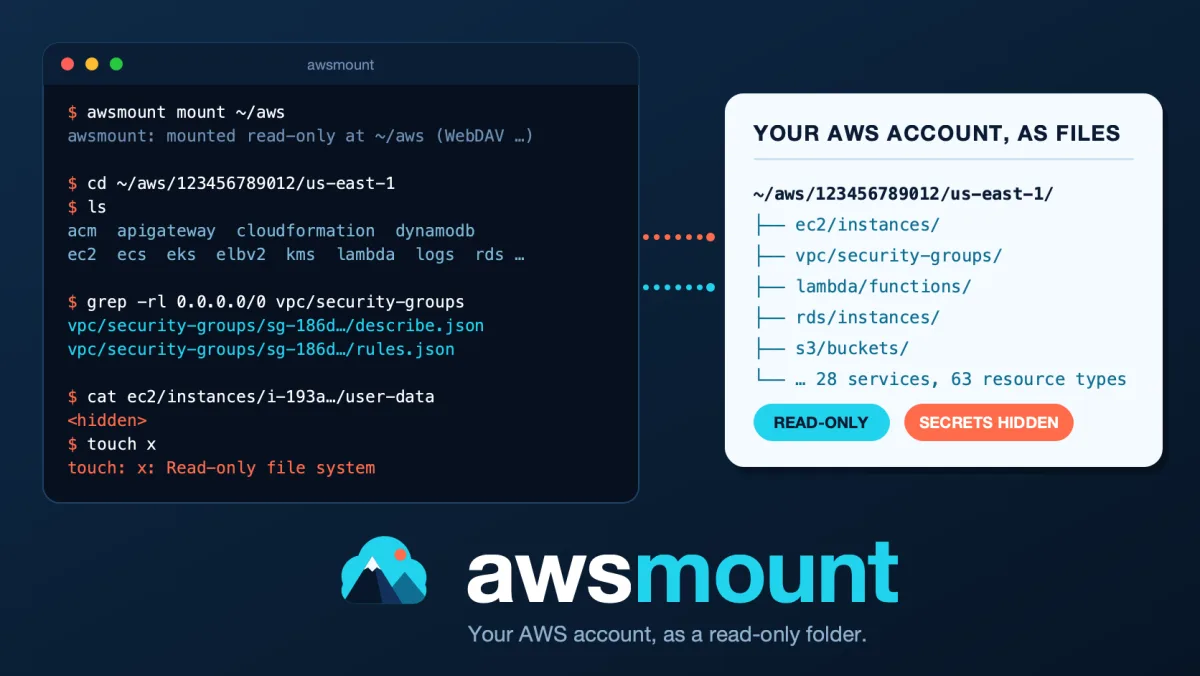
awsmount shows an AWS account as a read-only folder, so ls, cat, grep, find and diff work on it. It answers questions such as: which security groups have a rule that mentions 0.0.0.0/0 (the whole internet), which instances and load balancers use a given security group, which KMS key and dead-letter queue an SQS queue is configured with, and what changed in the account since last Monday.
It is open source (MIT): https://github.com/kloudsec-io/awsmount. It also has its own page in the tools section.
What it looks like
Every resource is a directory. Every API response is a file called describe.json. Here is a session in the interactive shell, on a throwaway test account:
awsmount:/$ ls /
123456789012
awsmount:/$ ls /123456789012/us-east-1
acm
apigateway
autoscaling
cloudformation
...
awsmount:/$ ls /123456789012/us-east-1/ec2/instances/i-82e5fa95bdf038498
arn
describe.json
instance-type
links
name
private-ip
state
tags
tags.json
user-data
awsmount:/$ cat /123456789012/us-east-1/ec2/instances/i-82e5fa95bdf038498/state
running
The first level is the account (its alias if it has one, otherwise the 12-digit id; awsmount ls / shows it), then the region, then the service, then the kind of resource, then one directory per resource. The path tells you where you are. IAM, Route 53, CloudFront and Organizations are global: they live in a global directory next to the regions. A _meta directory holds information about the account and the run.
Searching is just grep. This lists every security group that has a rule for 0.0.0.0/0, in either direction (the IPv6 equivalent is ::/0, which this search does not find):
awsmount -p myprofile -r us-east-1 grep -r -l '"cidr": "0.0.0.0/0"' \
  /123456789012/us-east-1/vpc/security-groups
Three ways to use it
- An interactive shell, nothing to mount:
awsmount -p myprofile -r us-east-1 shell. It hasls,cd,cat,grep,find,tree, tab completion and history. - A real mount:
awsmount -p myprofile -r us-east-1 mount ~/aws. Then any tool on your machine can read the account: your editor,jq,rg, scripts. On macOS it uses the WebDAV client that is built into the system, so there is nothing to install and no administrator password. On Linux it uses FUSE. - One-shot commands:
awsmount ls,cat,find,grep,treeandget, which are handy in scripts.
There is also awsmount export, which writes part of the tree into a normal directory. I use it for snapshots and for diff -r. The second article in this series is about that.
What it covers
28 services and 63 resource types today: EC2 and the VPC family, ELBv2, Lambda, RDS, ECS, EKS, Auto Scaling, S3, DynamoDB, SQS, SNS, KMS, CloudWatch Logs and alarms, ECR, Step Functions, Redshift, EventBridge, CloudFormation, Secrets Manager, SSM Parameter Store, ACM, API Gateway, Route 53, IAM, CloudFront and Organizations. It does not cover every AWS service, and the README has the full table.
Resources are linked to each other. A resource has a links/ directory with symlinks to the resources it is configured with (an SQS queue links to its dead-letter queue and its KMS key, for example). Security groups also have a referenced-by/ directory that lists the network interfaces, instances, load balancers, Lambda functions and other groups that use them. You move through the account by following paths. In the shell and on Linux these links are symlinks; on a macOS mount they are small text files that hold the target.
Read-only, and secret-looking values are hidden
Two things matter when you point a tool at a real account.
It only reads. Each boto3 client has a hook that checks every operation before a request is sent. An operation must be on an allow-list built from what awsmount reads, must be a read operation, and must not be on a deny-list of data and credential operations such as GetSecretValue, GetObject or Decrypt. Writes to the mount fail with "Read-only file system". This check runs inside awsmount, so for real protection also give it credentials with a read-only IAM policy. Note that awsmount export writes files on your own machine.
Secret-looking values are masked by default. Lambda and ECS environment values, EC2 user data and secret-looking CloudFormation values are shown as <hidden>:
awsmount:/$ cat /123456789012/us-east-1/ec2/instances/i-82e5fa95bdf038498/user-data
<hidden>
and in a Lambda function's describe.json:
"Environment": {
  "Variables": {
    "DB_PASSWORD": "<hidden>",
    "FEATURE_FLAGS": "<hidden>",
    "LOG_LEVEL": "<hidden>"
  }
},
Masking is based on key names and on a fixed list of rules for each service. A secret in a free-text field, a Step Functions definition, a resource policy, a CloudFormation output or an ECS command can still show up, so read an export before you share it or commit it. There is a --reveal flag that turns masking off. Think before you use it: every process that runs as your user can then read those files. Tag values are not hidden.
If you do need secret values, there is one separate command for that, awsmount secrets. It runs in its own session and is the only place awsmount can call GetSecretValue and GetParameter. Read docs/secrets.md in the repository before using it.
Try it
You need Python 3.11 or newer and AWS credentials set up the way the AWS CLI expects.
pip install awsmount
awsmount doctor
awsmount -p myprofile -r us-east-1 shell
awsmount doctor checks what works on your machine. awsmount runs on macOS and Linux. Windows is not supported.
Where it stands
This is version 1.0.0 and I consider it ready for evaluation on non-production accounts. The code is tested against the moto AWS emulator, and I have also run it on a real sandbox account, from a Mac and from an Amazon Linux instance. Some things have not been tested on real AWS: CloudFront, Organizations data, cross-account trust, accounts with thousands of resources, and most restricted permission sets. The README lists these under "Verification status".
How you can help
I would love your help to make it better.
- Star the repository if it looks useful. It helps other people find it: https://github.com/kloudsec-io/awsmount
- Report wrong or missing data. This is the most useful contribution. Open an issue with the path (for example
ec2/instances/<id>/describe.json), a sanitized copy of what you saw, and what you expected. - Ask for a service. Tell me which service and which resources you need. The provider guide in the repository explains how a provider is written, so a pull request is possible too.
- Try it on your accounts and tell me what breaks. A permission set I did not think of or a very large account will teach me more than my own tests.
- Security problems should not go in a public issue.
SECURITY.mdexplains how to report them.
Thank you for reading. If you try it, I would like to hear how it went.
Tarek Cheikh, KloudSec
Go Deeper: The State of AWS Security 2026
This article is just the start. Get the full picture with our free whitepaper - 8 chapters covering IAM, S3, VPC, monitoring, agentic AI security, compliance, and a prioritized action plan with 50+ CLI commands.
Related Services
AWS Security Assessment
A comprehensive review of your AWS environment to find misconfigurations, excessive access, and compliance gaps before they become incidents.
AWS Penetration Testing
Authorized, hands-on testing of your AWS-hosted applications and infrastructure to find exploitable vulnerabilities before an attacker does.
KloudSec, built by the team behind Toc Consulting
See AWS Security checked automatically, continuously
What you just read is a manual, one-time check. KloudSec runs this and 400+ more automated checks across 90+ AWS services, continuously, agentless, live in about 5 minutes.
Toc Consulting: AWS Security & Cloud Architecture
Want expert help with AWS Security?
Our team helps engineering teams secure and architect AWS the right way: assessment in week one, a prioritized action plan in week two.
More Articles
What You Can Do With an AWS Account That Behaves Like a Folder
Seven practical recipes with awsmount: find security groups open to the world, see what uses a security group, follow links between resources, diff two snapshots, keep your account in Git, and give an AI coding agent read-only access.
iam-to-english: Read Any AWS IAM Policy in Plain English and Catch Privilege Escalation Before It Ships
KloudSec releases iam-to-english, a free open-source CLI that explains AWS IAM policies in plain English, flags 21 known privilege escalation paths, including combinations spread across statements, diffs policy changes and gates CI. It runs offline.
AWS IAM Privilege Escalation: Paths, CloudTrail Events, and the Controls That Block Them
Twelve documented ways a limited IAM identity can raise its own permissions, the CloudTrail event each one leaves, and the AWS controls that block them. Commands and policies follow AWS documentation examples and the AWS CLI v2 reference.