
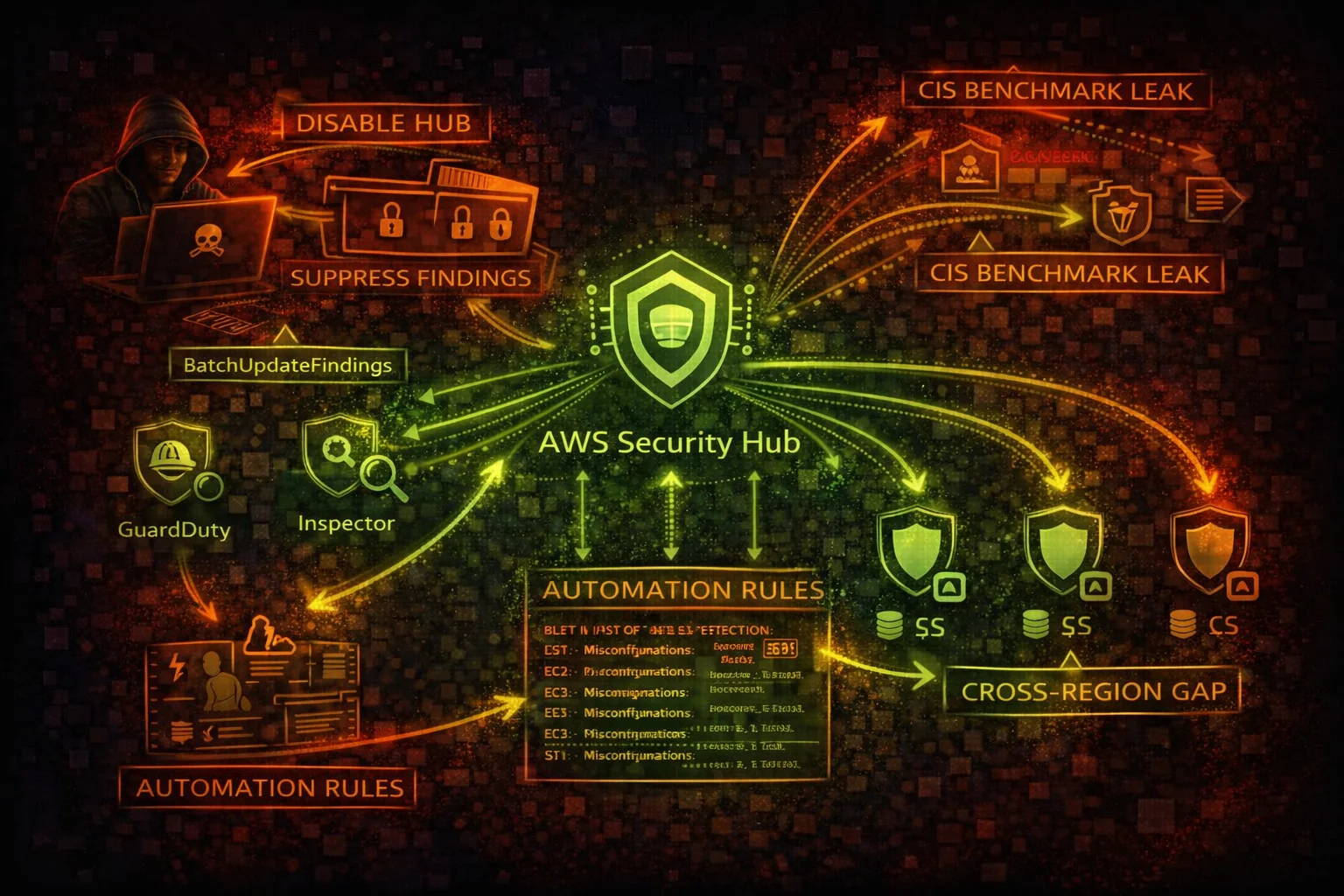

AWS Security Hub Security
SECURITY POSTURESecurity Hub aggregates findings from GuardDuty, Inspector, Macie, Config, and third-party tools. Attackers can disable it, suppress findings, or use GetFindings as a reconnaissance goldmine for misconfiguration discovery.
📋Service Overview
Finding Aggregation
Security Hub ingests findings from GuardDuty, Inspector, Macie, Config, Firewall Manager, and third-party tools. Disabling Security Hub silences all integrated findings in a single API call, creating a massive blind spot.
Compliance Standards
Built-in standards (CIS AWS Foundations, PCI DSS, NIST 800-53, AWS Foundational Security Best Practices) continuously evaluate your environment. GetFindings reveals every misconfiguration and compliance gap to an attacker.
Automation & Suppression
Automation rules can auto-update finding statuses. Attackers create rules to auto-suppress future findings, effectively creating persistent blind spots. BatchUpdateFindings can archive hundreds of findings instantly.
Security Risk Assessment
Security Hub is both a reconnaissance goldmine (GetFindings reveals all misconfigurations) and a key target for defense evasion (DisableSecurityHub, BatchUpdateFindings, CreateAutomationRule for suppression).
⚔️Attack Vectors
Defense Evasion
- •DisableSecurityHub silences ALL integrated findings
- •BatchUpdateFindings suppresses findings covertly
- •CreateAutomationRule auto-suppresses future findings
- •DisassociateFromAdministratorAccount escapes org monitoring
- •DisableImportFindingsForProduct blocks specific integrations
Reconnaissance via Findings
- •GetFindings returns complete misconfiguration inventory
- •CIS/PCI compliance failures map exploitable weaknesses
- •Findings reveal public S3 buckets, open security groups
- •Failed compliance checks identify unpatched resources
- •Cross-region aggregation shows full org posture
⚠️Misconfigurations
Coverage Gaps
- •Security Hub not enabled in all regions
- •Cross-region aggregation not configured
- •Not all compliance standards enabled
- •Third-party integrations not connected
- •Findings not exported to external SIEM
Access Control Issues
- •Member accounts can disable Security Hub independently
- •No SCP preventing DisableSecurityHub
- •BatchUpdateFindings allowed for non-admin users
- •Automation rules not audited for suppression patterns
- •Delegated admin account not hardened
🔍Enumeration
aws securityhub describe-hubaws securityhub get-findings \
--filters '{"ComplianceStatus":[{"Value":"FAILED","Comparison":"EQUALS"}]}' \
--max-items 100aws securityhub list-membersaws securityhub get-enabled-standardsaws securityhub list-automation-rules🚨Key Concepts
Finding Lifecycle Abuse
- •NEW -> NOTIFIED -> RESOLVED -> SUPPRESSED workflow
- •BatchUpdateFindings sets Workflow.Status to SUPPRESSED
- •Suppressed findings hidden from default dashboard view
- •RecordState set to ARCHIVED removes from active findings
- •Compliance.Status override hides failed checks
Aggregation Architecture
- •Region-scoped: each region runs independently
- •Cross-region aggregation copies findings to one region
- •Admin-member model: admin sees all member findings
- •Disassociating from admin breaks centralized visibility
- •Custom actions trigger EventBridge for automated response
⚡Persistence Techniques
Persistent Suppression
- •CreateAutomationRule to auto-suppress specific finding types
- •Automation rule with broad criteria silences future detections
- •Suppress by resource type to hide attacker infrastructure
- •Modify existing automation rules to expand suppression scope
- •Disable specific product integrations selectively
Monitoring Evasion
- •Disable Security Hub in non-aggregation regions
- •Disassociate member account from admin oversight
- •Delete custom EventBridge rules for finding alerts
- •Modify SNS subscriptions to redirect notifications
- •BatchUpdateFindings to mark critical findings as resolved
🛡️Detection
CloudTrail Events
- •DisableSecurityHub - hub disabled entirely
- •BatchUpdateFindings - findings suppressed/archived
- •CreateAutomationRule - suppression rule created
- •DisassociateFromAdministratorAccount - escaped monitoring
- •DisableImportFindingsForProduct - integration disabled
Indicators of Tampering
- •Security Hub disabled unexpectedly
- •Large batch of findings suppressed at once
- •New automation rules with broad suppression criteria
- •Member account disassociated from admin
- •Decrease in finding count without remediation
💻Exploitation Commands
aws securityhub disable-security-hubaws securityhub batch-update-findings \
--finding-identifiers '[{"Id":"arn:aws:securityhub:us-east-1:123456789012:finding/abc123","ProductArn":"arn:aws:securityhub:us-east-1::product/aws/securityhub"}]' \
--workflow '{"Status":"SUPPRESSED"}'aws securityhub create-automation-rule \
--rule-name "SuppressAll" \
--description "Suppress all critical findings" \
--rule-order 1 \
--criteria '{"SeverityLabel":[{"Value":"CRITICAL","Comparison":"EQUALS"}]}' \
--actions '[{"Type":"FINDING_FIELDS_UPDATE","FindingFieldsUpdate":{"Workflow":{"Status":"SUPPRESSED"}}}]'aws securityhub disassociate-from-administrator-accountaws securityhub get-findings \
--filters '{"ComplianceStatus":[{"Value":"FAILED","Comparison":"EQUALS"}],"RecordState":[{"Value":"ACTIVE","Comparison":"EQUALS"}]}' \
--query 'Findings[].[Title,Resources[0].Id]' \
--output tableaws securityhub disable-import-findings-for-product \
--product-subscription-arn arn:aws:securityhub:us-east-1:123456789012:product-subscription/aws/guardduty📜Security Hub Policy Examples
{
  "Version": "2012-10-17",
  "Statement": [{
    "Effect": "Allow",
    "Action": "securityhub:*",
    "Resource": "*"
  }]
}
Full Security Hub access allows disabling the service, suppressing findings, and creating suppression automation
{
  "Version": "2012-10-17",
  "Statement": [{
    "Effect": "Allow",
    "Action": [
      "securityhub:Get*",
      "securityhub:List*",
      "securityhub:Describe*"
    ],
    "Resource": "*"
  }]
}
Read-only access for security analysts to view findings without modification rights
{
  "Version": "2012-10-17",
  "Statement": [{
    "Effect": "Allow",
    "Action": [
      "securityhub:BatchUpdateFindings",
      "securityhub:CreateAutomationRule",
      "securityhub:BatchUpdateAutomationRules"
    ],
    "Resource": "*"
  }]
}
Ability to suppress findings and create automation rules enables covert defense evasion
{
  "Version": "2012-10-17",
  "Statement": [{
    "Sid": "PreventSecurityHubDisable",
    "Effect": "Deny",
    "Action": [
      "securityhub:DisableSecurityHub",
      "securityhub:DisassociateFromAdministratorAccount",
      "securityhub:DisableImportFindingsForProduct",
      "securityhub:DeleteMembers"
    ],
    "Resource": "*"
  }]
}
Organization SCP prevents member accounts from disabling Security Hub or escaping admin oversight
🛡️Defense Recommendations
SCP Prevent Disable
Use Organization SCPs to deny DisableSecurityHub, DisassociateFromAdministratorAccount in all member accounts.
Export Findings Externally
Send findings to S3 or external SIEM via EventBridge so they persist even if Security Hub is disabled.
aws events put-rule --name SecurityHubFindings \
--event-pattern '{"source":["aws.securityhub"],"detail-type":["Security Hub Findings - Imported"]}'Enable in All Regions
Security Hub is regional. Enable in all regions and configure cross-region aggregation.
aws securityhub create-finding-aggregator \
  --region us-east-1 \
--region-linking-mode ALL_REGIONSAudit Automation Rules
Regularly review automation rules to ensure none are suppressing findings inappropriately.
aws securityhub list-automation-rules \
--query 'AutomationRulesMetadata[].{Name:RuleName,Status:RuleStatus}'Use Org Delegated Admin
Centralize Security Hub management so member accounts cannot disable it independently.
aws securityhub enable-organization-admin-account \
--admin-account-id 123456789012Alert on Security Hub Changes
Create EventBridge rules for DisableSecurityHub, BatchUpdateFindings, and CreateAutomationRule events.
AWS Security Hub Security Card • Toc Consulting
Always obtain proper authorization before testing
KloudSec, built by the team behind Toc Consulting
See AWS Security Hub security checked automatically, continuously
What you just read is a manual, one-time check. KloudSec runs this and 400+ more automated checks across 90+ AWS services, continuously, agentless, live in about 5 minutes.
Toc Consulting: AWS Security & Cloud Architecture
Securing your AWS estate?
Our team helps engineering teams secure and architect AWS the right way: assessment in week one, a prioritized action plan in week two.