
Episode 4: S3 Exposure Hunter - Preventing the Data Breaches That Make Headlines
Tarek Cheikh
Founder & AWS Cloud Architect

The Nightmare Scenario You Can't Afford
Every security professional's worst nightmare: waking up to find your company's name trending on social media because someone discovered your customer database sitting in an open S3 bucket. It happened to Capital One ($190 million fine), Verizon (14 million records exposed), and countless others.
Here's what makes S3 exposure particularly dangerous:
- Silent exposure: Buckets can be public for months without anyone noticing
- Instant access: Once discovered, data can be downloaded in minutes
- No authentication required: Public buckets don't need passwords or keys
- Search engine indexing: Google can index and cache your exposed data
- Automated discovery: Hackers use bots that constantly scan for open buckets
The most frustrating part? Most S3 exposures aren't intentional. They happen through a perfect storm of misconfigurations, misunderstandings, and the complexity of S3's multiple security layers.
Why S3 Security Is So Confusing
The Multiple Personality Problem
S3 has FOUR different ways to control access, and they all interact:
- Bucket Policies — JSON documents that define who can do what
- Access Control Lists (ACLs) — Legacy permission system from 2006
- Public Access Blocks — Override settings that can block other permissions
- IAM Policies — User and role permissions that interact with bucket settings
Imagine trying to figure out if a door is locked when there are four different locks, each with its own key, and some locks can override others. That's S3 security.
Real Examples of How Buckets Become Public
Scenario 1: The Developer Shortcut
Developer needs to share files with a contractor.
--> Googles "make S3 bucket public"
--> Copies first Stack Overflow answer
--> Applies policy making entire bucket public
--> Forgets to revert after project ends
--> 6 months later: data breach
Scenario 2: The Migration Mistake
Team migrates from on-premise to AWS.
--> Uses automated migration tools
--> Tool creates buckets with default settings
--> Default includes "public read" for compatibility
--> Nobody checks the security settings
--> Customer data exposed from day one
Scenario 3: The Website Hosting Trap
Marketing team wants to host website assets.
--> Enables static website hosting on bucket
--> Doesn't realize this requires public access
--> Puts other files in same bucket for "convenience"
--> Entire bucket contents become public
How Attackers Find Your Exposed Buckets
Attackers don't randomly guess bucket names. They use sophisticated methods:
- Predictable Naming: Companies often use patterns like
company-name-backuporprojectname-data - DNS Records: Bucket names appear in DNS entries and SSL certificates
- Application Errors: Error messages often reveal bucket names
- GitHub Scanning: Code repositories frequently contain bucket names
- Automated Tools: Scripts that try millions of common bucket name combinations
Once found, downloading your data takes seconds:
aws s3 sync s3://your-exposed-bucket ./stolen-data --no-sign-request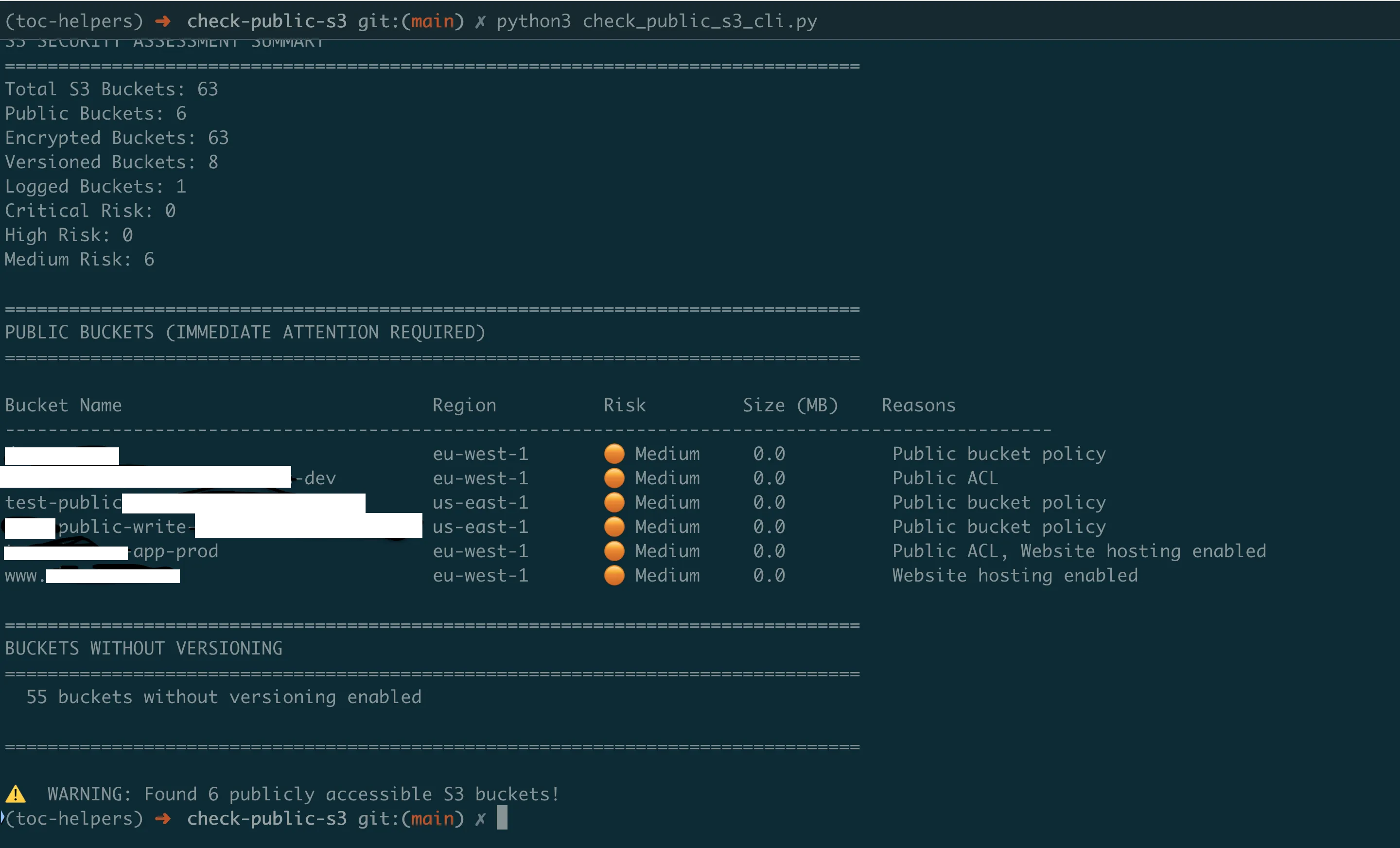
Understanding the S3 Exposure Hunter
The S3 Exposure Hunter solves these problems by analyzing ALL security mechanisms simultaneously to determine actual exposure risk.
What Makes a Bucket "Public"?
A bucket can be public through multiple paths:
Path 1: ACL Settings
- Bucket ACL grants "AllUsers" permission
- Even one "READ" permission makes bucket listable
- "WRITE" permission allows anyone to upload (including malware)
Path 2: Bucket Policy
- Policy contains
"Principal": "*"(anyone on internet) - Policy allows
s3:GetObjectwithout restrictions - Conditions in policy don't properly restrict access
Path 3: Static Website Hosting
- Website hosting enabled = bucket must allow public reads
- Often exposes more than intended website files
- Directory listing might be enabled
Path 4: Public Access Block Disabled
- All four block settings must be enabled for full protection
- Even one disabled setting can allow public access
- Organization-level blocks can be overridden
How the Scanner Identifies Real Risk
The tool doesn't just check if buckets are "public" — it determines actual risk levels:
CRITICAL Risk:
- Public AND contains sensitive data patterns (SSNs, credit cards)
- Public with WRITE permissions (anyone can modify)
- Large public buckets (>1GB of exposed data)
- Public buckets with database backups or credentials
HIGH Risk:
- Public via multiple mechanisms (harder to fix)
- Public without encryption (data readable if downloaded)
- Public in production accounts
MEDIUM Risk:
- Intentionally public but overly permissive
- Private but unencrypted (risk if configuration changes)
- Authenticated user access (any AWS account can access)
LOW Risk:
- Private with encryption
- Public but empty
- Properly configured CDN buckets
Getting Started with the S3 Exposure Hunter
Prerequisites
Before running the scanner:
- AWS CLI configured with appropriate credentials
- Python 3.7+ installed
- Required IAM permissions:
- S3: ListBuckets, GetBucketAcl, GetBucketPolicy, GetBucketPublicAccessBlock, GetBucketEncryption, GetBucketWebsite
- Additional for size analysis: ListObjectsV2
Installation and First Scan
# Get the S3 Exposure Hunter
git clone https://github.com/TocConsulting/aws-helper-scripts.git
cd aws-helper-scripts/check-public-s3

# Install dependencies
pip install -r requirements.txt

# Run your first S3 security scan
python check_public_s3_cli.py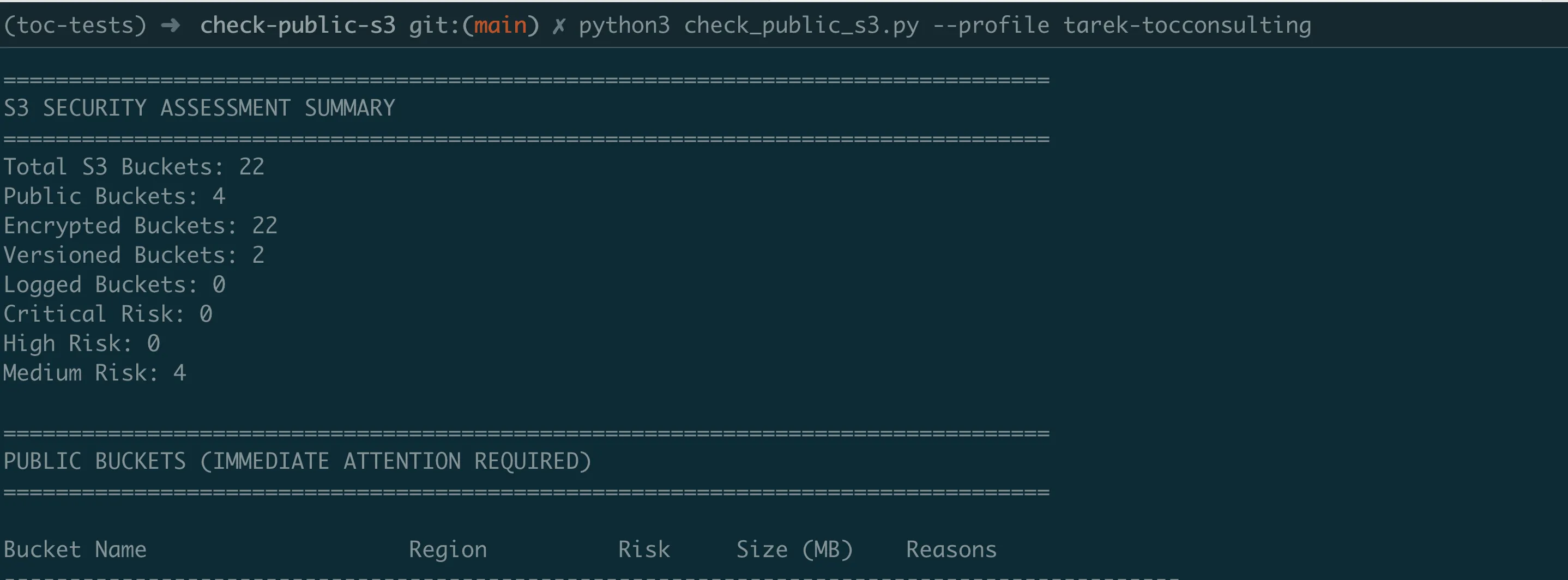
Understanding the Results
The scanner provides real-time analysis feedback as it works:
Using AWS Account: 123456789012
Analyzing S3 buckets for security issues...
Found 15 S3 buckets. Analyzing security configurations...

  Analyzing company-logs... Private
  Analyzing public-website-assets... PUBLIC (Public ACL, Website hosting enabled)
  Analyzing data-backup-bucket... PUBLIC (Public bucket policy)
  Analyzing staging-files... Private

================================================================================
S3 SECURITY ASSESSMENT SUMMARY
================================================================================
Total S3 Buckets: 15
Public Buckets: 3
Encrypted Buckets: 12
Versioned Buckets: 8
Logged Buckets: 5
Critical Risk: 1
High Risk: 1
Medium Risk: 4

================================================================================
PUBLIC BUCKETS (IMMEDIATE ATTENTION REQUIRED)
================================================================================

Bucket Name                    Region          Risk         Size (MB)    Reasons
-----------------------------------------------------------------------------------------------
public-website-assets          us-east-1       Critical     2450.5       Public ACL, Website hosting enabled
data-backup-bucket             us-west-2       High         125.2        Public bucket policy
company-logs                   eu-west-1       Medium       45.7         Website hosting enabled
The tool shows exactly why each bucket is public and uses indicators:
- Critical: Immediate security risk
- High: Significant exposure
- Medium: Needs review
- Private: Properly secured
Quick Wins: Immediate Actions
Find ALL public buckets right now:
python check_public_s3_cli.py --public-onlyGenerate compliance report for audit:
python check_public_s3_cli.py --export-csv s3_audit_report.csvCheck after fixing issues:
# Run scan again to verify fixes
python check_public_s3_cli.py
Fixing Exposed Buckets: The Right Way
Emergency Fix: Block Everything Now
If you find a critical exposure, apply this immediately:
# EMERGENCY: Block all public access immediately
aws s3api put-public-access-block \
  --bucket YOUR-EXPOSED-BUCKET \
  --public-access-block-configuration \
  "BlockPublicAcls=true,IgnorePublicAcls=true,BlockPublicPolicy=true,RestrictPublicBuckets=true"
This is the S3 equivalent of pulling the fire alarm — it blocks ALL public access immediately.
Systematic Remediation
Step 1: Enable Public Access Block (Unless bucket needs public access)
- Blocks new public ACLs
- Ignores existing public ACLs
- Blocks new public policies
- Restricts public bucket access
Step 2: Review and Fix ACLs
- Remove "AllUsers" permissions
- Remove "AuthenticatedUsers" permissions
- Grant specific access to IAM users/roles
Step 3: Audit Bucket Policies
- Replace
"Principal": "*"with specific principals - Add IP restrictions where appropriate
- Use condition statements for additional security
Step 4: Enable Encryption
- Protects data even if bucket becomes public
- Required for compliance (HIPAA, PCI-DSS)
- No performance impact with AES-256
Step 5: Enable Logging
- CloudTrail for API access
- S3 access logs for object-level tracking
- Essential for incident investigation
Continuous Monitoring with Lambda Automation
Manual scanning finds current issues, but buckets can become public at any time. The Lambda version provides automated, continuous monitoring.
Why Automation Is Essential
Configuration Drift: Even with perfect initial setup:
- Developers make "temporary" changes that become permanent
- New team members might not understand security requirements
- Copy-paste from documentation can introduce vulnerabilities
- AWS console "helpful" defaults might enable public access
Setting Up Automated Monitoring
# Navigate to Lambda version
cd ../check-public-s3-lambda

# Configure settings in template.yaml:
# - AlertEmail: security@yourcompany.com
# - ScanSchedule: rate(1 hour)  # For critical environments
# - CriticalBucketPatterns: ["*customer*", "*backup*", "*prod*"]

# Deploy monitoring system
sam build && sam deploy --guided
What Gets Deployed:
- Lambda function scanning all buckets
- Hourly/daily execution schedule
- SNS alerts for critical findings
- CloudWatch dashboard for trends
- Automatic remediation options (optional)
Alert Examples
Critical Alert (Immediate Action):
CRITICAL: Public S3 Bucket Detected!

Bucket: customer-database-backup
Region: us-east-1
Exposure: PUBLIC READ via ACL
Size: 2.3 GB
Contains: .sql, .csv files

IMMEDIATE ACTIONS REQUIRED:
1. Apply public access block NOW
2. Review CloudTrail for access logs
3. Check if data was accessed
4. Notify security team lead

One-click fix:
https://console.aws.amazon.com/s3/buckets/customer-database-backup?tab=permissions
Daily Summary Report:
S3 Security Report - Tuesday

Summary:
45 buckets secure
2 new buckets need review
1 bucket became public (fixed)

Trends:
- Public bucket rate: 2.1% (down from 4.3%)
- Encryption coverage: 89% (up from 85%)
- Buckets with logging: 67%

Action Items:
- Review 2 new buckets created by development team
- Enable encryption on 5 legacy buckets
- Schedule security training for new developers
Real-World Implementation Strategy
Week 1: Discovery and Emergency Fixes
Day 1:
- Run initial scan across all AWS accounts
- Fix all CRITICAL exposures immediately
- Document findings for management
Day 2–3:
- Address HIGH risk buckets
- Enable encryption on unencrypted buckets
- Apply public access blocks where possible
Day 4–5:
- Deploy Lambda monitoring
- Configure alerts for security team
- Create remediation playbook
Week 2: Systematic Improvement
- Implement bucket naming standards
- Create secure bucket templates
- Enable organization-wide public access blocks
- Train development teams on S3 security
Ongoing: Continuous Security
Daily:
- Review Lambda alerts
- Fix new exposures immediately
Weekly:
- Analyze security trends
- Update security policies
- Review access patterns
Monthly:
- Comprehensive audit with CLI tool
- Update risk assessments
- Report to leadership
Common Patterns and Solutions
Pattern: "We need a public bucket for our website"
Solution: Use CloudFront + S3 Origin Access Identity
- S3 bucket remains private
- CloudFront handles public access
- Better performance and security
- Cost-effective through caching
Pattern: "Developers need to share large files"
Solution: Use presigned URLs
- Bucket stays private
- Temporary, time-limited access
- Specific to individual objects
- Audit trail maintained
Pattern: "Third-party integration requires bucket access"
Solution: Cross-account IAM roles
- No credentials to share
- Revocable access
- Detailed permissions possible
- Full audit logging
Success Metrics
Track these metrics to demonstrate S3 security improvement:
Security KPIs
- Public Bucket Rate: Track percentage of public buckets
- Encryption Coverage: Track percentage of encrypted buckets
- Mean Time to Remediation: How quickly critical issues are fixed
- False Positive Rate: Percentage of alerts that don't require action
Business Impact
- Compliance Findings: Reduction in S3-related audit issues
- Incident Prevention: Number of potential breaches avoided
- Operational Efficiency: Time saved vs. manual checking
- Risk Reduction: Measured by exposure time reduction
Key Takeaways
Critical Lessons
- S3 security is complex by design — Multiple overlapping mechanisms require comprehensive analysis
- Public doesn't always mean exposed — But exposed always means risk
- Automation is mandatory — Manual checks can't keep up with changes
- Speed matters — Every hour of exposure increases breach probability
S3 Security Commandments
- Enable public access blocks by default — Disable only with documented exceptions
- Encrypt everything — No exceptions, no excuses
- Use least privilege — Specific permissions for specific needs
- Monitor continuously — Configuration drift is inevitable
- Test your assumptions — Verify security settings actually work
Next Steps
Today (Emergency Response)
- Run S3 Exposure Hunter immediately
- Fix all CRITICAL findings
- Enable public access blocks globally
This Week (Stabilization)
- Deploy Lambda monitoring
- Fix HIGH and MEDIUM risks
- Enable encryption everywhere
- Document security policies
This Month (Maturation)
- Implement preventive controls
- Train all developers
- Create secure templates
- Establish metrics tracking
Coming Next
In Episode 5, we'll explore load balancer security — another critical attack surface often overlooked. You'll learn how to build scanners that identify internet-facing load balancers, analyze their security rules, check SSL/TLS configurations, and prevent both data exposure and DDoS risks.
All tools from this series are production-ready and available at https://github.com/TocConsulting/aws-helper-scripts. Each tool is battle-tested in production environments and includes comprehensive documentation.
Go Deeper: The State of AWS Security 2026
This article is just the start. Get the full picture with our free whitepaper - 8 chapters covering IAM, S3, VPC, monitoring, agentic AI security, compliance, and a prioritized action plan with 50+ CLI commands.
KloudSec, built by the team behind Toc Consulting
See AWS Security checked automatically, continuously
What you just read is a manual, one-time check. KloudSec runs this and 400+ more automated checks across 90+ AWS services, continuously, agentless, live in about 5 minutes.
Toc Consulting: AWS Security & Cloud Architecture
Want expert help with AWS Security?
Our team helps engineering teams secure and architect AWS the right way: assessment in week one, a prioritized action plan in week two.
More Articles
Anatomy of a Real AWS Breach: Capital One, 2019
How a misconfigured WAF, an unauthenticated metadata service, and an over-privileged IAM role combined to expose data on roughly 100 million people in the US and 6 million in Canada, and the specific checks that would have stopped it.
Anatomy of a Real AWS Breach: Code Spaces, 2014
A single compromised AWS console login, no MFA, and a company was gone within 12 hours. The full story, and why "our backups are in AWS too" was the real failure.
Anatomy of a Real AWS Breach: Imperva, 2019
A security company got breached through one exposed AWS API key on an internet-reachable instance. Even the people who build WAFs for a living can miss this.