
Amazon API Gateway Deep Dive: Build and Manage APIs at Any Scale
Tarek Cheikh
Founder & AWS Cloud Architect
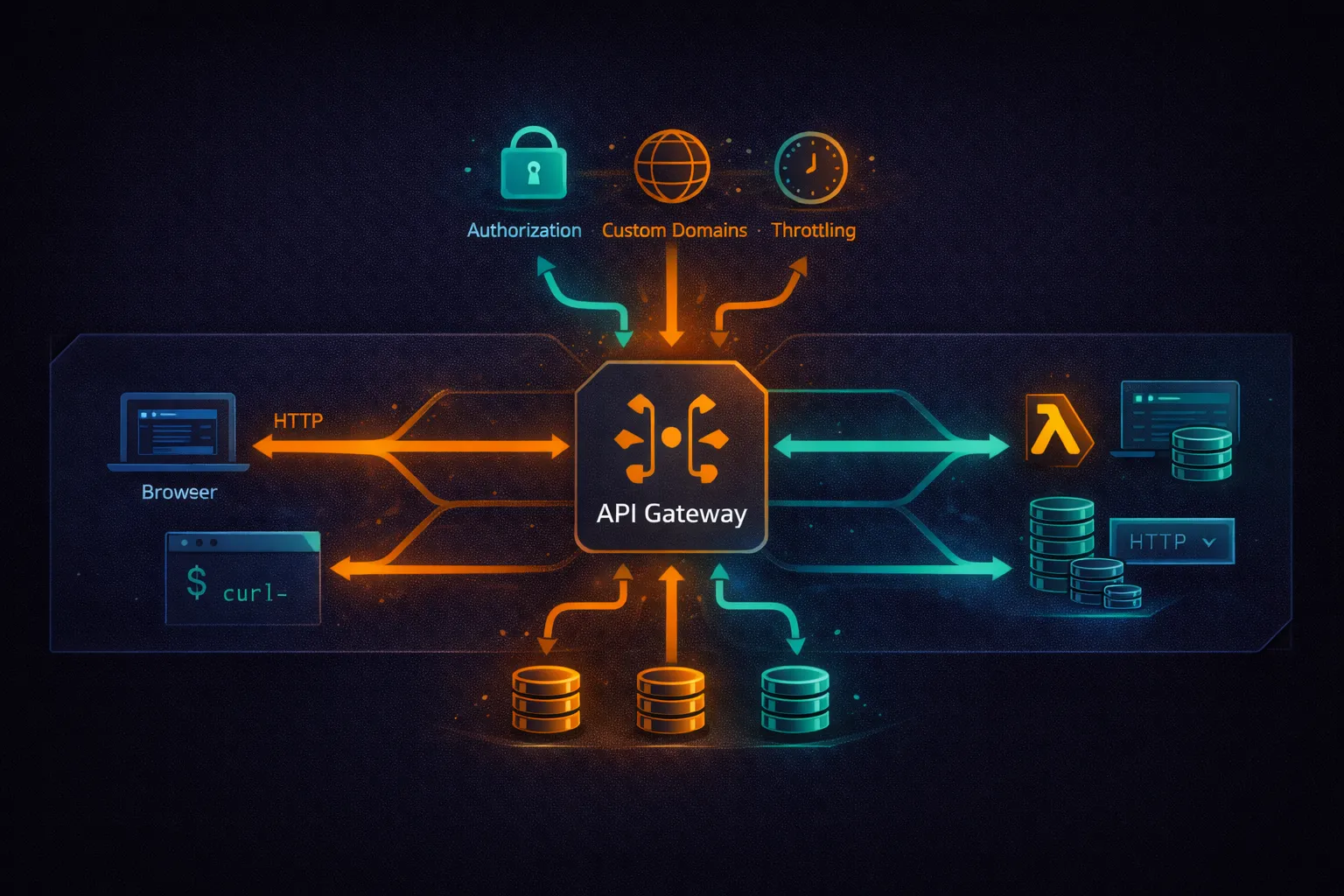
In the previous articles, we covered Lambda for serverless compute and DynamoDB for NoSQL storage. API Gateway is the front door that connects clients to those backend services. It handles routing, authentication, throttling, CORS, TLS termination, and request/response transformation — all without managing any servers.
This article covers API Gateway from first principles to production patterns: the three API types (REST, HTTP, WebSocket), Lambda integration, authorization, custom domains, throttling, stages, monitoring, and the architectural decisions that determine cost and performance.
What Is API Gateway?
Amazon API Gateway is a fully managed service for creating, publishing, and managing APIs at any scale. It accepts incoming API requests, routes them to backend services (Lambda, HTTP endpoints, AWS services), and returns responses to the caller.
What API Gateway provides:
- TLS termination — HTTPS for all endpoints, no certificate management
- Authentication and authorization — IAM, Cognito, Lambda authorizers, JWT
- Throttling and rate limiting — protect backends from traffic spikes
- Request validation — reject malformed requests before they reach your code
- CORS handling — configure cross-origin resource sharing
- Automatic scaling — handles from zero to hundreds of thousands of concurrent requests
- DDoS protection — integrated with AWS Shield Standard (free)
API Types: REST vs HTTP vs WebSocket
API Gateway offers three API types. Choosing the right one is the first and most important decision.
# API type comparison:

Feature                  REST API          HTTP API          WebSocket API
---------------------------------------------------------------------------
Protocol                 REST              REST/HTTP         WebSocket
Price per million        $3.50             $1.00             $1.00 (messages)
                                                            + $0.25 (connection min)
Lambda integration       Yes               Yes               Yes
IAM authorization        Yes               Yes               No
Cognito authorizer       Yes               Yes (JWT)         No
Lambda authorizer        Yes               Yes               Yes
API keys / usage plans   Yes               No                No
Request validation       Yes               No                No
Request transformation   Yes (VTL)         Parameter mapping  No
Response caching         Yes               No                No
WAF integration          Yes               No                No
Private APIs (VPC)       Yes               Yes               No
Custom domain            Yes               Yes               Yes
Mutual TLS               Yes               Yes               No

# Decision guide:
# Need caching, WAF, request validation, usage plans? --> REST API
# Need lowest cost, simple proxy to Lambda?            --> HTTP API
# Need real-time bidirectional communication?          --> WebSocket API
HTTP API (Recommended for Most Use Cases)
HTTP APIs are the simpler and cheaper option. They support Lambda and HTTP backend integrations with JWT authorization. For most serverless APIs, HTTP API is the right choice.
Create an HTTP API
# Create an HTTP API with Lambda integration
aws apigatewayv2 create-api \
    --name my-api \
    --protocol-type HTTP \
    --target arn:aws:lambda:us-east-1:123456789012:function:my-handler

# This creates:
# - An HTTP API
# - A $default stage with auto-deploy
# - A $default route that sends all requests to the Lambda function
# - The Lambda permission for API Gateway to invoke the function

# The API is immediately available at:
# https://{api-id}.execute-api.us-east-1.amazonaws.com/
HTTP API Lambda Event Format (v2)
# HTTP API sends payload format version 2.0
def lambda_handler(event, context):
    # event structure (v2):
    # {
    #   "version": "2.0",
    #   "requestContext": {
    #     "http": {
    #       "method": "GET",
    #       "path": "/users/123",
    #       "sourceIp": "203.0.113.1"
    #     },
    #     "authorizer": { "jwt": { "claims": {...} } },
    #     "stage": "$default"
    #   },
    #   "rawPath": "/users/123",
    #   "rawQueryString": "active=true",
    #   "headers": { "content-type": "application/json", ... },
    #   "queryStringParameters": { "active": "true" },
    #   "pathParameters": { "id": "123" },
    #   "body": "{...}",
    #   "isBase64Encoded": false
    # }

    method = event['requestContext']['http']['method']
    path = event['rawPath']

    return {
        'statusCode': 200,
        'headers': {'Content-Type': 'application/json'},
        'body': json.dumps({'method': method, 'path': path})
    }
Routes and Integrations
# Create specific routes (instead of catch-all)
# Each route can point to a different Lambda function

# Create Lambda integration
INTEGRATION_ID=$(aws apigatewayv2 create-integration \
    --api-id abc123 \
    --integration-type AWS_PROXY \
    --integration-uri arn:aws:lambda:us-east-1:123456789012:function:users-handler \
    --payload-format-version 2.0 \
    --query IntegrationId --output text)

# Create routes
aws apigatewayv2 create-route \
    --api-id abc123 \
    --route-key "GET /users" \
    --target integrations/$INTEGRATION_ID

aws apigatewayv2 create-route \
    --api-id abc123 \
    --route-key "POST /users" \
    --target integrations/$INTEGRATION_ID

aws apigatewayv2 create-route \
    --api-id abc123 \
    --route-key "GET /users/{id}" \
    --target integrations/$INTEGRATION_ID

aws apigatewayv2 create-route \
    --api-id abc123 \
    --route-key "PUT /users/{id}" \
    --target integrations/$INTEGRATION_ID

aws apigatewayv2 create-route \
    --api-id abc123 \
    --route-key "DELETE /users/{id}" \
    --target integrations/$INTEGRATION_ID
REST API
REST APIs offer more features than HTTP APIs at a higher cost. Use them when you need caching, request validation, WAF, usage plans, or request/response transformation.
REST API Lambda Event Format (v1)
# REST API sends payload format version 1.0
def lambda_handler(event, context):
    # event structure (v1):
    # {
    #   "resource": "/users/{id}",
    #   "path": "/users/123",
    #   "httpMethod": "GET",
    #   "headers": { "Content-Type": "application/json", ... },
    #   "queryStringParameters": { "active": "true" },
    #   "pathParameters": { "id": "123" },
    #   "body": null,
    #   "requestContext": {
    #     "authorizer": { "principalId": "user-001", ... },
    #     "stage": "prod"
    #   }
    # }

    method = event['httpMethod']
    resource = event['resource']
    route_key = f"{method} {resource}"

    return {
        'statusCode': 200,
        'headers': {
            'Content-Type': 'application/json',
            'Access-Control-Allow-Origin': '*'
        },
        'body': json.dumps({'route': route_key})
    }
CRUD API with REST API and DynamoDB
# api_handler.py
import json
import uuid
import boto3
from datetime import datetime
from decimal import Decimal

dynamodb = boto3.resource('dynamodb')
table = dynamodb.Table('Products')

class DecimalEncoder(json.JSONEncoder):
    def default(self, obj):
        if isinstance(obj, Decimal):
            return str(obj)
        return super().default(obj)

def lambda_handler(event, context):
    method = event['httpMethod']
    resource = event['resource']
    route = f"{method} {resource}"

    try:
        if route == 'GET /products':
            return list_products()
        elif route == 'GET /products/{id}':
            return get_product(event['pathParameters']['id'])
        elif route == 'POST /products':
            return create_product(json.loads(event['body']))
        elif route == 'PUT /products/{id}':
            return update_product(event['pathParameters']['id'], json.loads(event['body']))
        elif route == 'DELETE /products/{id}':
            return delete_product(event['pathParameters']['id'])
        else:
            return response(404, {'error': 'Not found'})
    except Exception as e:
        return response(500, {'error': str(e)})

def list_products():
    result = table.scan()  # Use Query with GSI for large tables
    return response(200, result['Items'])

def get_product(product_id):
    result = table.get_item(Key={'id': product_id})
    if 'Item' not in result:
        return response(404, {'error': 'Product not found'})
    return response(200, result['Item'])

def create_product(body):
    product = {
        'id': str(uuid.uuid4()),
        'name': body['name'],
        'price': Decimal(str(body['price'])),
        'created_at': datetime.now().isoformat()
    }
    table.put_item(Item=product)
    return response(201, product)

def update_product(product_id, body):
    result = table.update_item(
        Key={'id': product_id},
        UpdateExpression='SET #n = :name, price = :price, updated_at = :ts',
        ExpressionAttributeNames={'#n': 'name'},
        ExpressionAttributeValues={
            ':name': body['name'],
            ':price': Decimal(str(body['price'])),
            ':ts': datetime.now().isoformat()
        },
        ReturnValues='ALL_NEW'
    )
    return response(200, result['Attributes'])

def delete_product(product_id):
    table.delete_item(Key={'id': product_id})
    return response(204, '')

def response(status_code, body):
    return {
        'statusCode': status_code,
        'headers': {
            'Content-Type': 'application/json',
            'Access-Control-Allow-Origin': '*'
        },
        'body': json.dumps(body, cls=DecimalEncoder) if body else ''
    }
Authorization
JWT Authorizer (HTTP API)
# Create a JWT authorizer using Cognito User Pool
aws apigatewayv2 create-authorizer \
    --api-id abc123 \
    --name cognito-auth \
    --authorizer-type JWT \
    --identity-source '$request.header.Authorization' \
    --jwt-configuration '{
        "Audience": ["my-app-client-id"],
        "Issuer": "https://cognito-idp.us-east-1.amazonaws.com/us-east-1_ABC123"
    }'

# Attach authorizer to a route
aws apigatewayv2 update-route \
    --api-id abc123 \
    --route-id route-xyz \
    --authorization-type JWT \
    --authorizer-id auth-id

# The JWT claims are available in the Lambda event:
# event['requestContext']['authorizer']['jwt']['claims']
Lambda Authorizer (REST API)
# authorizer.py -- Lambda authorizer for REST API
import jwt
import os

def lambda_handler(event, context):
    token = event['authorizationToken'].replace('Bearer ', '')

    try:
        payload = jwt.decode(
            token,
            os.environ['JWT_SECRET'],
            algorithms=['HS256']
        )

        return {
            'principalId': payload['user_id'],
            'policyDocument': {
                'Version': '2012-10-17',
                'Statement': [{
                    'Action': 'execute-api:Invoke',
                    'Effect': 'Allow',
                    'Resource': event['methodArn']
                }]
            },
            'context': {
                'userId': payload['user_id'],
                'role': payload.get('role', 'user')
            }
        }

    except (jwt.ExpiredSignatureError, jwt.InvalidTokenError):
        raise Exception('Unauthorized')
        # Returning 'Unauthorized' string triggers a 401 response
# Create the Lambda authorizer
aws apigateway create-authorizer \
--rest-api-id abc123 \
--name token-auth \
--type TOKEN \
--authorizer-uri arn:aws:apigateway:us-east-1:lambda:path/2015-03-31/functions/arn:aws:lambda:us-east-1:123456789012:function:authorizer/invocations \
--identity-source method.request.header.Authorization \
--authorizer-result-ttl-in-seconds 300
# TTL caches the authorization result for 5 minutes
# Reduces Lambda invocations for repeated requests with the same tokenIAM Authorization
# IAM auth: callers sign requests with AWS Signature V4
# Useful for service-to-service communication

# The caller needs an IAM policy like:
{
    "Effect": "Allow",
    "Action": "execute-api:Invoke",
    "Resource": "arn:aws:execute-api:us-east-1:123456789012:abc123/prod/GET/users/*"
}
# Call an IAM-protected API from Python
from botocore.auth import SigV4Auth
from botocore.awsrequest import AWSRequest
import boto3
import requests
session = boto3.Session()
credentials = session.get_credentials().get_frozen_credentials()
request = AWSRequest(
method='GET',
url='https://abc123.execute-api.us-east-1.amazonaws.com/prod/users',
headers={'Host': 'abc123.execute-api.us-east-1.amazonaws.com'}
)
SigV4Auth(credentials, 'execute-api', 'us-east-1').add_auth(request)
response = requests.get(request.url, headers=dict(request.headers))CORS Configuration
# HTTP API: built-in CORS support
aws apigatewayv2 update-api \
    --api-id abc123 \
    --cors-configuration '{
        "AllowOrigins": ["https://myapp.com", "http://localhost:3000"],
        "AllowMethods": ["GET", "POST", "PUT", "DELETE", "OPTIONS"],
        "AllowHeaders": ["Content-Type", "Authorization"],
        "ExposeHeaders": ["X-Request-Id"],
        "MaxAge": 86400
    }'

# REST API: CORS must be configured per resource
# 1. Add an OPTIONS method with a MOCK integration
# 2. Add CORS headers in each Lambda response
# This is much more work -- another reason to prefer HTTP API
# In Lambda: always include CORS headers in responses
def response(status_code, body):
return {
'statusCode': status_code,
'headers': {
'Content-Type': 'application/json',
'Access-Control-Allow-Origin': 'https://myapp.com',
'Access-Control-Allow-Headers': 'Content-Type,Authorization',
'Access-Control-Allow-Methods': 'GET,POST,PUT,DELETE,OPTIONS'
},
'body': json.dumps(body, cls=DecimalEncoder) if body else ''
}Custom Domain Names
# Use your own domain instead of the generated execute-api URL

# 1. Request an ACM certificate (must be in us-east-1 for edge-optimized,
#    or the API's region for regional)
aws acm request-certificate \
    --domain-name api.mycompany.com \
    --validation-method DNS

# 2. Create the custom domain name
aws apigatewayv2 create-domain-name \
    --domain-name api.mycompany.com \
    --domain-name-configurations CertificateArn=arn:aws:acm:us-east-1:123456789012:certificate/abc-123

# 3. Map the domain to your API stage
aws apigatewayv2 create-api-mapping \
    --domain-name api.mycompany.com \
    --api-id abc123 \
    --stage '$default'

# 4. Create a Route 53 alias record pointing to the domain name's target
# The target is returned in the create-domain-name response

# Result: https://api.mycompany.com/ routes to your API
Stages and Deployments
# REST API: stages are explicit -- you deploy to a stage

# Create a deployment
aws apigateway create-deployment \
    --rest-api-id abc123 \
    --stage-name dev

aws apigateway create-deployment \
    --rest-api-id abc123 \
    --stage-name prod

# Each stage has its own URL:
# https://abc123.execute-api.us-east-1.amazonaws.com/dev
# https://abc123.execute-api.us-east-1.amazonaws.com/prod

# Stage variables: pass different config per stage
aws apigateway update-stage \
    --rest-api-id abc123 \
    --stage-name prod \
    --patch-operations '[{
        "op": "replace",
        "path": "/variables/tableName",
        "value": "Products-Prod"
    }]'

# Access stage variables in Lambda via:
# event['stageVariables']['tableName']

# HTTP API: $default stage with auto-deploy is the simplest option
# For multiple stages, create named stages explicitly
Canary Deployments (REST API)
# Route a percentage of traffic to a new deployment for testing

aws apigateway update-stage \
    --rest-api-id abc123 \
    --stage-name prod \
    --patch-operations '[{
        "op": "replace",
        "path": "/canarySettings/percentTraffic",
        "value": "10"
    }]'

# 10% of traffic goes to the canary (latest deployment)
# 90% continues to the current stable deployment
# Monitor error rates, then promote or roll back

# Promote canary to stable
aws apigateway update-stage \
    --rest-api-id abc123 \
    --stage-name prod \
    --patch-operations '[{
        "op": "remove",
        "path": "/canarySettings"
    }]'
Throttling and Usage Plans
# API Gateway default throttling:
# - 10,000 requests per second (account-level, across all APIs in a region)
# - 5,000 burst capacity

# Set throttling per stage (REST API)
aws apigateway update-stage \
    --rest-api-id abc123 \
    --stage-name prod \
    --patch-operations \
        '[{"op":"replace","path":"/*/*/throttling/rateLimit","value":"1000"},
          {"op":"replace","path":"/*/*/throttling/burstLimit","value":"2000"}]'

# Usage plans with API keys (REST API only)
# Useful for: rate-limiting third-party API consumers

# Create a usage plan
aws apigateway create-usage-plan \
    --name "basic-plan" \
    --throttle burstLimit=100,rateLimit=50 \
    --quota limit=10000,period=MONTH \
    --api-stages '[{"apiId":"abc123","stage":"prod"}]'

# Create an API key
aws apigateway create-api-key \
    --name "customer-acme" \
    --enabled

# Associate the key with the usage plan
aws apigateway create-usage-plan-key \
    --usage-plan-id plan-id \
    --key-id key-id \
    --key-type API_KEY

# Client sends the key in the x-api-key header
Request Validation (REST API)
# Validate request body and parameters before Lambda is invoked
# Rejects invalid requests at the API Gateway level (no Lambda cost)

# Create a request validator
aws apigateway create-request-validator \
    --rest-api-id abc123 \
    --name "validate-body" \
    --validate-request-body \
    --no-validate-request-parameters

# Define a model (JSON Schema)
aws apigateway create-model \
    --rest-api-id abc123 \
    --name CreateProduct \
    --content-type "application/json" \
    --schema '{
        "type": "object",
        "required": ["name", "price"],
        "properties": {
            "name": {"type": "string", "minLength": 1, "maxLength": 200},
            "price": {"type": "number", "minimum": 0}
        },
        "additionalProperties": false
    }'

# Attach the validator and model to the POST method
# Requests missing "name" or "price" are rejected with 400 before Lambda runs
Response Caching (REST API)
# Cache API responses to reduce Lambda invocations and improve latency

# Enable caching on a stage
aws apigateway update-stage \
    --rest-api-id abc123 \
    --stage-name prod \
    --patch-operations '[
        {"op":"replace","path":"/cacheClusterEnabled","value":"true"},
        {"op":"replace","path":"/cacheClusterSize","value":"0.5"}
    ]'

# Cache sizes: 0.5, 1.6, 6.1, 13.5, 28.4, 58.2, 118, 237 GB
# Pricing: $0.020/hr for 0.5 GB (~$14.60/month)

# Set TTL per method
# Default TTL: 300 seconds (5 minutes), max: 3600 seconds (1 hour)

# Cache key parameters: determine what makes a cached response unique
# By default, only the resource path is used
# Add query string parameters or headers to the cache key
# for responses that vary by those values
WebSocket API
WebSocket APIs enable real-time bidirectional communication between clients and backend services. Useful for chat applications, live dashboards, notifications, and collaborative editing.
# Create a WebSocket API
aws apigatewayv2 create-api \
    --name my-websocket-api \
    --protocol-type WEBSOCKET \
    --route-selection-expression '$request.body.action'

# Three built-in routes:
# $connect    -- client opens a WebSocket connection
# $disconnect -- client closes the connection
# $default    -- messages that don't match other routes

# Custom routes match on the route-selection-expression:
# If the message body is {"action": "sendMessage", "text": "hello"},
# and route-selection-expression is $request.body.action,
# it routes to the "sendMessage" route
# WebSocket handler
import json
import boto3
dynamodb = boto3.resource('dynamodb')
connections_table = dynamodb.Table('WebSocketConnections')
def connect_handler(event, context):
connection_id = event['requestContext']['connectionId']
connections_table.put_item(Item={'connection_id': connection_id})
return {'statusCode': 200}
def disconnect_handler(event, context):
connection_id = event['requestContext']['connectionId']
connections_table.delete_item(Key={'connection_id': connection_id})
return {'statusCode': 200}
def send_message_handler(event, context):
domain = event['requestContext']['domainName']
stage = event['requestContext']['stage']
message = json.loads(event['body'])
apigw = boto3.client(
'apigatewaymanagementapi',
endpoint_url=f'https://{domain}/{stage}'
)
# Broadcast to all connected clients
connections = connections_table.scan()['Items']
for conn in connections:
try:
apigw.post_to_connection(
ConnectionId=conn['connection_id'],
Data=json.dumps({
'action': 'message',
'text': message.get('text', ''),
'timestamp': event['requestContext']['requestTimeEpoch']
})
)
except apigw.exceptions.GoneException:
connections_table.delete_item(Key={'connection_id': conn['connection_id']})
return {'statusCode': 200}WAF Integration (REST API)
# AWS WAF protects your API from common web exploits

# Associate a WAF Web ACL with your REST API stage
aws wafv2 associate-web-acl \
    --web-acl-arn arn:aws:wafv2:us-east-1:123456789012:regional/webacl/my-api-waf/abc123 \
    --resource-arn arn:aws:apigateway:us-east-1::/restapis/abc123/stages/prod

# Common WAF rules for APIs:
# - Rate limiting per IP
# - Block known bad IPs (AWS managed IP reputation list)
# - SQL injection detection
# - Size constraints on request body
# - Geographic restrictions
Monitoring
# CloudWatch metrics (automatic for all API types):

# REST API metrics:
Count              # Total number of API requests
Latency            # Time from request received to response sent (ms)
IntegrationLatency # Time spent in the backend integration (ms)
4XXError           # Client errors (400-499)
5XXError           # Server errors (500-599)
CacheHitCount      # Requests served from cache (REST API only)
CacheMissCount     # Requests not in cache

# Enable access logging
aws apigatewayv2 update-stage \
    --api-id abc123 \
    --stage-name '$default' \
    --access-log-settings '{
        "DestinationArn": "arn:aws:logs:us-east-1:123456789012:log-group:/aws/apigateway/my-api",
        "Format": "{"requestId":"$context.requestId","ip":"$context.identity.sourceIp","method":"$context.httpMethod","path":"$context.path","status":"$context.status","latency":"$context.responseLatency","integrationLatency":"$context.integrationLatency"}"
    }'

# Set alarms
# - 5XXError rate > 1% -- backend errors
# - 4XXError rate > 10% -- possible misconfigured clients or attacks
# - Latency p99 > 5000ms -- performance degradation
# - Count sudden spike -- possible DDoS or misconfigured retry loop
Deployment with SAM
# template.yaml -- SAM template for a complete serverless API
AWSTemplateFormatVersion: '2010-09-09'
Transform: AWS::Serverless-2016-10-31

Globals:
  Function:
    Runtime: python3.12
    Timeout: 30
    MemorySize: 256
    Architectures:
      - arm64
    Environment:
      Variables:
        TABLE_NAME: !Ref ProductsTable

Resources:
  # HTTP API
  HttpApi:
    Type: AWS::Serverless::HttpApi
    Properties:
      StageName: prod
      CorsConfiguration:
        AllowOrigins:
          - "https://myapp.com"
        AllowMethods:
          - GET
          - POST
          - PUT
          - DELETE
        AllowHeaders:
          - Content-Type
          - Authorization

  # API handler function
  ApiFunction:
    Type: AWS::Serverless::Function
    Properties:
      Handler: api_handler.lambda_handler
      CodeUri: src/
      Policies:
        - DynamoDBCrudPolicy:
            TableName: !Ref ProductsTable
      Events:
        ListProducts:
          Type: HttpApi
          Properties:
            ApiId: !Ref HttpApi
            Path: /products
            Method: GET
        CreateProduct:
          Type: HttpApi
          Properties:
            ApiId: !Ref HttpApi
            Path: /products
            Method: POST
        GetProduct:
          Type: HttpApi
          Properties:
            ApiId: !Ref HttpApi
            Path: /products/{id}
            Method: GET
        UpdateProduct:
          Type: HttpApi
          Properties:
            ApiId: !Ref HttpApi
            Path: /products/{id}
            Method: PUT
        DeleteProduct:
          Type: HttpApi
          Properties:
            ApiId: !Ref HttpApi
            Path: /products/{id}
            Method: DELETE

  # DynamoDB table
  ProductsTable:
    Type: AWS::DynamoDB::Table
    Properties:
      TableName: Products
      AttributeDefinitions:
        - AttributeName: id
          AttributeType: S
      KeySchema:
        - AttributeName: id
          KeyType: HASH
      BillingMode: PAY_PER_REQUEST

Outputs:
  ApiUrl:
    Value: !Sub "https://${HttpApi}.execute-api.${AWS::Region}.amazonaws.com/prod"
# Build and deploy
sam build
sam deploy --guided
# Test locally
sam local start-api --port 3000
curl http://localhost:3000/productsAPI Gateway Pricing
# HTTP API pricing (us-east-1):
Requests:  $1.00 per million
           First 300 million: $1.00/M
           300M - 1B: $0.90/M
           Over 1B: $0.80/M

# REST API pricing (us-east-1):
Requests:  $3.50 per million
           First 333 million: $3.50/M
           Over 333M: $2.80/M
Cache:     $0.020/hr (0.5 GB) to $3.800/hr (237 GB)

# WebSocket API pricing:
Messages:  $1.00 per million
Connection minutes: $0.25 per million

# Data transfer: standard AWS data transfer rates
# Free tier: 1 million REST API calls + 1 million HTTP API calls
#            + 1 million WebSocket messages per month for 12 months
# Cost example: 10 million requests/month, 256 MB Lambda, 200ms average
# With HTTP API:
# API Gateway: 10M * $1.00/M = $10.00
# Lambda: 10M * $0.0000002 = $2.00 (requests)
# 10M * 0.256 * 0.2 = 512,000 GB-s * $0.0000133 = $6.81 (duration, arm64)
# Total: $18.81/month
# With REST API:
# API Gateway: 10M * $3.50/M = $35.00
# Lambda: same = $8.81
# Total: $43.81/month
# HTTP API is 57% cheaper for the same workloadBest Practices
Architecture
- Use HTTP API unless you specifically need REST API features (caching, WAF, usage plans, request validation)
- Use separate Lambda functions per route group (users, products, orders) rather than one monolithic handler
- Put CloudFront in front of API Gateway for global edge caching and lower latency
- Use custom domain names for stable API URLs that do not change when you recreate APIs
Security
- Enable authorization on every route — never leave API endpoints open unintentionally
- Use JWT authorizers (HTTP API) or Cognito authorizers (REST API) for user-facing APIs
- Use IAM authorization for service-to-service APIs
- Enable WAF on REST APIs exposed to the public internet
- Configure throttling to protect backend services from traffic spikes
- Use request validation (REST API) to reject malformed requests before Lambda runs
Performance
- Enable response caching on REST APIs for GET endpoints that return stable data
- Use Lambda Provisioned Concurrency for latency-sensitive API endpoints
- Keep Lambda response payloads small (API Gateway has a 10 MB payload limit)
- Use access logging to identify slow endpoints and high-error routes
Operations
- Use SAM or CloudFormation for infrastructure as code — do not configure APIs manually in the console
- Use stages for dev/staging/prod environments
- Use canary deployments for safe production releases
- Set CloudWatch alarms on 5XXError rate and latency p99
- Enable access logs for debugging and audit trails
Go Deeper: The State of AWS Security 2026
This article is just the start. Get the full picture with our free whitepaper - 8 chapters covering IAM, S3, VPC, monitoring, agentic AI security, compliance, and a prioritized action plan with 50+ CLI commands.
Toc Consulting: AWS Security & Cloud Architecture
Want expert help with AWS Mastery?
Our team helps engineering teams secure and architect AWS the right way: assessment in week one, a prioritized action plan in week two.
More Articles
AWS Architecture Patterns: Proven Blueprints for Scalable Cloud Applications
Six production-proven AWS architecture patterns: three-tier web apps, serverless APIs, event-driven processing, static websites, data lakes, and multi-region disaster recovery with diagrams and implementation guides.
AWS Cost Optimization: Reduce Your Cloud Bill Without Sacrificing Performance
Complete guide to AWS cost optimization covering Cost Explorer, Compute Optimizer, Savings Plans, Spot Instances, S3 lifecycle policies, gp2 to gp3 migration, scheduling, budgets, and production best practices.
AWS AI and ML Services: Add Intelligence to Your Applications
Complete guide to AWS AI services including Rekognition, Comprehend, Textract, Polly, Translate, Transcribe, and Bedrock with CLI commands, pricing, and production best practices.